Migrate Existing Projects to DaVinci Configurator Classic Version 6
This section guides you through migrating your existing DaVinci Configurator Classic Version 5 projects to be compatible with DaVinci Configurator Classic Version 6. This includes changes in project structure, configuration formats, scripting and tooling.
To have a first insight into what changed, have a look at Major Changes.
Migration Process Overview
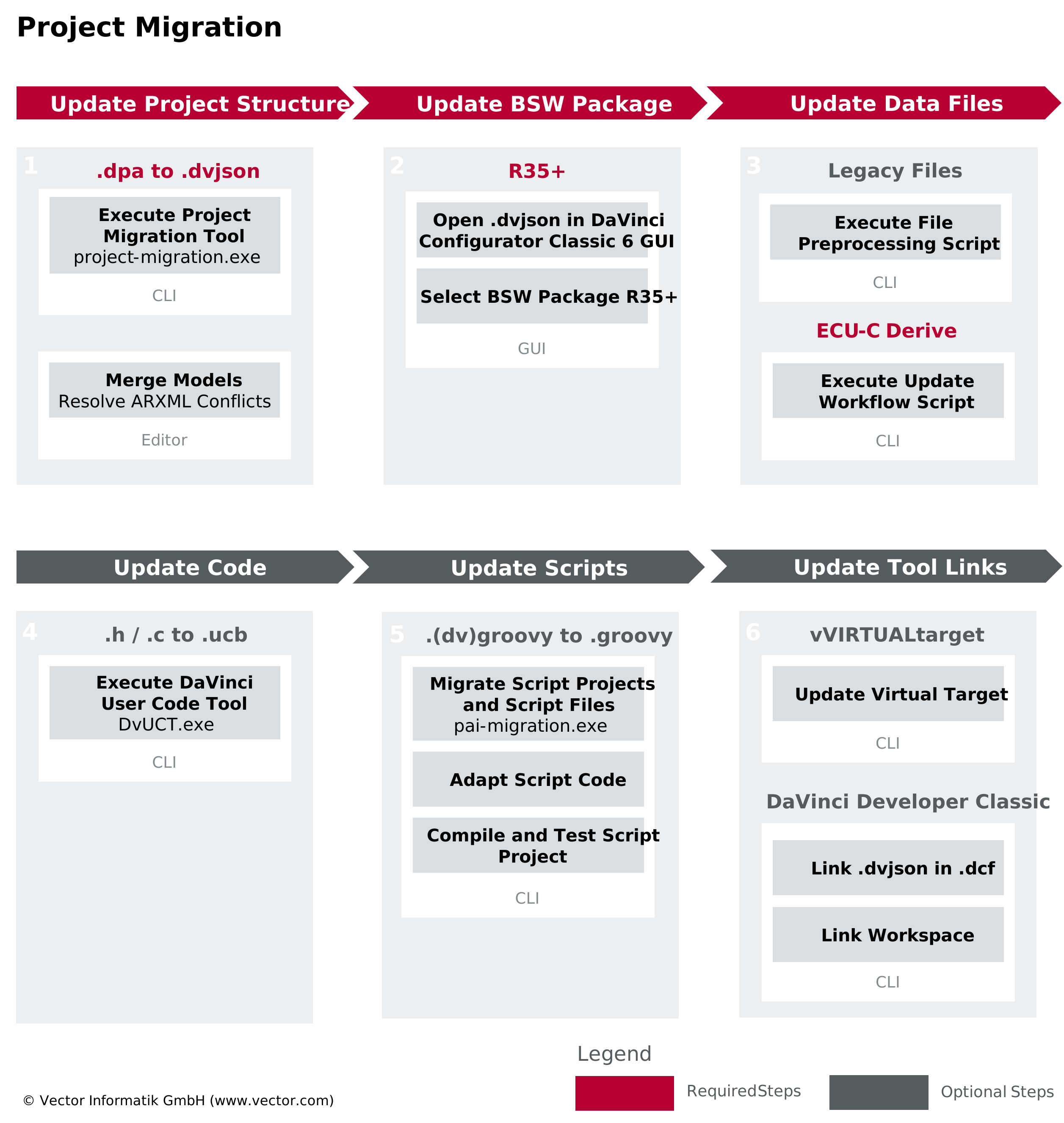
To fully migrate your projects and to ensure compatibility with DaVinci Configurator Classic Version 6, we recommend to perform following steps:
-
Update Project Structure
Update your project to match the new default DaVinci Configurator Classic Version 6 project structure and merge model data.-
Execute Project Migration Tool
Execute the Project Migration Tool to automatically transform your project structure, create a Structured Extract and an Update Workflow Script, and to change Active EcuC data. -
Merge Models
Merge your ARXML models and solve upcoming conflicts (automatically or manually).
-
-
Update BSW Package
If necessary, update your BSW modules. -
Update Data Files
Update model data by executing the Update Workflow Script generated by the Project Migration Tool (see Execute Update Workflow Script). -
Update Code
Update or create user code blocks to preserve custom implementations. -
Update Scripts
Update Automation Interface scripts and script projects. -
Update Tool Links
Update linked Vector tools (like DaVinci Developer Classic) that are connected to your DaVinci Project (see Link Tools).
Additional Resources
For further information on the migration process, supporting examples and scripts, please refer to the following resources:
-
DaVinci Configurator Classic Version 6 - Rollout Impact [External]
-
davinci-samples Github repository [External], providing migration support scripts and examples
-
Video tutorial, demonstrating the full migration process: