What’s New in Version 6
Tool Help
With DaVinci Configurator Classic 6, a new tool help is available at help.vector.com. This tool help provides everything you need to install and operate, including:
-
Comprehensive Getting Started guides
-
Detailed instructions for configuration and usage
With online tool documentation, you get:
-
Easily access to content for different tool versions
-
Always up-to-date information thanks to regular updates and improvements
To ensure availability even without an internet connection, the help is also included with the tool installation.
Independent Tool Delivery and Deployment
DaVinci Configurator Classic 6 is now independent of MICROSAR releases, allowing all projects to benefit from the latest tool updates without requiring BSW package updates. This change makes updating the tool simpler and faster. Instead of being bundled with the BSW package, the tool can now be installed separately—either directly from the Vector Download Center or by using Vector’s apt repository for Linux or chocolatey repository for Windows.
Modernized Command-Line Interface
DaVinci Configurator Classic 6 introduces a modernized command-line interface (CLI) featuring new executable names and updated parameters. These changes make integration with CI systems and automation workflows easier and more intuitive.
The CLI now includes clean, well-structured help output, providing a clear entry point for getting familiar with the updated commands and options.
Usage: dvcfg-b [-vh] [DOMAIN | COMMAND]

Description:
DaVinci Configurator Classic - Command-line interface for configuring, validating, and generating MICROSAR Classic
projects. Designed for modern software factories and automated development pipelines.

Options:
  -v, --version   Print version information.
  -h, --help      Display the help.

Domains:
  automation     Set up and manage automation workflows scoped to a specific project and bsw-package.
  export         Perform model exports and list available exporters of a specific project and bsw-package.
  import         Import external data into the model of a specific project and bsw-package.
  project        Perform and manage a specific project and bsw-package, including creation, validation, generation, module cluster
activation and update.

Commands:
  stop       Stop a running Config Core instance.
  status     List all running Config Core instances.

Exit Codes:
  0    Successful program execution.
  1    Command execution failed.
  2    Usage error: User input for the command was incorrect.
130    Command was cancelled by the user.
Modular Input File Processing
DaVinci Configurator Classic 6 introduces a streamlined separation of the project import and update workflow into clear, modular command-line steps. Now, producing EcuExtracts from various proprietary inputs, deriving the Ecu-Configuration, and updating the DaVinci project can each be performed individually on the command-line. This increases transparency and traceability. It also eases integration with automated build systems and enables caching.
Project File and Structure
Project settings are now stored in a text-based JSON format, making them easy to edit directly within your preferred IDE. To simplify this process, VS Code and IntelliJ extensions are available in their respective marketplaces.
This change also makes sharing and collaboration seamless, as settings can be tracked and managed through version control systems.
In addition, a new default project folder structure provides a cleaner organization for your projects. This not only improves clarity but also enhances integration with version control, making it easier to manage changes and collaborate across teams.
Improved Traceability for Derived Module Configurations
With DaVinci Configurator Classic 6, derived module configurations can now be traced back to their original input system description elements. This enhancement significantly improves traceability, enabling users to quickly identify the source of configuration data and efficiently determine the root cause of issues. As a result, troubleshooting and maintaining complex configurations becomes far more transparent.
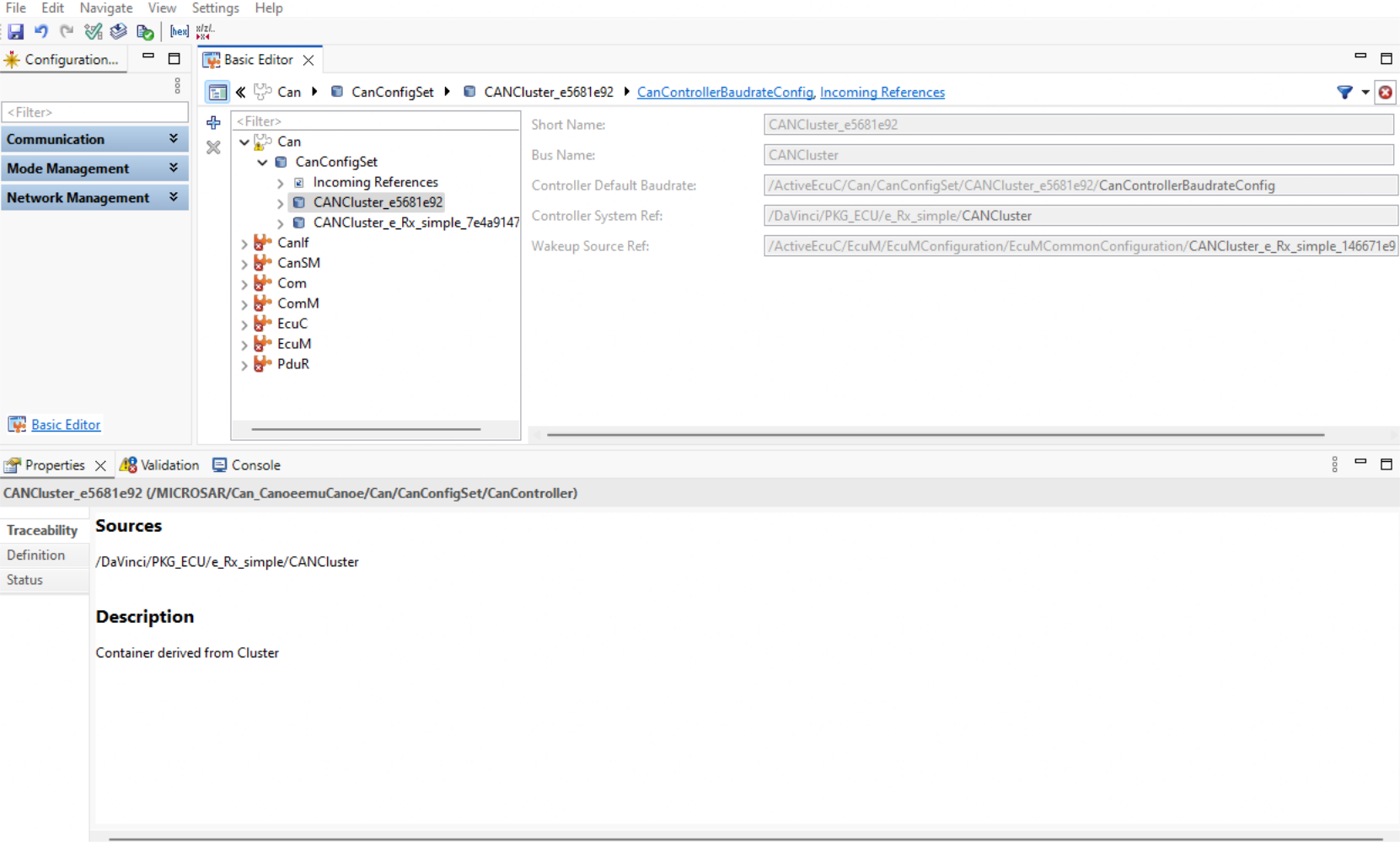
Traceability details are available in the Properties View when selecting a derived module configuration element.
More Efficient Model Loading
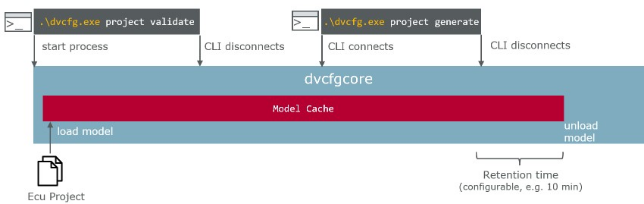
Another enhancement is the ability to avoid model loading times through a background process that keeps project data (such as EcuC and SWCs) loaded. This enables sequential command-line interface calls without waiting for the project data to reload each time, supporting more granular and efficient continuous integration activities. In a first step, this feature is only available for the command-line interface. Corresponding support for the graphical user interface is planned.
Could Be Interesting
DaVinci Configurator Classic 6 introduces several improvements and modernizations to the public automation interface. For a detailed overview of these changes, please refer to the Migrate Automation Scripts.
To explore additional enhancements and resolved issues, check out the Release Notes.