Workflow Overview
This page provides a high-level overview of the typical workflow when using Forge to create and manage your configuration. The Forge workflow is designed to be flexible and adaptable to different use cases, but it generally follows these steps:
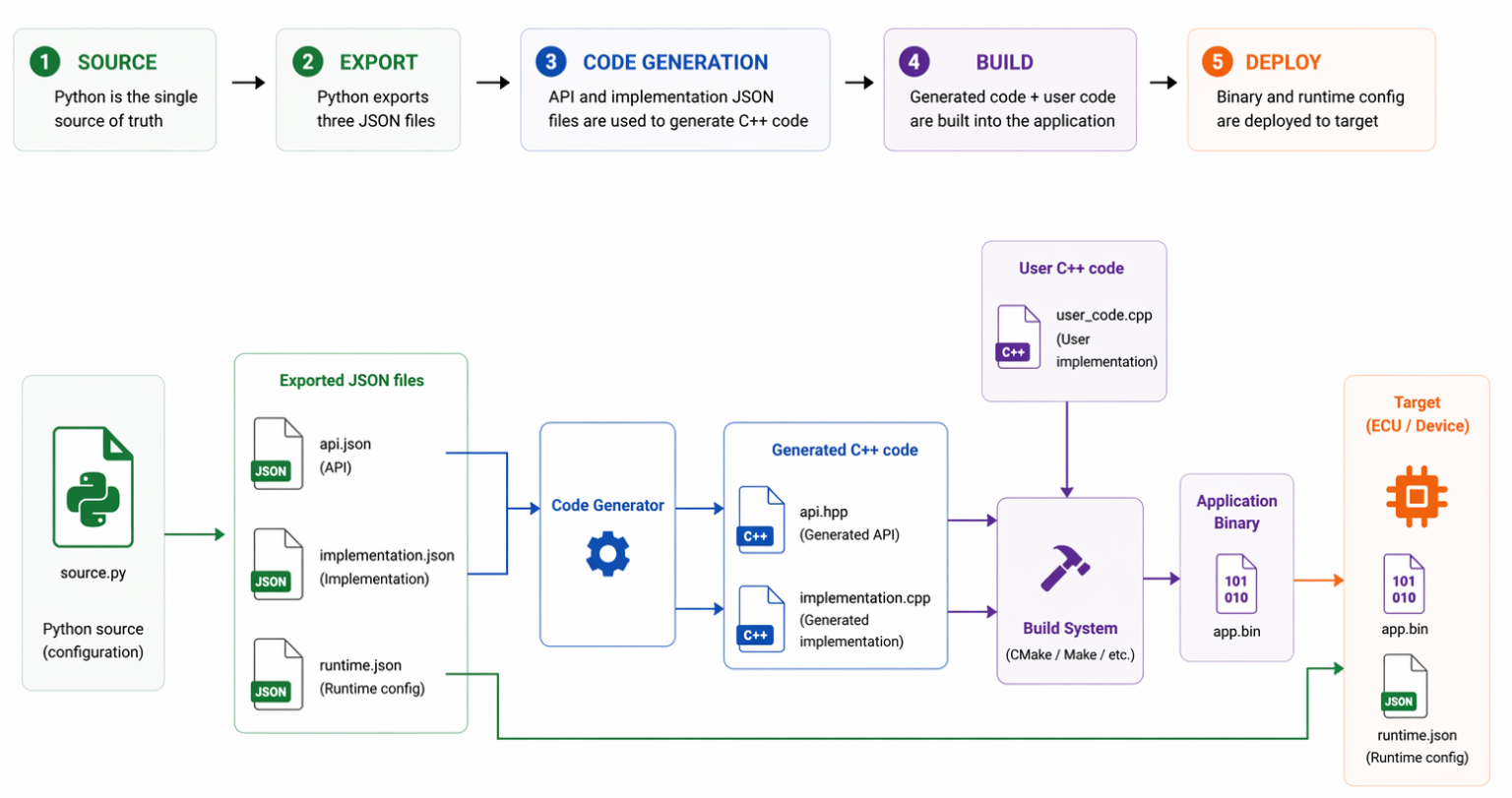
The workflow consists of five stages:
-
Define configuration: A Python project that is the single source of truth for the entire configuration. You define all Configurable Unit settings in Python using the Forge facade API. See Writing configuration for more details. Other input formats (such as ARXML) can be used as well, but they are typically converted into Python objects at this stage. See Choosing your input format for more details.
|
If you work with ARXML files, you can use the DaVinci Developer Adaptive tool to create and manage your configuration in a graphical interface. The DaVinci Developer Adaptive User Manual provides detailed guidance on how to use the tool. |
-
Export: Running the Python script exports the configuration as JSON files, one file per configuration schema (for example,
api.json,implementation.json, andruntime.json). These files are the machine-readable representation of your configuration. See Exporting configuration for more details. With the help of the JSON schema, they can also be edited manually or generated from other input formats. -
Code Generation: The API and implementation JSON files are passed to the code generator. The generator produces C++ source files. See Code generation for more details. The runtime JSON file is not needed at this stage.
-
Build: The generated C++ files are compiled together with your own user code by the build system (CMake, Bazel etc.) to produce the application binary.
-
Deploy: The application binary and the
runtime.jsonfile are deployed to the target device (ECU). The binary contains the compiled logic; the runtime JSON provides the configuration that takes effect at runtime without requiring a rebuild.
|
This page covers the Forge configuration workflow itself. For how the generated code and Basic Software (BSW) stack are integrated into your build and runtime environment, refer to the integration documentation of the Integration Component package you are using. |
Updating Existing Configuration
A common scenario is that you already have configuration—either as a Python project or as a set of JSON files—and you need to update or extend it. This follows the same overall workflow, but the starting point is existing artifacts rather than a blank project.
Typical cases include:
-
Updating values in an existing Python configuration script and re-exporting.
-
Loading existing JSON files back into Python models, modifying them programmatically, and re-exporting.
See Updating configuration for step-by-step guidance on each of these cases.
Opinionated Configuration
When several components share the same configuration rules or constraints, you can encode those rules once and reuse them across your project. Opinionated configuration patterns wrap or extend the Forge facade API to enforce project-specific defaults, reducing repetition and preventing misconfiguration.
See Opinionated configuration for the available patterns.