Create Network Endpoint
The Create Network Endpoint wizard supports you in creating Network Endpoints.
Open Wizard
The Create Network Endpoint wizard can be opened as follows:
-
When creating a new Machine Design, click the
 Create
Network Endpoint… icon on the SOME/IP Service Discovery or Network
Endpoints page of the Create Machine
Design wizard.
Create
Network Endpoint… icon on the SOME/IP Service Discovery or Network
Endpoints page of the Create Machine
Design wizard. -
Alternatively, open the
 Machine Editor. In the Machine Design area
of
Machine Editor. In the Machine Design area
of
 Machine
elements, click the
Add Network
or Add
SOME/IP Service Discovery icon. On the dialog that opens, click the
New Network
Endpoint… icon.
Machine
elements, click the
Add Network
or Add
SOME/IP Service Discovery icon. On the dialog that opens, click the
New Network
Endpoint… icon.
The Create Network Endpoint wizard opens.
Step-by-Step Procedure
To create a Network Endpoint, open the Create Network Endpoint wizard and proceed as follows:
-
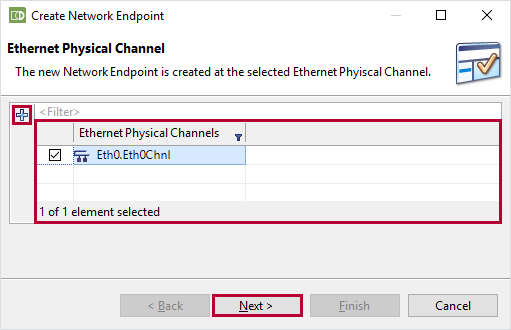
Ethernet Physical Channel Page
The Ethernet Physical Channel page lists all existing Ethernet Physical Channels. An Ethernet Physical Channel is a child element of a cluster. Every cluster has exactly one Ethernet Physical Channel. The names of the listed Ethernet Physical Channels are formed as follows: <CLUSTER-NAME>.<CHNL-NAME>.
Activate the check box of the Ethernet Physical Channel for which you want to create a Network Endpoint.
To create a new Ethernet Physical Channel, click the
Create
Ethernet Physical Channel icon and specify the general settings in the
Create Ethernet Physical Channel dialog.Click Next > to confirm your selection.
-
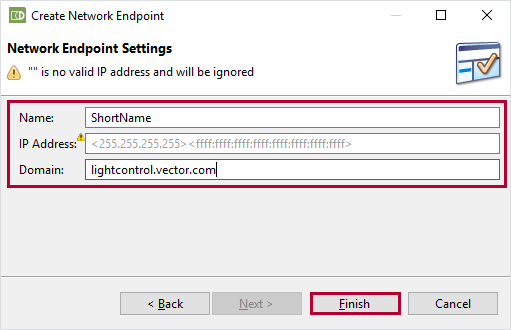
Network Endpoint Settings Page
On the Network Endpoint Settings page, the Network Endpoint for the selected Ethernet Physical Channel is defined.
Enter the Name of the Network Endpoint.
Optionally, enter the IP Address (IPv4 or IPv6) and Domain name.Click Finish to close the wizard.
 . The Network Endpoint has been created.