SOME/IP Transformation Properties
SOME/IP transformation properties deal with how data is serialized and deserialized to facilitate communication across the bus. These properties play a crucial role in defining the format and sequence of the serialized data.
With DaVinci Developer Adaptive you can create and configure Transformation Properties as well as map them to a Service Interface Element.
You can configure SOME/IP transformation properties through the Transformation Properties wizard in the Service Editor or the Model Explorer.
Transformation Properties Wizard
The Transformation Properties wizard lets you configure SOME/IP transformation properties directly in the Service Editor.
Open Transformation Properties Wizard
Transformation Properties can be added to Methods, Events and Fields of a Service Interface.
Prerequisites:
-
You have opened the Service Editor.
-
You have created a Method / Event / Field
-
In the Method tab, double-click on the cell in the Call column (for method calls) or Return column (for method returns) under the Transformation Properties column.
In the Event and Fields tabs, double-click on the cell in the Transformation Properties column.The Transformation Properties wizard opens.
Add Transformation Properties
Transformation Properties can be added to Methods, Events and Fields of a Service Interface.
Prerequisites:
-
Choose or
 create a Transformation Properties Set ( A ).
 -
Create Transformation Properties ( B ).
A new row of Transformation Properties has been created with default settings. The new row is automatically
 selected.
 -
Edit the new row of Transformation Properties by double clicking it or using the
 edit icon ( C ).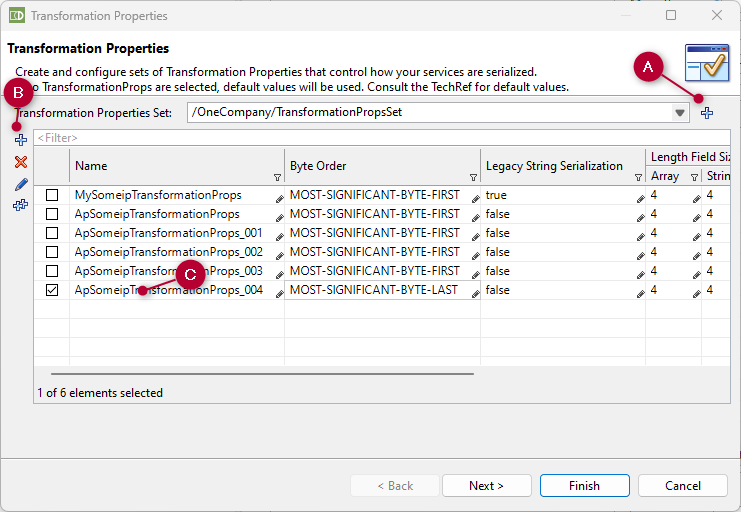
The Edit Transformation Properties dialog opens.
-
Make the necessary changes and click Finish.
The dialog closes.
-
In the Transformation Properties wizard, click Next.
Map Transformation Properties to a Service Interface Element
Prerequisites:
-
You have
selected a row of Transformation Properties on the first page of the
wizard. -
You are now on second page of the wizard TransformationProps To Service Interface Element Mapping.
-
Create or
select a Transformation Properties Mapping.
-
Click Finish.
The wizard closes.
For the Method tab, the name of the new Transformation Properties is displayed in the Call column (for method calls) or in the Return column (for method returns) under the Transformation Properties column.
For the Event and Field tab, the name of the new Transformation Properties is displayed in the Transformation Properties column.
Edit Transformation Properties
Prerequisites:
-
Open the Edit Transformation Properties dialog by double-clicking on the Transformation Properties you want to change; or by clicking the
edit icon. -
Change the settings and click Finish.
The changes are saved. The Edit Transformation Properties dialog closes.
-
Close the Transformation Properties wizard.
