Compare and Merge
The "Compare and Merge" feature is an essential tool for managing and integrating changes in projects. It allows developers to identify differences between various versions of files or projects and merge them efficiently. This feature plays a crucial role in collaborative development by highlighting conflicts and facilitating the merging of changes.
Read Only Project Comparison
The 'Read Only Project Comparison' feature allows developers to compare different versions of files or projects without the ability to merge changes. This feature is particularly useful for reviewing changes, understanding differences, ensuring quality before any integration occurs and creating own reports.
Structure
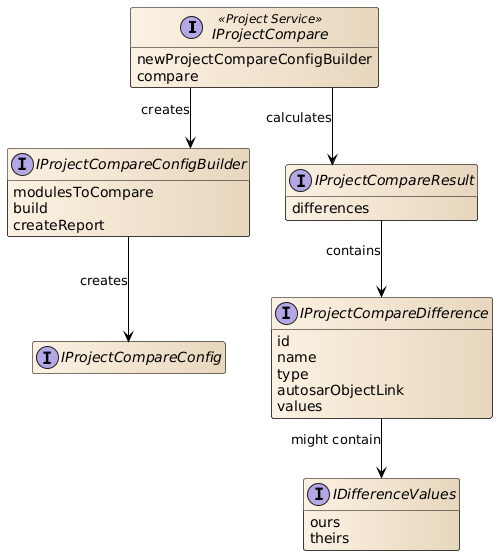
The entry point for the read only project comparison is the project service IProjectCompare.
Accessing the API
In order to access the read only project compare API the project service IProjectCompare is used.
IProjectCompare projectCompare = projects.activeProject.projectContext[IProjectCompare]
IProjectCompareConfigBuilder configBuilder = projectCompare.newProjectCompareConfigBuilder(projectToCompareWith)

IProjectCompareResult result = projectCompare.compare(configBuilder.build())
def differences = result.getDifferences()

def autosarLinkAndTypeOfDifferences = differences.collect { difference ->
    [difference.autosarObjectLink, difference.type]
}
IProjectCompare
Represents the entry point for the read only project compare API. To configure the API use
IProjectCompareConfigBuilder which can be created via
IProjectCompare.newProjectCompareConfigBuilder(Object).
IProjectCompare.compare(IProjectCompareConfig)
IProjectCompareConfig.
Creating new comparison config builder
newProjectCompareConfigBuilder(Object) creates a new builder instance for the IProjectCompareConfig.
Supported are:
- Absolute paths
- Relative paths are resolved to the location of the script
Executing the comparison
compare(IProjectCompareConfig) executes the compare operation with the given IProjectCompareConfig.
Compare only distinct module configurations
addModulesToCompare(List) adds the short names of the module configurations to compare.
Build comparison config
build() builds the IProjectCompareConfig containing all the settings made so far.
Create report
createReport() sets a flag indicating that a report should be generated. The report will be located in the logging directory.
Create report with format
createReport(ECompareReportFormat) sets a flag indicating that a report should be generated in the specified format. The report
will be located in the logging directory.
ECompareReportFormat
The ECompareReportFormat specifies the output format of a Difference Report generated by the read-only project comparison.
HTML generates a human-readable HTML difference report. This is the default format when IProjectCompareConfigBuilder.createReport() is called without a
format argument.
SARIF generates a machine-readable SARIF (Static Analysis Results Interchange Format) difference report, suitable for integration into CI/CD pipelines and
downstream tooling.
JSONL generates a machine-readable JSON Lines difference report (one JSON object per line), suitable for automated processing and CI/CD integration.
UNIFIED_DIFF generates a human-readable Unified Diff difference report. The output follows the
unified diff format and is suitable for inspection and CI/CD integration.
Note: Because DaVinci Difference Reports operate on AUTOSAR model elements rather than source-code files, the output is informational only and cannot be applied as
a patch file (e.g., via git apply).
The ID of the difference
getId() gets the ID of the difference. This ID is based on the path of the associated element. E.g.
/Root/AUTOSAR/ActiveEcuC/EcuC/EcucPduCollection/PduB/Root/EcuC/EcucPduCollection/PduB
The type of the difference
getType() gets the type of the difference indicating that an element is only available in one of the projects or an element is
changed.
The AsrObjectLink of the difference
getAutosarObjectLink() gets the AsrObjectLink for the corresponding element of the difference. This
method takes into account that the associated model element is not available (only in mine / only in other). In case mine is available the link of mine is returned otherwise
other is used.
Examples
To take only one specific module into account in the comparison, this must already be specified in the comparison configuration: IProjectCompareConfigBuilder.addModulesToCompare
IProjectCompare projectCompare = projects.activeProject.projectContext[IProjectCompare]
IProjectCompareConfigBuilder configBuilder = projectCompare.newProjectCompareConfigBuilder(projectToCompareWith)

// We only want to compare 'EcuC' module configuration
configBuilder.addModulesToCompare(List.of("EcuC"))

IProjectCompareResult result = projectCompare.compare(configBuilder.build())
def differences = result.getDifferences()

def nameAndTypeOfDifferences = differences.collect { difference ->
    [difference.name, difference.type]
}
To create a report from the comparison result, the following method is used: IProjectCompareConfigBuilder.createReport To create a report in a specific format (HTML, SARIF, JSONL, or UNIFIED_DIFF), use: IProjectCompareConfigBuilder.createReport(ECompareReportFormat) To get the path to the created report, the following method is used: IProjectCompareResult.getReport
IProjectCompare projectCompare = projects.activeProject.projectContext[IProjectCompare]
IProjectCompareConfigBuilder configBuilder = projectCompare.newProjectCompareConfigBuilder(projectToCompareWith)

// We want to create a report that contains the differences in the 'EcuC' module configuration
configBuilder.addModulesToCompare(List.of("EcuC"))
configBuilder.createReport()

// Retrieve the comparison result - including the report
IProjectCompareResult result = projectCompare.compare(configBuilder.build())
result.getReport()
To create a SARIF report from the comparison result, the following method is used: IProjectCompareConfigBuilder.createReport(ECompareReportFormat) with {@link ECompareReportFormat#SARIF}
IProjectCompare projectCompare = projects.activeProject.projectContext[IProjectCompare]
IProjectCompareConfigBuilder configBuilder = projectCompare.newProjectCompareConfigBuilder(projectToCompareWith)

// We want to create a SARIF report that contains the differences in the 'EcuC' module configuration
configBuilder.addModulesToCompare(List.of("EcuC"))
configBuilder.createReport(ECompareReportFormat.SARIF)

// Retrieve the comparison result - including the SARIF report
IProjectCompareResult result = projectCompare.compare(configBuilder.build())
result.getReport()
Auto merge
The auto merge functionality allows changes from various sources to be automatically merged without the need for manual intervention. This feature is particularly useful in collaborative environments where multiple developers work on the same project simultaneously.
Structure
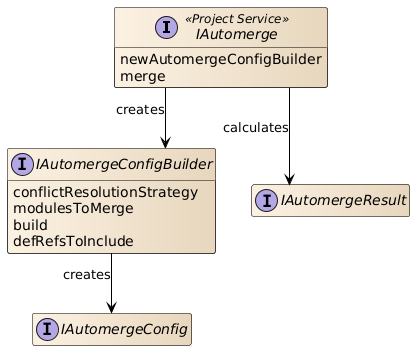
The entry point for the auto merge is the project service IAutomerge.
Accessing the API
In order to access the auto merge API the project service IAutomerge is used.
IAutomerge automerge = projects.activeProject.projectContext[IAutomerge]
IAutomergeConfigBuilder configBuilder = automerge.newAutomergeConfigBuilder(projectToCompareWith, projectBase)

automerge.merge(configBuilder.build())
IAutomerge
Represents the entry point for the auto merge API. To configure the API use IAutomergeConfigBuilder which can be created
via IAutomerge.newAutomergeConfigBuilder(Object, Object). The merge operation can be executed by calling IAutomerge.merge(IAutomergeConfig) with the created
IAutomergeConfig.
Creating new auto merge config builder
newAutomergeConfigBuilder(Object, Object) creates a new builder instance for the auto merge configuration. Supported
are:
- Absolute paths
- Relative paths are resolved to the location of the script
Executing the auto merge
merge(IAutomergeConfig) executes the auto merge operation with the given IAutomergeConfig.
Merge only distinct module configurations
addModulesToMerge(List) adds the short names of the module configurations to merge.
Conflict resolution
setConflictResolutionStrategy(EConflictResolutionStrategy) sets the conflict resolution strategy which is used in case a conflict is
detected (e.g. use value of 'Theirs' or 'Ours').
Create XML report
setCreateXmlReport() sets a flag which indicates that a XML report should be created. Please note that the structure of this report may
change from version to version.
Create HTML report
setCreateHtmlReport() sets a flag which indicates that a HTML report should be created. Note that in this case an XML report is also
created as the HTML is created based on this. Please note that the structure of this report may change from version to version.
Build comparison config
build() builds the IAutomergeConfig containing all the settings made so far.
For details about the possible filter use cases see also FilterUseCases.
Path to XML report
getPathToXmlReport() gets the path to the generated XML report for not merged differences. See also
IAutomergeConfigBuilder.setCreateXmlReport().
Path to HTML report
getPathToHtmlReport() gets the path to the generated HTML report for not merged differences. See also
IAutomergeConfigBuilder.setCreateHtmlReport().
Differences which couldn’t be merged
getNotAutomergeableDifferences() gets the differences which couldn't be merged during the auto merge operation.
The AUTOSAR object link
getAsrObjectLink() gets the link to the model element. Note that the link might point to a model element which is not available in
the project.
The not merged reasons
getReasons() gets the reason(s) why the auto merge was not able to merge the difference.
Filter Use Cases
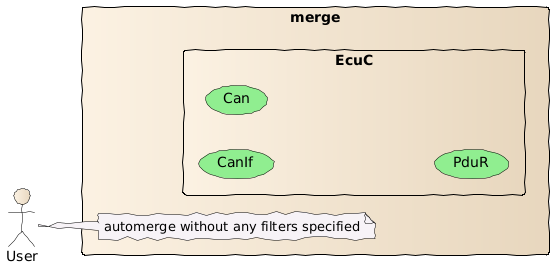
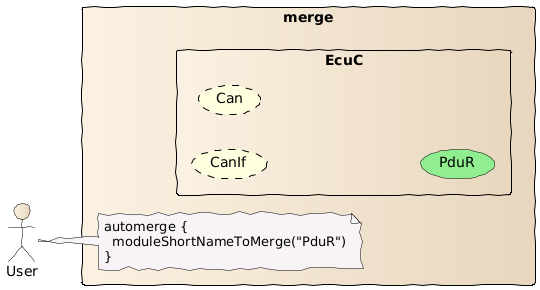
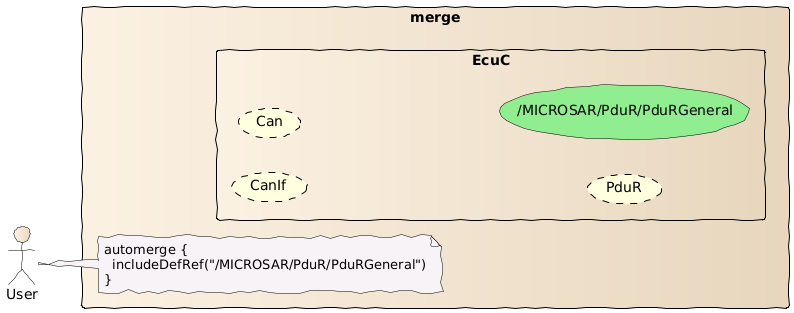
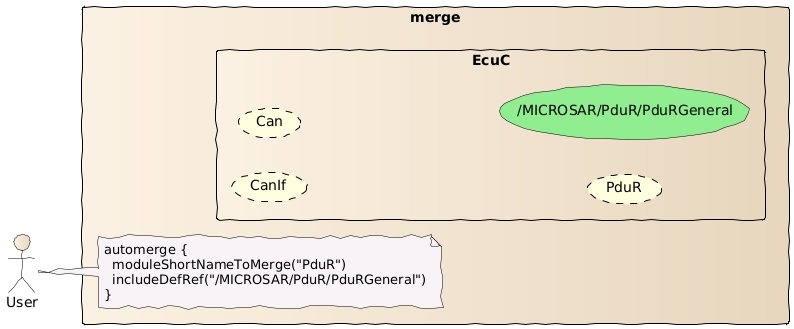
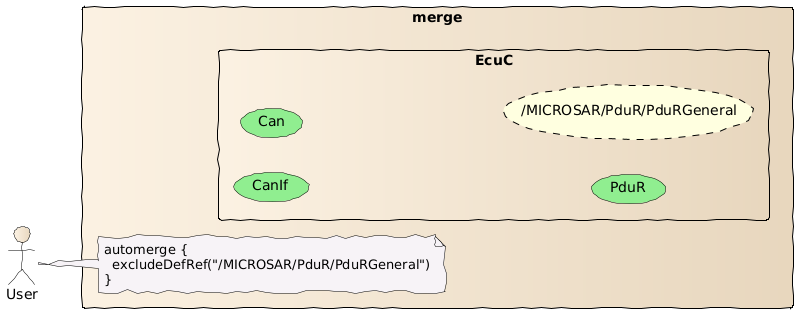
With the existing filter options, there are numerous possibilities which will be explained here in detail using examples. Please note that the code shown in the user note of the images is just pseudocode.
No filter specified In case no filter is specified all available module configuration are considered during auto merge.
Short name of module configuration In case the user specified a distinct module configuration short name only the corresponding module configuration is considered.
Include DefRef In case the user specified a distinct (including) DefRef only elements matching this DefRef are considered.
Short name of module configuration and include DefRef It's also possible to combine filters like module configuration short name and an include DefRef. Here is an important edge case if the user specified a module configuration short name and a DefRef pointing to the same module configuration. In this case the merge only considers elements matching the specified DefRef.
Exclude DefRef In case the user specified a distinct (excluding) DefRef these elements and the sub-elements are ignored. It's not possible to include an element below an excluded element.
Unified Diff
The Unified Diff format is a widely used format for displaying differences between two versions of a file. It was developed to present differences in a compact and clear manner by omitting redundant context lines and highlighting only the relevant changes. This format is commonly used in version control systems like Git, Subversion, and others to track changes in source code and other text files.
The Unified Diff format offers several advantages:
- Compactness: By omitting redundant lines, the size of diff files is reduced.
- Readability: Changes are presented in a clear and understandable format, making it easier to review and track modifications.
- Compatibility: It is compatible with many tools and systems that can process and apply diffs.
Structure
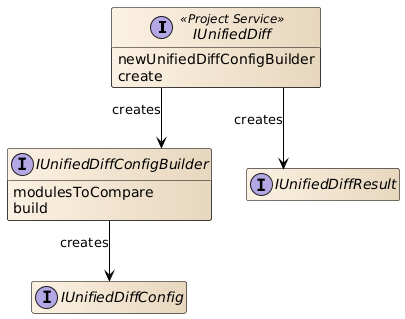
The entry point for the unified diff creation is the project service IUnifiedDiff.
Accessing the API
In order to access the unified diff creation API the project service IUnifiedDiff is used.
IUnifiedDiff unifiedDiff = projects.activeProject.projectContext[IUnifiedDiff]
def resultFile = tempFolder.resolve("MyUnified.diff")
IUnifiedDiffConfigBuilder configBuilder = unifiedDiff.newUnifiedDiffConfigBuilder(projectToCompareWith, resultFile)
unifiedDiff.create(configBuilder.build())
IUnifiedDiff
Represents the entry point for the unified diff API. To configure the API use IUnifiedDiffConfigBuilder which can be
created via IUnifiedDiff.newUnifiedDiffConfigBuilder(Object, Object). The create operation can be executed by calling IUnifiedDiff.create(IUnifiedDiffConfig)
with the created IUnifiedDiffConfig.
Creating new comparison config builder
newUnifiedDiffConfigBuilder(Object, Object) creates a new builder instance for the unified diff configuration. It's
expected that the unified diff result file ends with the '.diff' file extension. Supported are:
- Absolute paths
- Relative paths are resolved to the location of the script
Executing the comparison
create(IUnifiedDiffConfig) executes the unified diff creation with the given IUnifiedDiffConfig.
Compare only distinct module configurations
addModulesToCompare(List) adds the short names of the module configurations to compare.
Build comparison config
build() builds the IUnifiedDiffConfig containing all the settings made so far.
IUnifiedDiffResult
Represents the result of a unified diff.
This interface currently contains no fields or members but has already been made available for compatibility reasons.
IProjectCompare projectCompare = projects.activeProject.projectContext[IProjectCompare]
IProjectCompareConfigBuilder configBuilder = projectCompare.newProjectCompareConfigBuilder(projectToCompareWith)

IProjectCompareResult result = projectCompare.compare(configBuilder.build())
def differences = result.getDifferences()

def autosarLinkAndTypeOfDifferences = differences.collect { difference ->
    [difference.autosarObjectLink, difference.type]
}IProjectCompare projectCompare = projects.activeProject.projectContext[IProjectCompare]
IProjectCompareConfigBuilder configBuilder = projectCompare.newProjectCompareConfigBuilder(projectToCompareWith)
// We only want to compare 'EcuC' module configuration
configBuilder.addModulesToCompare(List.of("EcuC"))
IProjectCompareResult result = projectCompare.compare(configBuilder.build())
def differences = result.getDifferences()
def nameAndTypeOfDifferences = differences.collect { difference ->
[difference.name, difference.type]
}IProjectCompare projectCompare = projects.activeProject.projectContext[IProjectCompare]
IProjectCompareConfigBuilder configBuilder = projectCompare.newProjectCompareConfigBuilder(projectToCompareWith)
// We want to create a report that contains the differences in the 'EcuC' module configuration
configBuilder.addModulesToCompare(List.of("EcuC"))
configBuilder.createReport()
// Retrieve the comparison result - including the report
IProjectCompareResult result = projectCompare.compare(configBuilder.build())
result.getReport()IProjectCompare projectCompare = projects.activeProject.projectContext[IProjectCompare]
IProjectCompareConfigBuilder configBuilder = projectCompare.newProjectCompareConfigBuilder(projectToCompareWith)
// We want to create a SARIF report that contains the differences in the 'EcuC' module configuration
configBuilder.addModulesToCompare(List.of("EcuC"))
configBuilder.createReport(ECompareReportFormat.SARIF)
// Retrieve the comparison result - including the SARIF report
IProjectCompareResult result = projectCompare.compare(configBuilder.build())
result.getReport()IAutomerge automerge = projects.activeProject.projectContext[IAutomerge]
IAutomergeConfigBuilder configBuilder = automerge.newAutomergeConfigBuilder(projectToCompareWith, projectBase)
automerge.merge(configBuilder.build())IUnifiedDiff unifiedDiff = projects.activeProject.projectContext[IUnifiedDiff]
def resultFile = tempFolder.resolve("MyUnified.diff")
IUnifiedDiffConfigBuilder configBuilder = unifiedDiff.newUnifiedDiffConfigBuilder(projectToCompareWith, resultFile)
unifiedDiff.create(configBuilder.build())