Architecture
Components
The DaVinci Configurator 6 consists of three components:
- Core Components
- AutomationInterface (AI) - also called Automation API
- Scripting Engine
The other part is the script provided by the user.
The scripting engine will load the script, and the script uses the AutomationInterface to perform tasks. The AutomationInterface will translate the requests from the script into Core component calls.
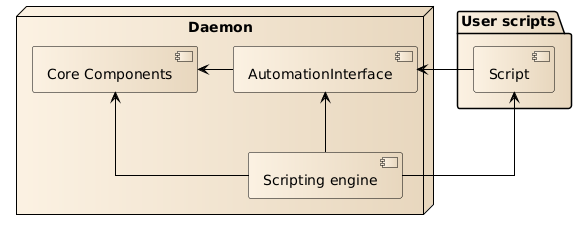
The separation of the AutomationInterface and the Core components has multiple benefits:
- Stable API for script writers
- Including checks, that the API will not break in following releases
- Well defined and documented API
- Abstraction from the internal heavy lifting
- This eases the usage for the user, because the automation interfaces are tailored to the use cases.
PublishedApi
All AutomationInterface classes are marked with a special annotation to highlight the fact that it is part of the published API. The annotation is called@PublishedApi.
So every class marked with @PublishedApi can be used by the client code. But if a class is not marked
with @PublishedApi or is marked with @Deprecated it should not be used by any client code, nor shall a client call
methods via reflection or other runtime techniques.
You should not access DaVinci Configurator private or package private classes, methods or fields.