What’s New in Version 6
Tool Help
With DaVinci Configurator Classic 6, a new tool help is available at help.vector.com. This tool help provides everything you need to install and operate, including:
-
Comprehensive Getting Started guides
-
Detailed instructions for configuration and usage
With online tool documentation, you get:
-
Easily access to content for different tool versions
-
Always up-to-date information thanks to regular updates and improvements
To ensure availability even without an internet connection, the help is also included with the tool installation.
Independent Tool Delivery and Deployment
DaVinci Configurator Classic 6 is now independent of MICROSAR releases, allowing all projects to benefit from the latest tool updates without requiring BSW package updates. This change makes updating the tool simpler and faster. Instead of being bundled with the BSW package, the tool can now be installed separately—either directly from the Vector Download Center or by using Vector’s apt repository for Linux or chocolatey repository for Windows.
Modernized Command-Line Interface
DaVinci Configurator Classic 6 introduces a modernized command-line interface (CLI) featuring new executable names and updated parameters. These changes make integration with CI systems and automation workflows easier and more intuitive.
The CLI now includes clean, well-structured help output, providing a clear entry point for getting familiar with the updated commands and options.
Browse the complete CLI Command Reference — it is generated from the command model of the tools and always matches the output of the -h option.
Modular Input File Processing
DaVinci Configurator Classic 6 introduces a streamlined separation of the project import and update workflow into clear, modular command-line steps. Now, producing EcuExtracts from various proprietary inputs, deriving the Ecu-Configuration, and updating the DaVinci project can each be performed individually on the command-line. This increases transparency and traceability. It also eases integration with automated build systems and enables caching.
Project File and Structure
Project settings are now stored in a text-based JSON format, making them easy to edit directly within your preferred IDE. To simplify this process, VS Code and IntelliJ extensions are available in their respective marketplaces.
This change also makes sharing and collaboration seamless, as settings can be tracked and managed through version control systems.
In addition, a new default project folder structure provides a cleaner organization for your projects. This not only improves clarity but also enhances integration with version control, making it easier to manage changes and collaborate across teams.
Improved Traceability for Derived Module Configurations
With DaVinci Configurator Classic 6, derived module configurations can now be traced back to their original input system description elements. This enhancement significantly improves traceability, enabling users to quickly identify the source of configuration data and efficiently determine the root cause of issues. As a result, troubleshooting and maintaining complex configurations becomes far more transparent.
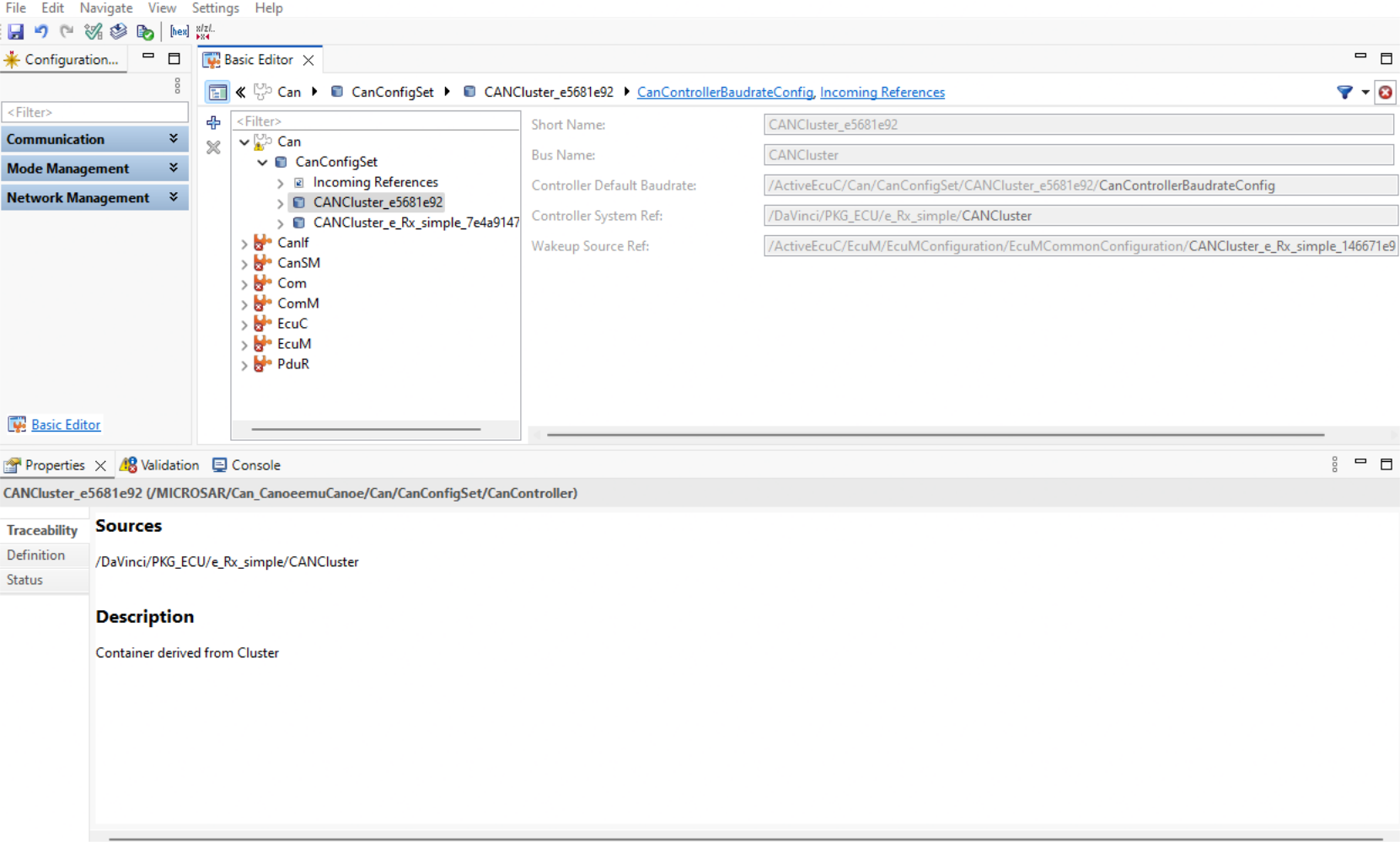
Traceability details are available in the Properties View when selecting a derived module configuration element.
More Efficient Model Loading
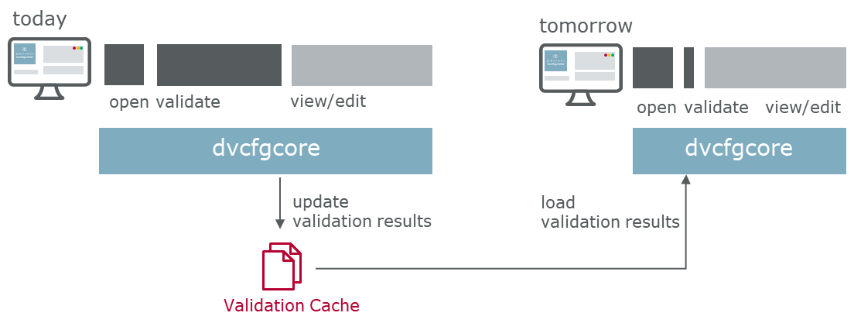
By caching validation results, the tool can now skip redundant checks when a previously already validated model gets loaded, resulting in much faster overall startup. For large projects, this means that initial validation times are drastically reduced, allowing users to get started and iterate more quickly. Initially, this feature uses a local cache, but support for remote caching will be added soon.
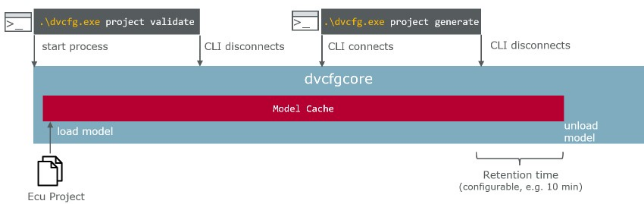
Another enhancement is the ability to avoid model loading times through a background process that keeps project data (such as EcuC and SWCs) loaded. This enables sequential command-line interface calls without waiting for the project data to reload each time, supporting more granular and efficient continuous integration activities. In a first step, this feature is only available for the command-line interface. Corresponding support for the graphical user interface is planned.
Automatic User Code Restore After Generation
DaVinci Configurator Classic 6 automatically restores user code blocks after every project generate and project generate-swct command.
External Generation Steps which are executed in previous version to restore user code blocks after generation can now be removed, as this is handled by the tool itself.
To enable this, configure the userCodeBlocks folder in your project’s General.json:
"folders": {
    "userCodeBlocks": "Config/UCB"
}
When this folder is configured, DaVinci Configurator Classic invokes the DaVinci User Code Tool restore command automatically. If the folder is not configured, no automatic restore is performed and behavior is unchanged from previous versions.
Could Be Interesting
DaVinci Configurator Classic 6 introduces several improvements and modernizations to the public automation interface. For a detailed overview of these changes, please refer to the Migrate Automation Scripts.
To explore additional enhancements and resolved issues, check out the Release Notes.