Configure with the ECU SDK
The ECU SDK lets you configure an ECU "as code". Instead of storing the configuration in the DaVinci Project and editing it in the GUI, you describe the ECU as type-safe Kotlin code. This code is the source of the configuration. It is kept in plain text under version control, and the ECU SDK generates a validated, reproducible ECU configuration from it in DaVinci Configurator Classic.
Consider the ECU SDK if you want to:
-
keep the ECU configuration as reviewable text in your version control system instead of ARXML files,
-
let many developers work on the same ECU project in parallel without merging ARXML files,
-
reuse configuration logic across ECU projects and BSW package updates,
-
run the configuration automatically, for example in a CI pipeline.
The ECU SDK is optional. The GUI workflow of DaVinci Configurator remains fully supported.
|
The ECU SDK only works with a configuration that is stored as code. You must first migrate an existing DaVinci Project to this form. Until the migration is done, the functionality of the ECU SDK is not fully available for that project. |
Role in the Configuration Workflow
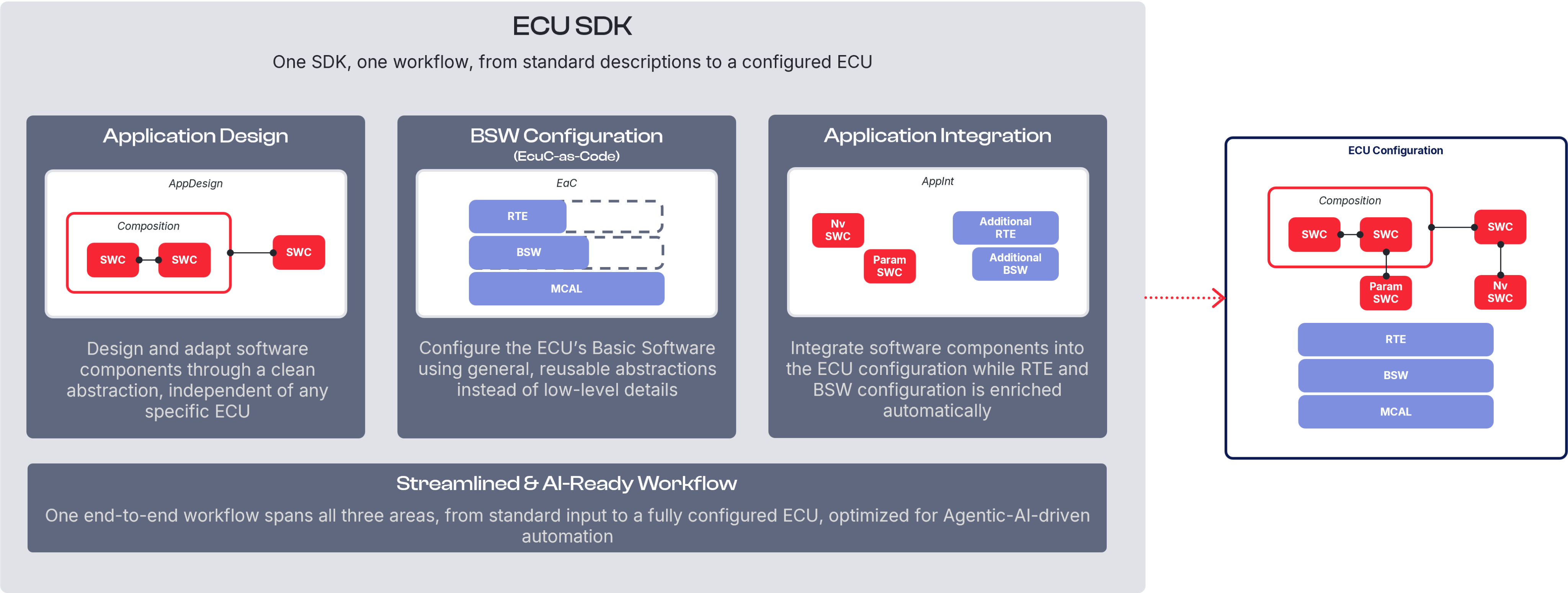
The ECU SDK works together with DaVinci Configurator. DaVinci Configurator hosts the configuration model, validates it, and generates the BSW code. The ECU SDK creates and modifies this configuration model based on your code.
The ECU SDK contains the knowledge of a MICROSAR Classic integrator and executes the required configuration steps in the correct order. You describe the essential characteristics of your ECU, and the ECU SDK derives the standard configuration from them. For project-specific requirements, you add your own configuration logic at defined extension points.
You typically work with the ECU SDK when you:
-
set up the initial configuration of a new ECU project,
-
update the configuration after changes to the system or diagnostic description,
-
update the BSW package, or
-
extend the standard configuration with project-specific logic.
The result of an ECU SDK run is a regular DaVinci Project. You can open it in DaVinci Configurator to inspect the generated configuration, validate it, and generate code as usual.
Further Information
This section only introduces the role of the ECU SDK. For installation, project setup, migration, concepts, and all available configuration capabilities, see the ECU Software Development Kit Documentation.