Integration Notes
Code Integration in Dual-Target Projects
Your application or integration code might need hardware-specific or virtualization-specific code.
To differentiate the target, use the following #define:
#define VVIRTUALTARGET
If the preprocessor symbol is set, the code compiles for vVIRTUALtarget.
If it is undefined, the compilation targets the hardware.
Use a simple preprocessor #ifdef statement to check the target.
This way, you can adapt complex device drivers to also work in the virtual environment. Replace any direct hardware access with access to system variables, which let you communicate with the test environment. User-Defined System Variables describes how to configure and use user-defined system variables.
Virtual MCU Mode Handling
The virtual MCU offers four modes:
-
VTTMCU_MODE_NORMAL, the MCU is up and running. -
VTTMCU_MODE_SLEEP, the MCU is sleeping. -
VTTMCU_MODE_RESET, the MCU is executing a (software) reset. -
VTTMCU_MODE_POWER_OFF, the MCU is powered off.
When working in a Dual-Target project, you must configure a suitable MCU mode mapping to simulate the correct mode handling of the hardware MCU. First, configure the MCU modes in the hardware MCU module. Assume you configure the modes NORMAL (0), SLEEP (1), RESET (2), and POWER_OFF (3) as shown in [hardware-mcu-modes-configured].
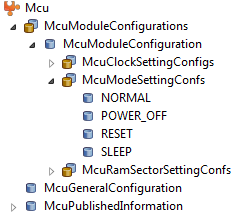
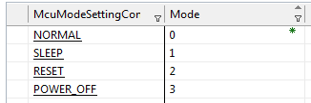
vVIRTUALtarget synchronizes the configured modes of the hardware MCU to the virtual MCU module.
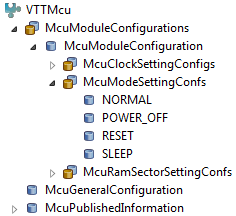
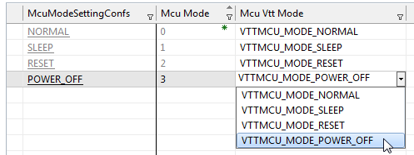
However, you must specify which supported virtual MCU mode each hardware MCU mode maps to, as shown in
[hardware-mcu-modes-mapping].
By default, vVIRTUALtarget maps each hardware MCU mode to the virtual MCU mode VTTMCU_MODE_NORMAL.
|
You can map multiple hardware MCU modes to the same virtual MCU mode. For example, if the hardware MCU supports two distinct sleep modes, you can map both to the single virtual MCU mode |
After you generate code with DaVinci Configurator Classic, you can access the
symbolic name values for the hardware MCU modes via the header file
Mcu_Cfg.h, for example:
#define McuConf_McuModeSettingConf_NORMAL (0u)
#define McuConf_McuModeSettingConf_SLEEP (1u)
#define McuConf_McuModeSettingConf_RESET (2u)
#define McuConf_McuModeSettingConf_POWER_OFF (3u)
You can use these symbolic name values in the EcuM callouts EcuM_AL_Reset, EcuM_AL_SwitchOff, and EcuM_McuSetMode in the file EcuM_Callout_Stubs.c.
You can implement the callout EcuM_AL_Reset as follows:
FUNC(void, ECUM_CODE) EcuM_AL_Reset(EcuM_ResetType Reset)
{
#if (STD_ON == MCU_PERFORM_RESET_API)
  Mcu_PerformReset();
#else
  Mcu_SetMode(McuConf_McuModeSettingConf_RESET);
#endif
}
If the Perform Reset API of the MCU module is not available, you can reset by calling Mcu_SetMode with the symbolic name value representing the reset mode of the hardware MCU.
To power off the virtual MCU, implement the callout EcuM_AL_SwitchOff as follows:
FUNC(void, ECUM_CODE) EcuM_AL_SwitchOff(void)
{
  Mcu_SetMode(McuConf_McuModeSettingConf_POWER_OFF);
}
Finally, delegate the MCU mode to the MCU via the Mcu_SetMode API in
the callout EcuM_McuSetMode:
FUNC(void, ECUM_CODE) EcuM_McuSetMode(Mcu_ModeType McuMode)
{
  Mcu_SetMode(McuMode);
}|
In a VTT Only project, the hardware MCU module is pre-configured with four modes: NORMAL, RESET, SLEEP, and POWER_OFF. When you later migrate the project to a Dual-Target setup, you must revise the configuration to correctly simulate the mode handling of the chosen hardware MCU. |
User-Defined System Variables
System variables are the interface to CANoe for exchanging data, and you can use them to implement your own complex device drivers. For example, the VTT IO modules use system variables to communicate with CANoe.
The VTTCntrl module lets you specify system variables through configuration elements.
VTTCntrl generates API functions for reading and writing these variables, and you access them by symbolic name values.
To use the API, include the header file VttCntrl_SysVar.h.
For more details on configuring and using system variables via VTTCntrl, see the Technical Reference of VTTCntrl.