BswmdModel Details
BswmdModel - DefinitionModel
The BswmdModel provides a type safe and easy access to data of BSW modules (Ecu configuration elements).
Examples:
- Access a single parameter
/MICROSAR/ComM/ComMGeneral/ComMUseRte:comM.getComMGeneral().getComMUseRte() - Access containers
[0:*]/MICROSAR/ComM/ComMChannel:
for(ComMChannel channel :comM.

getComMChannel()){
int value = channel.getComMChannelId().getValue();
}
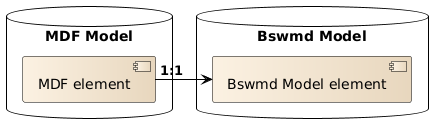
The DaVinci Configurator Classic internal Model (MDF model) has a 1:1 relationship to your BswmdModel. The BswmdModel retrieves all data from the underlying MDF model.
DefinitionModel
The DefinitionModel is the base implementation of every BswmdModel. Every BswmdModel class is a subclass of the DefinitionModel where the classes begin withGI, like GIContainer.
Types of DefinitionModels
There are two types of DefinitionModels:- BswmdModel (formally known as DefinitionTyped BswmdModel)
- DefRef API (formally known as Untyped BswmdModel)
The BswmdModel consists of generated classes for the module definition elements like ModuleDefinitions, Containers, Parameters in bswmd files. The
generated class contains getter methods for each child element. So you can access every child by the corresponding getter method with compile time safety of the sub type.
The BswmdModel derives from the DefinitionModel DefRef API, so the BswmdModel contains all functionalities of the DefRef API.
The DefRef API of the DefinitionModel provides a generic access to the Ecu configuration structure via DefRefs. There are NO generated classes
for the Definition structure. The DefRef API uses the base classes of the DefinitionModel to provide this DefRef based access. Every interface in the
DefinitionModel starts with an GI. The Ecu Configuration elements have corresponding base interfaces for each element:
- ModuleConfiguration -
GIModuleConfiguration - Container -
GIContainer - ChoiceContainer -
GIChoiceContainer - Parameter -
GIParameter<?> - Integer Parameter -
GIParameter<BigInteger> - Boolean Parameter -
GIParameter<Boolean> - Float Parameter -
GIParameter<Double> - String Parameter -
GIParameter<String> - Reference -
GIReference<?> - Container Reference -
GIReferenceToContainer - Foreign Reference-
GIReference<Class>
DefRef Getter Methods of Untyped Model
The DefRef API classes have no getter methods for the specific child types, but the children can be retrieved via the generic getter methods like:
GIContainer.getSubContainers()GIContainer.getParameters()GIContainer.getParameters(TypedDefRef)GIContainer.getParameter(TypedDefRef)GIContainer.getReferencesToContainer(TypedDefRef)GIModuleConfiguration.getSubContainer(TypedDefRef)GIParameter.getValueMdf()
GIContainer.getParent()GIContainer.getParent(DefRef)GIContainer.getReferencesPointingToMe()GIContainer.getReferencesPointingToMe(DefRef)
The following listings describe the usage of the untyped BswmdModel method:
// Get the container from external method getCanIfInitConfigBswmd() ...
final GIContainer canIfInit = getCanIfInitConfigBswmd();

// Gets all subcontainers from a container CanIfRxPduConfig from the canIfInit instance
final List<GIContainer> subContainers = canIfInit.getSubContainers(CanIfRxPduConfig.DEFREF.castToTypedDefRef());
if (subContainers.isEmpty()) {
    // ERROR Handling
}
final GIContainer cont = subContainers.get(0);

// Gets exactly one CanIfCanRxPduHrhRef reference from the cont instance
final GIReference<MIContainer> child = cont.getReference(CanIfCanRxPduHrhRef.DEFREF.castToTypedDefRef());
final GIReferenceToContainer ref = getCanIfCanRxPduHrhRefBswmd();

final GIContainer target = ref.getRefTarget();
final GIParameter<BigInteger> param = getCanIfInitConfigBswmd().getParameter(CanIfInitConfiguration.CANIF_NUMBER_OF_CAN_TXPDU_IDS_DEFREF);

final BigInteger value = param.getValueMdf();
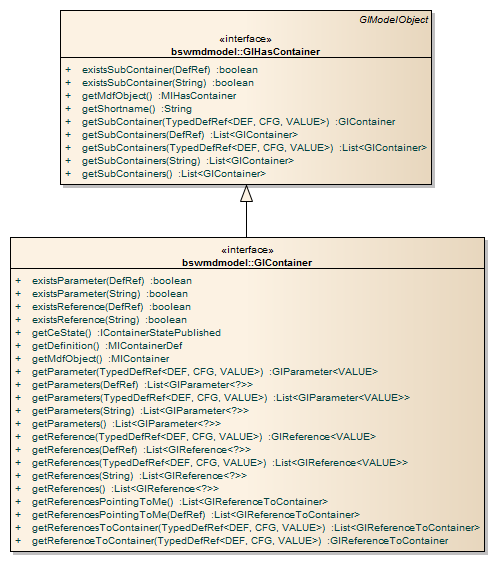
Figure SubContainerDefRefNavigation shows the available DefRef navigation methods for the Untyped model. There are more methods to
navigate with the DefRef API through the DefinitionModel, please look into the Javadoc documentation of the GI... classes for more
functionality.
References
All references in the BswmdModel are subtypes of GIReference. The generated model contains generated DefintionTyped classes for
references to container, for the other references there are only Untyped classes like GInstanceReference.
A GIReference has the method getRefTargetMdf(), this will always return the target in the MDF model as MIReferrable. For non
GIReferenceToContainer this is the normal way to resolve references, but for references to a container you should always try to use the method
getRefTarget(), which will not leave the BswmdModel.
Note: Try to use getRefTarget() as much as possible.
The following references are references to a container (References pointing to container) and are subtypes of the
GIReferenceToContainer.
- Normal Reference
- SymbolicNameReference
- ChoiceReference
References have the method getRefTarget(), which returns the target as BswmdModel object. If the type of the target is known at model generation time, the return
type will be the generated type, otherwise the return type is GIContainer.
Note: It is always allowed to call getRefTarget(), also for references pointing to external types.
getPossibleRefTargets(), which returns all possible target container as list. If the type of the targets is known at model generation
time, the list type will be the generated type, e.G. List<CanGeneral>. Otherwise the return type is GIContainerList<List<{@link GIContainer}>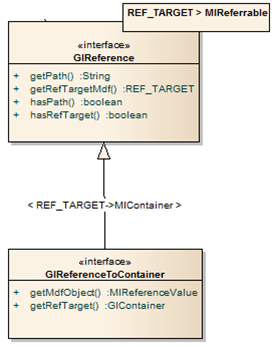
SymbolicNameReferences have the same methods as GIReferenceToContainer and the additional methods
getRefTargetParameterMdf(), which returns the target parameter as MIObject The method getRefTargetParameter() return a BswmdModel object, if the
type is known at model generation time, the type will be the generated type. Otherwise the return type is GIParameter.
Note: It is always allowed to call getRefTargetParameter(), also for references pointing to external types.
Post-build selectable with BswmdModel
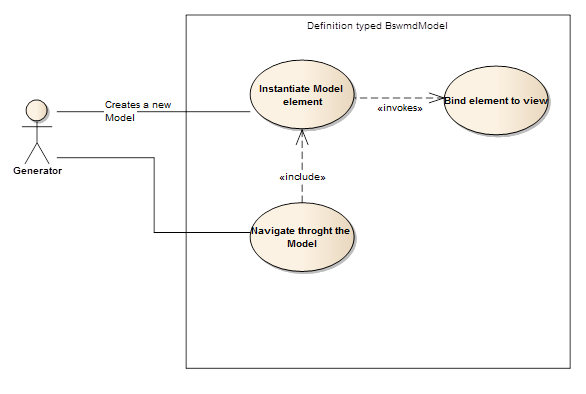
The BswmdModel supports the Post-build selectable use case, in respect that you do not have to switch nor cache the correspondingIModelView. The BswmdModel objects
cache the so called Creation ModelView and switch transparently to that view when accessing the Model. So you don't have to switch to the correct view on access. See figure
BswmdModelCreatePBSelectable. You only have to ensure, that the requested IModelView is active or passed as parameter, when you create an instance at
the GIModelFactory. Note: A lazy created object will inherit the view of the existing element.
Creation ModelView of the BswmdModel
EveryGIModelObject (BswmdModel object) has a creation IModelView. This is the IModelView, which was active or passed during creation of the
BswmdModel. At every method call to the BswmdModel, the model will switch to this view.
The method getCreationModelView() returns the IModelView of this GIModelObject, which was
active during the creation of this BswmdModel.
The method executeWithCreationModelView() executes the code under visibility of the
getCreationModelView() of this GIModelObject.
The returned IModelViewExecutionContext must be used within a Java "try-with-resources" block. It makes sure, that the old view is restored when the try is
completed.
GIModelObject myModelObject = ...;

try (final IModelViewExecutionContext context = myModelObject.executeWithCreationModelView()) {
        // do some operations
        ...
}executeWithCreationModelView(Runnable) executes the Runnable code under
visibility of the getCreationModelView() of this GIModelObject.
 GIModelObject myModelObject = ...;

 myModelObject.executeWithCreationModelView(()->{
  // do some operations
});executeWithCreationModelView() executes the Supplier code under visibility
of the getCreationModelView() of this GIModelObject. You could use this method, if you want to return an object from this operation.
GIModelObject myModelObject = ...;

ReturnType returnVal = myModelObject.executeWithCreationModelView(()->{
  // do some operations
  return theValue;
 });
Lazy Instantiating
The BswmdModel is instantiated lazily; this means when you create a ModuleConfiguration
object only one object for the module configuration is created.
When you call a getXXX() method on the configuration it will create the requested sub element,
if it exists. So you can start at any point in the model (e.g. a Subcontainer) and the model is
built successively by your calls.
It is also allowed to call getParent() on a Subcontainer, if the parent was not created yet.
This technique can be used in validations when the creation of the full BswmdModel is too expensive.
Then you can create only the needed container from an MDF model object.
Optional Elements
All elements (Container, Parameter ...) are considered optional if they have a multiplicity of
0:1. The BswmdModel provides a special handling of optional elements to support you in
recognizing optional elements during development (in most cases some kind of special handling
is needed).
An optional element has other access methods than a required element: The method getXXX()
will not return the element directly — it will return a GIOptional<Element> object instead.
You can query the GIOptional object if the element exists (optElement.exists()). Then
optElement.get() can be called to retrieve the real object.
You also have the choice to use the method existsXXX() to check for element existence.
This method is equivalent to getXXX().exists(). The difference is that you get a compile error
if you try to use the optional element without any check.
When you are sure that the element must exist you can directly call getXXXUnsafe().
Note: If you use any of the get methods (optElement.get() or getXXXUnsafe()) and the
element does not exist, the normal BswmdModelException is thrown.
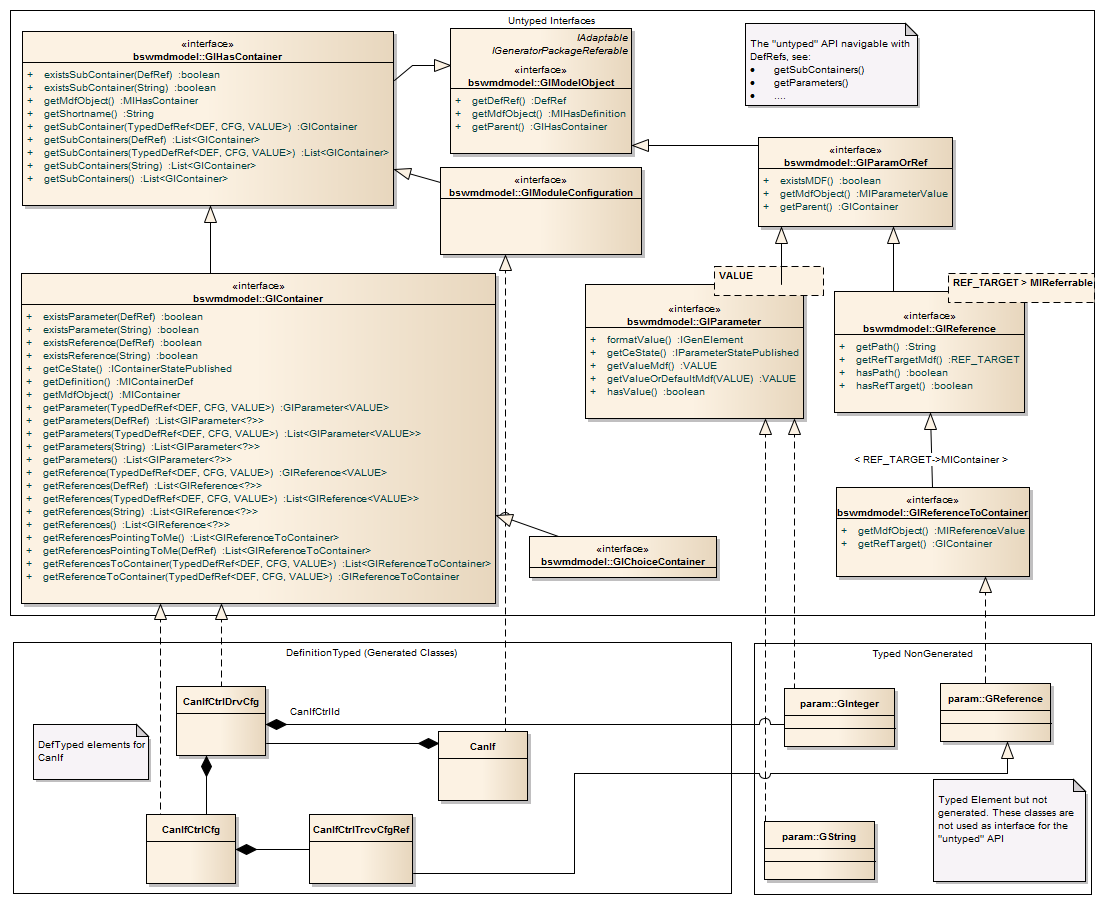
Class and Interface Structure of the BswmdModel
The class structure shows the Untyped API (GI... interfaces) in the upper part. The bottom left
part is an example of a DefinitionTyped (generated) class for the CanIf module. The bottom
right part shows the classes used by the DefinitionTyped model, which are not visible in the
Untyped model.
BswmdModel Write Access
The BswmdModel supports a write access for ECU configuration elements. This means new elements can be created and existing elements can be modified and deleted by the BswmdModel.
NOTE: The model is in read-only state by default, so no objects can be created. For this reason all calls to an API which creates or deletes elements has to be executed within a transaction.
Optional and required Elements (0:1/1:1 Multiplicity)
For optional or required elements, the following additional methods are generated, if BswmdModelWriteAccess is enabled:
get...OrNull(): Returns the requested element ornullif it is missing.get...OrCreate(): Returns the existing requested element or implicitly creates a new one if it is missing.
E.g. EcucGeneral:
Ecuc ecuc = getEcucModuleConfig();

//Gets the EcucGeneral container or null if it is missing.
EcucGeneral ecucGeneralOrNull = ecuc.getEcucGeneralOrNull();

//Gets the existing EcucGeneral container or creates a new one if it is missing.
EcucGeneral ecucGeneralOrCreate = ecuc.getEcucGeneralOrCreate();
Multiple elements (Upper Multiplicity > 1)
For each multiple element, the return type for these elements is changed from List<> to GIPList<> for parameter
and GICList<> for container, if BswmdModelWriteAccess is enabled. These new interfaces provide methods which allow
creating and adding new children for the corresponding elements:
createAndAdd(): Creates a new child element, appends it to the list and returns the new element.createAndAdd(int index): Creates a new child element, inserts it to the list at the specified index position and returns the new element.- For
GICList<>only:createAndAdd(String shortName): Creates a new child element with the specified shortName, appends it to the list and returns the new element.createAndAdd(String shortName, int index): Creates a new child element with the specifiedshortName, inserts it to the list at the specified index position and returns the new element.byName(String shortName): Gets the container by specified shortName or throws an exception if it is missing.byNameOrNull(String shortName): Gets the container by specified shortName ornullif it is missing.byNameOrCreate(String shortName): Gets the container by specified shortName or implicitly creates a new one if it is missing.exists(String shortname): Returnstrueif the container exists, otherwisefalse.
The following example creates EcucCoreDefinition via the Write API:
Ecuc ecuc = getEcucModuleConfig();

//Gets the EcucCoreDefinition list (create EcucHardware container if it is missing)
GICList<EcucCoreDefinition> ecucCores = ecuc.getEcucHardwareOrCreate().getEcucCoreDefinition();

//Adds two EcucCores
EcucCoreDefinition core0 = ecucCores.createAndAdd("EcucCore0");
EcucCoreDefinition core1 = ecucCores.createAndAdd("EcucCore1");

if(ecucCores.exists("EcucCore0")){
    //Sets EcucCoreId from EcucCore0 to 0
    ecucCores.byName("EcucCore0").getEcucCoreId().setValue(0);
}

//Creates a new EcucCore by method byNameOrCreate
EcucCoreDefinition core2 = ecucCores.byNameOrCreate("EcucCore2");

...
Other write API
- Deleting model objects: It is also possible to delete objects from the model.
moRemove: Deletes the specified object from the model.moIsRemoved: Returnstrue, if the object was removed from repository, or is invisible in the current activeIModelView.
//Deletes the container 'EcucGeneral' from the model.
ecucGeneral.moRemove();

//Deletes the parameter 'EcuCSafeBswChecks' from the model.
ecucGeneral.getEcuCSafeBswChecks.moRemove();

//Deletes the child container 'EcucCoreDefinition' with shortname 'EcucCore0' from the model.
ecucCores.byName("EcucCore0").moRemove();

// Checks if the container 'EcucGeneral' was removed from repository, or is invisible in the current active `IModelView`.
if(ecucGeneral.moIsRemoved()){
    ...
}- Duplication of containers: The method
duplicate()copies a container with all its children and appends it to the same parent.
//Duplicates the container 'EcucGeneral'
EcucGeneral duplicatedEcucGeneral = ecucGeneral.duplicate();

//Duplicates the child container 'EcucCoreDefinition' with shortname 'EcucCore0'
var duplicatedEcucCore0 = ecucCores.byName("EcucCore0").duplicate();- Parameter values: The method
setValue(VALUE)sets the value of a parameter. This method checks if the specified parameters configuration object is available and sets the new value. If the parameter object is missing it is implicitly created in the model.
//Sets the value of the parameter 'EcuCSafeBswChecks' to 'true'
ecucGeneral.getEcuCSafeBswChecks.setValue(true);- Reference targets: The method
setRefTarget(REF_TARGET)sets the target of a reference. This method sets the specified target object as reference target of the specified reference parameter. If the reference parameter object is missing it is implicitly created in the model.
//Gets the container 'OsCounter' with shortname 'SystemTimer'
OsCounter osCounterTarget = os.getOsCounters.byName("SystemTimer");

//Sets the reference target of the parameter 'CanCounterRef'
can.getCanGeneral().getCanCounterRef().setRefTarget(osCounterTarget);
BswmdModel Declaration API
The BswmdModel supports declaration API to declare an AUTOSAR ECU configuration structure in code, which is then synchronized with the existing structure to create elements in a declarative way.
Note: The model is in read-only state by default, so no objects can be created or synchronized. You must have an open transaction running, when using the Declaration API, because it will change the model.
Entrypoint into Declaration
You can enter the Declaration API on every module configuration or container with the method declare{}.
Inside the declare{} block you use the Declaration API.
can.declare {
    //Inside here you can use the Declaration API
}
Usage of the Declaration API on an existing container:
CanGeneral canGeneral = can.canGeneral
canGeneral.declare { CanGeneralDeclaration decl ->
    //Inside here you can use the Declaration API
}
API Structure
Every module or container class has a corresponding <ElementName>Declaration class,
which is used to declare the structure of the module or container tree.
Every <Name>Declaration class defines the methods to declare its direct child containers and child parameters:
<ContainerName>(Action)method: For0:1or1:1child containers<ContainerName>(String shortname, Action)method: For0:*child containers<ParameterName>(value)method: For0:1or1:1child parameters<ParameterName>(values...)method: For0:*child parameters<ReferenceName>(referenceTarget)method: For0:1or1:1child references<ReferenceName>(referenceTargets...)method: For0:*child references
The declaration methods will return the created or existing BswmdModel element (GIxxx), which was used by the called declaration.
So the CanGeneral{} method returns the CanGeneral container.
This can be useful, if you need the element as a reference target for a reference pointing to that container.
Semantics
The Declaration API does not clean the underlying AUTOSAR model,
it tries to synchronize the existing model with your declared structure.
If you want to declare a new structure, you have to delete (with moRemove()) the model element before declaring elements.
So a call to the CanGeneral{} in the Can module with multiplicity 1:1 will use the existing container.
If no container exists, a new container will be created with the name CanGeneral.
can.declare {
    CanGeneral {
        //Declares the CanGeneral container
    }
}
For the 0:* multiplicity, the Declaration API tries to find the container with the given shortname,
otherwise it will create the container with the shortname. That is the reason why 0:* containers need a shortname in the API.
can.declare {
    CanConfigSet("Config1") {
        //Declares "Config1" CanConfigSet container
    }
    CanConfigSet("Config2") {
        //Declares "Config2" CanConfigSet container
    }
}
All 0:1 and 1:1 parameters and references are automatically created, when their values are set.
And also existing parameters are synchronized with the new values.
can.declare {
    CanGeneral {
        //Declares 0:1 or 1:1 parameters
        CanDevErrorDetection(true)
        CanInterruptLock(ECanInterruptLock.APPL)
        CanGenericConfirmation(false)
    }
}
For 0:* parameters and references, the Declaration API will synchronize the existing parameters with the new values by index.
If there is no parameter for that index, a new parameter will be created. But existing ones are not deleted.
The 0:* parameters have a vararg parameter, where the index in the vararg array is the index of the resulting parameter.
can.canGeneral.declare {
    CanMainFunctionRWPeriods {
        //Declares 3 parameters of type CanMainFunctionReadPeriod
        CanMainFunctionReadPeriod(10, 30, 50)
    }
}
Interop with BswmdModel and MDF Model
The Declaration API provides interop methods to switch into the normal BswmdModel or the MDF model for each element.
You can use the methods getBswmdModelObject() or getMdfObject() to switch to them.
can.declare {
    CanGeneral {
        //Switch into the normal BswmdModel API
        CanGeneral theBswmdObject = bswmdModelObject
        def theObjectLink = bswmdModelObject.objectLink
        //Switch into the MDF model
        MIContainer theMdfObj = mdfObject
    }
}
You can also interleave other model operation code with the Declaration API code. The Declaration API will synchronize the model directly at the method call and the BswmdModel will reflect the change immediately.
The method setShortname() can be used to rename an object.
can.declare {
    CanGeneral {
        //Get the current shortName
        String theShortName = shortname
        //Set shortName of the container
        shortname = theShortName + "New"
    }
}
The Declaration API uses the underlying BswmdModel Write Access to synchronize the model, so the same post-build selectable write semantics apply.
Usage Sample
The following sample declares a structure on the Can module with the Declaration API.
can.declare {

    CanGeneral {
        CanDevErrorDetection(true)
        CanGetStatus(false)
        CanIdenticalIdCancellation(false)
        CanInterruptLock(ECanInterruptLock.APPL)
        CanIndex(5)
        CanGenericPreTransmit(false)
    }

    CanConfigSet("CanConfigSet") {
        CanController("Controller1") {
            CanControllerId(1)
            CanBusName("CanBus1")

            def baud1 = CanControllerBaudrateConfig("Baud1") {
                CanSamplingMode(ECanSamplingMode.OneSample)
            }
            //Second Baudrate config
            CanControllerBaudrateConfig("Baud2") {
                CanSamplingMode(ECanSamplingMode.ThreeSamples)
            }

            CanControllerDefaultBaudrate(baud1) //Assign a refTarget to reference
        }

        CanController("Controller2") {
            CanControllerId(2)
        }
    }
}
BswmdModel generation
The BswmdModel for the automation interface is generated automatically by the DaVinci Configurator.
DerivativeMapping
If the BSW Package contains one or more modules with a DerivativeMapping, the BswmdModel classes for these modules can only be generated for one certain derivative. By default, the first derivative is selected, sorted by UUID.
If a other derivative shall be selected for BswmdModel generation a Settings_BswmdModel.xml file can be defined in the BSW Package. The supported location
depends on the BSW Package structure:
- Legacy structure (no
Components/folder):
place the file at<SIP-ROOT-PATH>/DaVinciConfigurator/Generators/Settings_BswmdModel.xml - Current structure (has
Components/folder):
place the file in any component's generator folder,
e.g.<SIP-ROOT-PATH>/Components/<Module>/GeneratorDvC6/Settings_BswmdModel.xml. Note:DaVinciConfigurator/Generators/is not evaluated for BSW packages with the current structure. If multiple components each define aSettings_BswmdModel.xmlwith the same setting key but different values, loading will fail with an error. If all files define the same value, the duplicates are silently ignored.
Sample file:
 <Settings>
     <Settings Name="com.vector.cfg.bswmdmgen.BswmdAutomationModelSettings">
              <!--Selects the derivative with the name or UUID specified by Value-->
              <Setting Name="SelectedDerivative" Value="SPX546B"/>
     </Settings>
 </Settings>