Validation
Introduction
All examples in this chapter are based on the scenario shown below. The module and the validators are not from the real MICROSAR stack, but just for the examples.
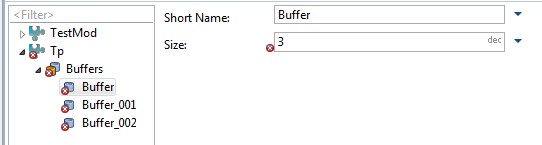
As shown in the ValidationExample_1, there is a module Tp that has 3 Buffer containers and each Buffer has a Size parameter with value=3.
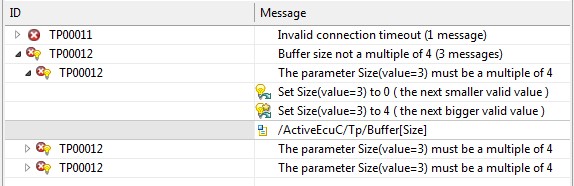
There is also a validator that requires the Size parameter to be a multiple of 4. For each Size parameter that
violates this constraint, a validation-result with ID TP00012 is created, as shown in the ValidationExample_1.
Such a validation-result has 2 solving-actions. One that sets the Size to the next smaller valid value, and one that
sets the Size to the next bigger valid value. The later solving-action is marked as preferred-solving-action.
There is also a TP00011 result that stands for any other result. The examples will not touch it.
Remark:
The validation-results to solve are identified via their ID. This ID is case-sensitive.
Validation-Result-IDs of MICROSAR BSW modules are usually in capital letters (e.g. COM02325).
Other validation-results may use validation-IDs in camel-case style (e.g. Cfg00022).
Access Validation-Results
validation{} block gives access to the validation API of the consistency component. That means accessing the
validation-results that are existing in the consistency, and solving them by executing solving-actions
which belong to each individual result.
validationResults in AutomationIf waits for background-validation-idle
and returns all validation-results of any kind. The returned collection has no deterministic order
scriptTask("CheckValidationResults_filterByOriginId", DV_PROJECT){
    code{
        validation{
            // access all validation-results
            def allResults = validationResults
            assert allResults.size() > 3

            // filter based on methods of IValidationResultUI e.g. isId()
            def tp12Results = validationResults.filter{it.isId("TP", 12)}
            assert tp12Results.size() == 3
        }

        // alternative access to validation-results without a validation block
        assert validation.validationResults.size() > 3
    }
}
Model Transaction and Validation-Result Invalidation
Before we continue in this chapter with solving validation-results, the following information is import to know:
Relation to model transactions:
Solving validation-results with solving-actions always creates a transaction implicitly. An IllegalStateException will
be thrown if this is done within an explicitly opened transaction.
Invalidation of validation-results:
Any model modification may invalidate any validation-result. In that case, the
responsible validator creates a new validation-result if the inconsistency still exists. Whether this happens for a particular modification/validation-result depends on the
validator implementation and is not visible to the user/client.
Trying to solve an invalidated validation-result will throw an IllegalStateException. Therefore it is not safe to solve a particular ISolvingActionUI that
was fetched before the last transaction. Instead, please fetch a solving-action after the last transaction, or use the method ISolver.solve(Closure) which is
the most preferred way of solving validation-results with solving-actions.
See chapter SolverAPI for details.
Solve Validation-Results with Solving-Actions
A single validation-result can be solved by calling solve() on one of its solving-actions.
scriptTask("SolveSingleResultWithSolvingAction", DV_PROJECT){
    code{
        validation{
            def tp12Results = validationResults.filter{it.isId("TP", 12)}
            assert tp12Results.size() == 3

            // Take first (any) validation-result and filter its solving-actions based on methods of ISolvingActionUI
            tp12Results.first.solvingActions.filter{
                it.description.contains("next bigger valid value")

            }.single.solve() // reduce the collection to a single ISolvingActionUI and call solve()

            assert validationResults.filter{it.isId("TP", 12)}.size() == 2
            // One TP12 validation-result solved
        }
    }
}
Solver API
getSolver() gives access to the ISolver API, which has advanced methods for bulk solutions.
ISolver.solve(Action) allows to solve multiple validation-results within one transaction.
You should always use this method to solve multiple validation-results at once instead of calling ISolvingActionUI.solve() in a loop. This is very important, because
solving one validation-result, may cause invalidation of another one. And calling ISolvingActionUI.solve() of an invalidated validation-result throws an
IllegalStateException. Also, invalidated validation-results may get recalculated and you would miss the recalculated validation-results with the loop approach. But
with ISolver.solve(Action) you can solve invalidated->recalculated results as well as results which didn't exist at the time of the call (but have been caused by
solving some other validation-result).
ISolver.solve(Action) first waits for background-validation-idle in order to have reproducible results.
The closure may contain multiple statements like:
result{specify result predicate}.withAction{select solving action}
All statements together will be used as a mapper from any solvable validation-result to a particular solving-action. The order of these statements does not affect the
solving action execution order. The statement order might only be relevant if multiple statements match on a particular result, but would select a different solving-action.
In that case, the first statement that successfully selects a solving-action wins.
scriptTask("SolveMultipleResults", DV_PROJECT){
  code{
    validation{
      assert validationResults.size() == 4
      solver.solve{
        // Call result() and pass a closure that works as filter
        // based on methods of IValidationResultUI.
        result{
          isId("TP", 12)
        }
        // On the return value, call withAction() and pass a closure that
        // selects a solving-action based on methods
        // of IValidationResultForSolvingActionSelect
        .withAction{
          containsString("next bigger valid value")
        }

        // multiple result() calls can be placed in one solve() call.
        result{isId("COM", 34)}.withAction{containsString("recalculate")}
      }

      // Three TP12 and zero COM34 (didn't exist) results solved. One other left
      assert validationResults.size() == 1
}}}
Solve all PreferredSolvingActions
ISolver.solveAllWithPreferredSolvingAction() solves all validation-results with their preferred
solving-action (solving-action return by IValidationResultUI.getPreferredSolvingAction()). Validation-results without a preferred solving-action are skipped.
This method first waits for background-validation-idle in order to have reproducible results.
scriptTask("SolveAllWithPreferred", DV_PROJECT){
  code{
    validation{
      assert validationResults.size() == 4

      solver.solveAllWithPreferredSolvingAction()

      assert validationResults.size() == 1

      // this would do the same
      transactions.transactionHistory.undo()
      assert validationResults.size() == 4

      solver.solve{
        result{true}.withAction{preferred}
      }

      assert validationResults.size() == 1
}}}
Advanced Topics
Erroneous CEs of a Validation-Result
To check if a certain model element is affected by the result please use the following methods:
IValidationResultUI.matchErroneousCE(MIObject)IValidationResultUI.matchErroneousCE(IHasModelObject)IValidationResultUI.matchErroneousCE(MIHasDefinition, DefRef)
scriptTask("IValidationResultUIErroneousCEs", DV_PROJECT){
    code{
        validation{
            // sampleDefRefs contains DefRef constants just for this example. Please use the real DefRefs from your SIP

            def result = validationResults.filter{it.isId("TP", 12)}.first

            // Retrieve the model element to check
            def modelElement // = retrieveElement ...

            // Check if the model object is affected by the validation-result
            assert result.matchErroneousCE(modelElement)

        }
    }
}
Access Validation-Results of a Model Object
You can retrieve validation-results also from any model object (MDF, Domain or BswmdModel).
MIObject.validationResults returns the validation-results of an MIObject.
scriptTask("CheckValidationResultsOfObject", DV_PROJECT){
    code{
        // sampleDefRefs contains DefRef constants just for this example. Please use the real DefRefs from your SIP

        // a Buffer container
        def buffer002 = mdfModel(AsrPath.create("/ActiveEcuC/Tp/Buffer_002"))
        // the Size parameter
        def sizeParam = buffer002.parameter(sampleDefRefs.tpBufferSizeDefRef).single

        // the result exists for the Size parameter, not for the Buffer container
        assert sizeParam.validationResults.size() == 1
        assert buffer002.validationResults.size() == 0
    }
}
MIObject.validationResultsRecursive returns the validation-results of an MIObject and all its children.
IViewedModelObject.validationResults returns the validation-results for the element matching the model object and model view.
The following condition must be true to match:
IValidationResultUI.matchErroneousCE(theObject) &&
(
  IValidationResultUI.isGeneralVariantContext() ||
  IValidationResultUI.getPredefinedVariantContexts().contains(theView)
)
IViewedModelObject.validationResultsRecursive returns the validation-results of an MIObject and all its children.
This will also filter for the correct com.vector.cfg.model.asr.view.IModelView.
So this will return all results of the whole subtree, like an editor displays results at parent objects.
Access Validation-Results of a DefRef
DefRef.validationResults returns all validation-results which match the given definition.
This means for each validation-result that is returned, at least one of its configuration elements has the given definition.
scriptTask("CheckValidationResultsOfDefRef", DV_PROJECT){
    code{
        // sampleDefRefs contains DefRef constants just for this example. Please use the real DefRefs from your SIP

        assert sampleDefRefs.tpBufferSizeDefRef.validationResults.size() == 3
    }
}
Filter Validation-Results using an ID Constant
Groovy allows you to spread list elements as method arguments using the spread operator. This allows you to define
constants for the isId(String,int) method.
scriptTask("FilterResultsUsingAnIdConstant2", DV_PROJECT){
    code{
        validation{
            def tp12Const = ["TP",12]

            assert validationResults.size() > 3
            assert validationResults.filter{it.isId(*tp12Const)}.size() == 3
        }
    }
}
Identification of a Particular Solving-Action
A so called solving-action-group-ID identifies a solving-action group globally unique.
If solving-action groups are used, it is much safer to use the solving-action-group-IDs for solving-action identification than description-text matching, because a description-text may change.
final String SA_GROUP_ID_TP12_NEXT_BIGGER_VALID_VALUE = "ESolvingActionGroup#2"

scriptTask("SolveMultipleResultsByGroupId", DV_PROJECT){
  code{
    validation{
      assert validationResults.size() == 4

      solver.solve{
        result{isId("TP", 12)}
          .withAction{
            byGroupId(SA_GROUP_ID_TP12_NEXT_BIGGER_VALID_VALUE)
          }
          // instead of .withAction{containsString("next bigger valid value")}
      }

      assert validationResults.size() == 1
      // Three TP12 validation-results solved.
    }
  }
}
Validation-Result Description as MixedText
IValidationResultUI.getDescription() returns an IMixedText that describes the inconsistency.
IMixedText is a construct that represents a text, whereby parts of that text
can also hold the object which they represent. This allows a consumer e.g. a GUI to make the object-parts of the text clickable and to reformat these object-parts as
wanted.
Consumers which don't need these advanced features can just call IMixedText.toString() which returns a default format of the text.
Further IValidationResultUI Methods
The following listing gives an overview of other "properties" of an IValidatonResultUI.
scriptTask("IValidationResultUIApiOverview", DV_PROJECT){
  code{
    validation{
      def r = validationResults.filter{it.isId("TP", 12)}.first
      assert r.id.origin == "TP"
      assert r.id.id == 12
      assert r.description.toString().contains("must be a multiple of")
      assert r.severity == EValidationSeverityType.ERROR
      assert r.solvingActions.size() == 2
      assert r.getSolvingActionByGroupId("ESolvingActionGroup#2").description.contains("next bigger valid value")

      // this result has a preferred-solving-action
      assert r.preferredSolvingAction == r.getSolvingActionByGroupId("ESolvingActionGroup#2")

      // results with lower severity than ERROR can be acknowledged
      assert r.acknowledgement.isPresent() == false

      // if the cause was an exception, r.cause.get() returns it
      assert r.cause.isPresent() == false

      // an ERROR result gets reduced to WARNING if one of its erroneous CEs is user-defined (user-overridden)
      assert r.isReducedSeverity() == false

      // on-demand results are reported with the on-demand generator validation
      assert r.isOnDemandResult() == false
    }
  }
}
IValidationResultUI Acknowledgement
An IValidatonResultUI can have an acknowledgement and this acknowledgement will be stored within the project. The acknowledgement can be read and edited with the following APIs:
boolean isAcknowledged()Optional<String> getAcknowledgement()void setAcknowledgement(String)
However, the acknowledgement can only be edited if the relevant files are writable. This information is stored in project settings.
The following API can be used to check if the acknowledgement is read-only:
boolean isAcknowledgementReadOnly()
Note: When the
setAcknowledgement(String) method is called, it will internally open a transaction to persist the acknowledgement. It is not allowed to call this method inside another transaction, otherwise, an IllegalStateException exception will be thrown from the
setAcknowledgement(String) method.
IValidationResultUI in a variant (Post-Build selectable) Project
scriptTask("IValidationResultUIInAVariantProject", DV_PROJECT){
    code{
        validation{
            def r = validationResults.filter{it.isId("TP", 12)}.first
            assert r.isGeneralVariantContext() // either it is a general result...
            assert r.predefinedVariantContexts.size() == 0 // or it is assigned to one or more (but never all) variants
            // If a validator assigns a result to all variants, it will be a general result at UI-side.
        }
    }
}
Advanced Descriptor Details
An IDescriptor is a construct that can be used to "point to" some
location in the model. A descriptor can have several kinds of aspects to describe where it points to. Aspect kinds are e.g. IMdfObjectAspect, IDefRefAspect,
IMdfMetaClassAspect, IMdfFeatureAspect.
getAspect(Class) gets a particular aspect if available, otherwise
null.
A descriptor has a parent descriptor. This allows to describe a hierarchy.
E.g. if you want to express that something with definition X is missing as a child of the existing MDF object Y. In this example you have a descriptor with an
IDefRefAspect containing the definition X. This descriptor that has a parent descriptor with an IMdfObjectAspect containing the object Y.
import com.vector.cfg.model.cedescriptor.aspect.*

scriptTask("IValidationResultUIErroneousCEs", DV_PROJECT){
    code{
        validation{
            // sampleDefRefs contains DefRef constants just for this example. Please use the real DefRefs from your SIP

            def result = validationResults.filter{it.isId("TP", 12)}.first
            def descriptor = result.erroneousCEs.single // this result in this example has only a single erroneous-CE descriptor
            def defRefAspect = descriptor.getAspect(IDefRefAspect.class)
            assert defRefAspect != null // this descriptor in this example has an IDefRefAspect
            assert defRefAspect.defRef == sampleDefRefs.tpBufferSizeDefRef
            def objectAspect = descriptor.getAspect(IMdfObjectAspect.class)
            assert objectAspect != null // // this descriptor in this example has an IMdfObjectAspect
            // An IMdfObjectAspect would be unavailable for a descriptor describing that something is missing
            def parentObjectAspect = descriptor.parent.getAspect(IMdfObjectAspect.class)
            assert parentObjectAspect != null

            // Dealing with descriptors is universal, but needs more code. Using these methods might fit your needs.
            assert result.matchErroneousCE(objectAspect.getObject())
            assert result.matchErroneousCE(parentObjectAspect.getObject(), sampleDefRefs.tpBufferSizeDefRef)
        }
    }
}
Examine Solving-Action Execution
The easiest and most reliable option for verifying solving-action execution is to check the presence of validation-results afterwards.
Apart from that, there are other options of examination:
ISolvingActionUI.solve() returns an ISolvingActionExecutionResult.
An ISolvingActionExecutionResult represents the result of one solving action execution. Use isOk() to find out if it was
successful. Call getUserMessage() to get the failure reason.
ISolver.solve(Action) returns an ISolvingActionSummaryResult.
An ISolvingActionSummaryResult represents the execution of multiple results.
ISolvingActionSummaryResult.isOk() returns true if getExecutionResult() is EExecutionResult.SUCCESSFUL or
EExecutionResult.WARNING, this is if at least one sub-result was ok.
Call getSubResults() to get a list of ISolvingActionExecutionResults.
import com.vector.cfg.util.activity.execresult.EExecutionResult

scriptTask("SolvingReturnValue", DV_PROJECT){
    code{
        validation{
           assert validationResults.size() == 4
           // In this example, three validation-results have a preferred solving action.
           // One of the three cannot be solved because a parameter is user-defined.
           def summaryResult = solver.solveAllWithPreferredSolvingAction()
           assert validationResults.size() == 2 // Two have been solved, one with a preferred solving-action is left.
           assert summaryResult.executionResult == EExecutionResult.WARNING

           // DemoAsserts is just for this example to show what kind of sub-results the summaryResult contains.
           DemoAsserts.summaryResultContainsASubResultWith("OK",summaryResult)
           //two such sub-results for the validation-results with preferred-solving-action that could be solved

           DemoAsserts.summaryResultContainsASubResultWith(["invalid modification","not changeable","Reason","is user-defined"],summaryResult)
           // such a sub-result for the failed preferred solving action due to the user-defined parameter

           DemoAsserts.summaryResultContainsASubResultWith("Maximum solving attempts reached for the validation-result of the following solving-action",summaryResult)
           // Multiple attempts are taken to solve a result because other changes may eliminate a blocking reason, but stops after an execution limit is reached.
        }
    }
}
Create a Validation-Result in a Script Task
The resultCreation API provides methods to create new IValidationResults, which could then be reported to a
IValidationResultSink. This is can be used to report validation-results similar to a validator/generator, but from within a script task.
ValidationResultSink
You can retrieve anIValidationResultSink from the method getResultSink(). Or you get it by the context, e.g. some script tasks
pass an IValidationResultSink as argument (like DV_GENERATION_STEP ).
Reporting ValidationResult in Task providing a ResultSink
This sample applies to task types providing a ResultSink in the Task API, like DV_GENERATION_STEP.
scriptTask("ScriptTaskCreationResult" /* Insert with task type providing resultSink */ ){
  code{
    validation{
      resultCreation{
        // The ValidationResultId group multiple results
        def valId = createValidationResultIdForScriptTask(
                /* ID */ 1234,
                /* Description */ "Summary of the ValidationResultId",
                /* Severity */ EValidationSeverityType.ERROR)
        // Create a new resultBuilder
        def builder = newResultBuilder(valId, "Description of the Result")

        // You can add multiple elements as error objects to mark them
        builder.addErrorObject(bswDefRef.EcucGeneral.bswmdModel().single)
        // Add more calls when needed

        // Create the result from the builder
        def valResult = builder.buildResult()

        // You need to report the result to a resultSink
        // You have to get the sink from the context, e.g. script task args
        // a sample line would be
        resultSinkForTask.reportValidationResult(valResult)
      }
    }
}}
scriptTask("ScriptTaskCreationResult", DV_PROJECT){
  code{
    validation{
      resultCreation{
        // The ValidationResultId group multiple results
        def valId = createValidationResultIdForScriptTask(
                /* ID */ 1234,
                /* Description */ "Summary of the ValidationResultId",
                /* Severity */ EValidationSeverityType.ERROR)
        // Create a new resultBuilder
        def builder = newResultBuilder(valId, "Description of the Result")

        // Create the result from the builder
        def valResult = builder.buildResult()

        // Access a resultSink to report an on-demand result
        resultSink.reportValidationResult(valResult)

        // With this method you can clear all the on-demand results
        clearOnDemandValidationResults()
 }}}}
Clear the on-demand ValidationResult
As shown in the above example, you can clear on-demand results when needed.
With the method clearOnDemandValidationResults(), you can clear all OnDemand results that are currently
existing in the Consistency.
Turn off auto-solving-action execution
Auto-solving-action execution is a feature to simplify configuration by automatically adjusting dependent data after a change was made by the
user. This feature runs synchronous to the user change and may have impact on UI responsiveness. If UI response time is not acceptable, this should be reported to Vector.
Using setEnabled(boolean), auto-solving-action execution can be disabled to find out if this is the cause and as an interim workaround.
If auto-solving-action execution is disabled, data might get out of sync after a user change, E.g. Vtt dual target sync, BSW Internal Behavior, ... . In that case, these have
to be solved manually with the corresponding validaton-result's solving action.
This setting is stored as user-independent project setting.
This setting can only be changed if isChangeable() returns true (false e.g. due to read-only project), otherwise an IllegalStateException is thrown.
scriptTask("SolvingReturnValue", DV_PROJECT){
    code{
        validation{
            settings{
                if (autoSolvingActionExecution.changeable) {
                    autoSolvingActionExecution.enabled = false
                }
            }
        }
    }
}