Set Up a vVIRTUALtarget Project
vVIRTUALtarget sets up a build environment for a virtual ECU. The most important configuration steps in the tool include:
-
Define application source files to include in the solution, in addition to the BSW code included by default.
-
Define include directories to set in the solution.
-
Define static libraries and further configuration settings like compiler and linker options.
-
Select available build options:
-
Generate build and development environment
-
Generate System Under Test
-
For a detailed description of the different options and configuration parameters, see the vVIRTUALtarget Help.
|
DaVinci Configurator 6 project support was incorporated into vVIRTUALtarget beginning with version 9 SP3. |
-
A DaVinci Configurator 6 project in place (see Creation Methods if you still need to create one).
-
Create a new vVIRTUALtarget project, then link it to your DaVinci Configurator 6 project by adding the project’s generated .dvjson file within vVIRTUALtarget, to map the ECU System Description, as illustrated in Link a DaVinci Configurator 6 project to a vVIRTUALtarget project. Saving the vVIRTUALtarget project automatically creates a .vttjson file with the same filename as the corresponding .dvjson file. The VTTCntrl component, an essential element for all virtual ECU projects, requires the .vttjson file to invoke the
VttCmdcommand.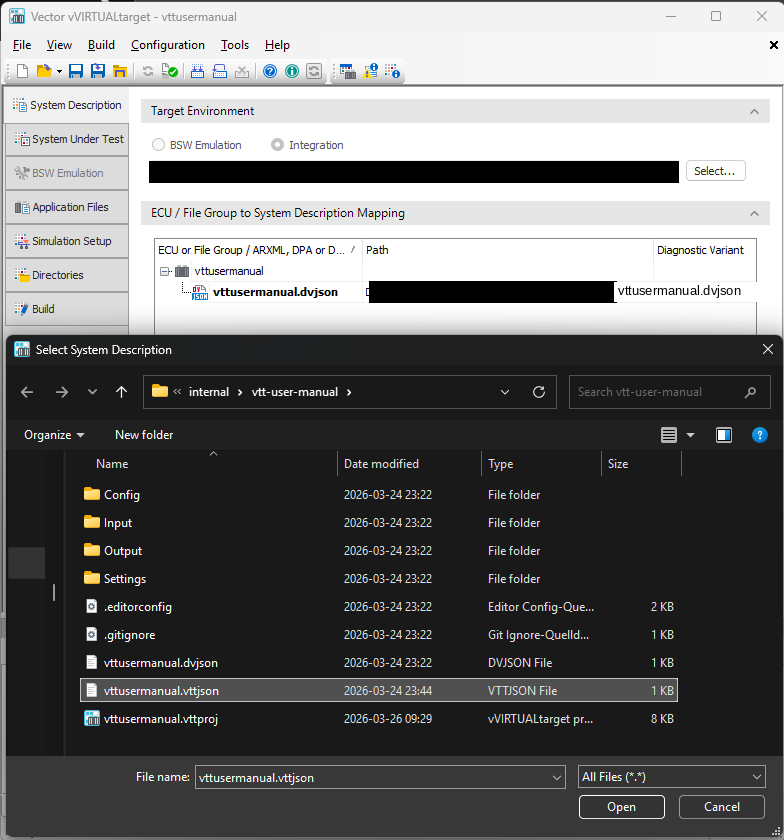 Figure 1. Link a DaVinci Configurator 6 project to a vVIRTUALtarget project
 -
Configure the Target Environment. When you choose a .dvjson file, the tool defaults to the Integration use case. However, you must specify the path to the BSW Package designated for the vECU. In the Target Environment tab, use the Select button to define the path to your BSW Package’s root directory.
After you set up the vVIRTUALtarget project, continue with Configure the ECU for vVIRTUALtarget. This procedure and the following topics explain the remaining steps for configuring the ECU.
|
Alternatively, you can start on the vVIRTUALtarget side and create a vVIRTUALtarget project first. In this case, the vVIRTUALtarget tool provides a setup script that summarizes the steps for creating a DaVinci Configurator Classic project. |