Raw AUTOSAR Data
Note: The information in this chapter is focused on the Java API. In most cases it is more convenient to use the Groovy APIs described in the Model API chapter. So, whenever possible use the Groovy API and read this chapter only to get background information when required.
The MDF model is being used to store the AUTOSAR model loaded from several ARXML files. It consists of Java interfaces and classes which are generated from the AUTOSAR meta-model.
Naming
The MDF interfaces have the prefix MI followed by the AUTOSAR meta-model name of the class
they represent. For example, the MDF interface related to the meta-model class ARPackage
(AUTOSAR package in the top-level structure of the meta-model) is MIARPackage. The AUTOSAR
meta model can be found for example on the link: AUTOSAR Website.
The Models Inheritance Hierarchy
The MDF model therefore implements (nearly) the same inheritance hierarchy and associations as defined by the AUTOSAR model. These interfaces provide access to the data stored in the model.
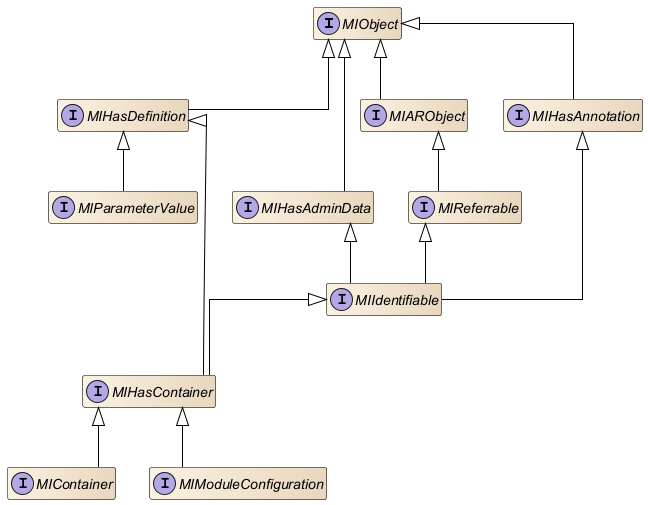
The following figure shows the (simplified) inheritance hierarchy of the ECUC container type MIContainer. What we can see in this example:
-
A container is an
MIIdentifiablewhich again is aMIReferrable. TheMIReferrableis the type which holds the shortname (getName()). All types which inherit from theMIReferrablehave a shortname (MIARPackage,MIModuleConfiguration, ...) -
A container is also a
MIHasContainer. This is an artificial base class (not part of the AUTOSAR meta-model) which provides all features of types which have sub-containers. TheMIModuleConfigurationtherefore has the same base type -
A container also inherits from
MIHasDefinition. This is an artificial base class (not part of the AUTOSAR meta-model) which provides all features of types which have an AUTOSAR definition. TheMIModuleConfigurationandMIParameterValuetherefore has the same base type -
All
MIIdentifiables can hold ADMIN-DATA and ANNOTATIONs -
All MDF objects in the AUTOSAR model tree inherit from
MIObjectwhich is again anMIObject
MIObject and MDFObject
The MIObject is the base interface for all AUTOSAR model objects in the DaVinci Configurator
data model. It extends MDFObject which is the base interface of all model objects. Your client
code shall always use MIObject, when AUTOSAR model objects are used, instead of MDFObject.
The Models Containment Tree
The root node of the AUTOSAR model is MIAUTOSAR. Starting at this object the complete model
tree can be traversed. MIAUTOSAR.getSubPackage() for example returns a list of MIARPackage
objects which again have child objects and so on.
In general, objects which have child objects provide methods to retrieve them:
MIAUTOSAR.getSubPackage()for example returns a list of child packagesMIContainer.getSubContainer()returns the list of sub-containers andMIContainer.getParameter()all parameter-values and reference-values of a container
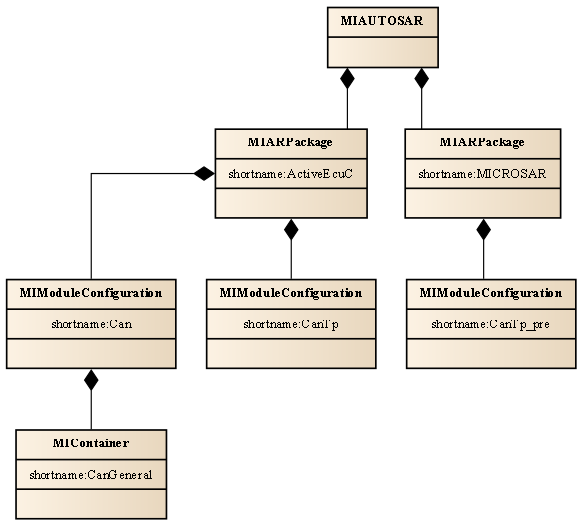
The following Java code shows how client code traverses the MDF model’s containment tree:
// Start with the AUTOSAR models root object
final MIAUTOSAR root = modelRootAccess.getAutosarRoot();
printModuleConfigurationNames(root);// Recursive method for traversing the AR-package tree
private void printModuleConfigurationNames(final MIHasPackage hasPackage) {
final List<MIARPackage> subPackages = hasPackage.getSubPackage();
for (final MIARPackage subPackage : subPackages) {
// Visit all packages recursively
printModuleConfigurationNames(subPackage);
// Get all packageable elements
final List<MIPackageableElement> packageableElements = subPackage.getElement();
// Find module configurations
for (final MIPackageableElement packageableElement : packageableElements) {
if (packageableElement instanceof final MIModuleConfiguration moduleConfiguration) {
final String name = moduleConfiguration.getName();
logger.debug("Module configuration: " + name);
}
}
}
}The ECUC Model
The interfaces and classes which represent the ECUC model don't exactly follow the AUTOSAR meta-model naming, because they are designed to store AUTOSAR 3 and AUTOSAR 4 models as well.
Affected interfaces are:
MIModuleConfigurationand its child objects (containers, parameters, ...)MIModuleDefand its child objects (containers definitions, parameter definitions, ...)
The ECUC model also unifies the handling of parameter- and reference-values. Both, parameter-values
and reference-values of a container, are represented as MIParameterValue in the MDF model.
Order of Child Objects
Child object lists in the MDF model have the same order as the data specified in the ARXML files. So, loading model objects from ARXML doesn't change the order.
AUTOSAR References
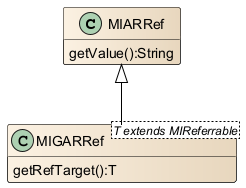
All AUTOSAR reference objects in the MDF model have the base interface MIARRef and the base
generic interface MIGARRef.
In ARXML, such a reference can be specified as:
<TYPE-TREF DEST="IMPLEMENTATION-DATA-TYPE">
    /DataTypes/MyImplDataType
</TYPE-TREF>-
MIARRef.getValue()returns the AUTOSAR path of the object the reference points to (as specified in the ARXML file). In the example above"/DataTypes/MyImplDataType"would be this value -
MIGARRef.getRefTarget()on the other hand returns the referenced MDF object if it exists. This method is located in a specific, type-safe (according to the type it points to) reference interface which extendsMIARRef. So, if an object with the AUTOSAR path"/DataTypes/MyImplDataType"exists in the model, this method will return it
Model Changes
Transactions
The MDF model provides model change transactions for grouping several model changes into one atomic change.
A solving action, for example, is being executed within a transaction for being able to change model content. Validation and generator developers don't need to care for transactions. The tools framework mechanisms guarantee that their code is being executed in a transaction where required.
The tool guarantees that model changes cannot be executed outside of transactions. So, for example, during validation of model content the model cannot be changed. A model change here would lead to a runtime exception.
Undo/Redo
On basis of model change transactions, MDF provides means to undo and redo all changes made within one transaction. A GUI can allow users to execute undo/redo on this granularity.
Event Handling
MDF also supports model change events. All changes made in the model are reported by this asynchronous event mechanism. Validations, for example, detect this way which areas of the model need to be re-validated. The GUI can use this mechanism to update its editors and views when model content changes.
Deleting Model Objects
Model objects must be deleted by a dedicated API. In Java code that's: MIObject.deleteFromModel().
Deleting an object means:
- All associations of the object are deleted. The connection to its parent object, for example, is being deleted which means that the object is not a member of the model tree anymore
- The object itself is being deleted. In fact, it is not really deleted (and garbage collected) as a Java object but only marked as removed. Undo of the transaction, which deleted this object, removes this marker and restores the deleted associations
Access to Deleted Objects
All subsequent access to content of deleted objects throws a runtime exception. Reading the
shortname of an MIContainer, for example.
Set-methods
Model interfaces provide get-methods to read model content. MDF also offers set-methods for
fields and child objects with multiplicity 0..1 or 1..1.
These set-methods can be used to change model content:
MIARRef.getValue()for example returns a reference's AUTOSAR pathMIARRef.setValue(String newValue)sets a new path
Changing Child List Content
MDF doesn't offer set-methods for fields and child objects with multiplicity 0..* or 1..*.
MIContainer.getSubContainer(), for example, returns the list of sub-containers but there is no
MIContainer.setSubContainer() method to change the sub-containers.
Changing child lists means changing the list itself:
- To add a new object to a child list, client code must use the list's
add()method.MIContainer.getSubContainer().add(container), for example, adds a container as additional sub-container. This added object is being appended at the end of the list - Removing child list objects is a side-effect of deleting this object. The delete operation removes it from the list automatically
Change Restrictions
The tools transaction handling implements some model consistency checks to avoid model changes which shall be avoided. Such changes are, for example:
- Creating duplicate shortnames below one parent object (e.g. two sub-containers with the same shortname)
- Changing or deleting pre-configured parameters
When client code tries to change the model this way, the related model change transaction is being canceled and the model changes are reverted (unconditional undo of the transaction). A special case here are solving actions. When a solving action inconsistently changes the model, only the changes made by this solving action are reverted (partial transaction undo of one solving action execution).