About vVIRTUALtarget
vVIRTUALtarget (VTT) is the Vector solution for virtualizing individual software components and fully configured ECUs for all typical AUTOSAR Classic projects. It lets developers, integrators, and test engineers create virtual ECUs (vECUs) and work efficiently across the entire ECU software development process, independent of the real hardware.
CANoe serves as an execution platform and test environment. With its rich test feature set and the ability to connect and test virtual ECUs with real hardware, CANoe is the ideal solution for every task during the development and testing phase. vVIRTUALtarget includes virtualized OS and MCAL modules designed to operate seamlessly with CANoe. vVIRTUALtarget-generated vECUs can also run in custom environments based on, for example, Vector SIL Kit or the OpenSUT API.
vVIRTUALtarget projects allow testing ECU software in an early development phase, before hardware is available. Early debugging and simulation of corner cases simplify error detection from the start. Later, the ECU configuration project can be easily migrated to a VTT Dual-Target project, which contains modules for both the virtual and the real target. The key aspect of the VTT Dual-Target approach: only the configuration parameters for the Real-Target MCAL modules require maintenance. The virtual MCAL modules' configuration parameters are synchronized automatically from the hardware MCAL modules. Non-MCAL configuration parameters are common to both targets. This "single-source principle" enables code generation for both vVIRTUALtarget and the hardware target from a single configuration project.
The vecu-derive tool, part of vVIRTUALtarget, can be used to derive a vECU from a Real-Target project based on any AUTOSAR Classic stack.
Architecture Overview
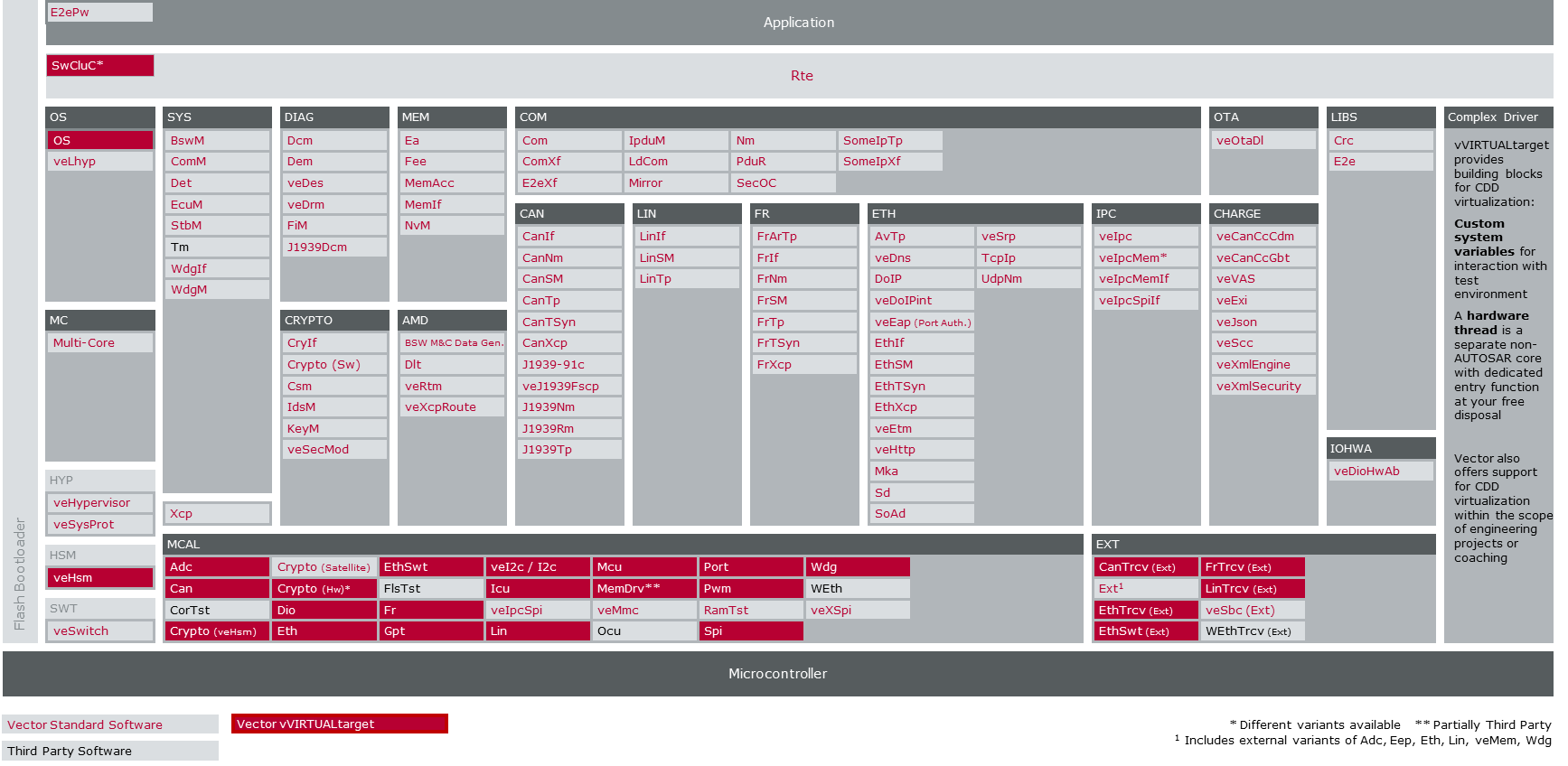
The following figure shows where the vVIRTUALtarget modules are in the AUTOSAR architecture.
Use Cases of vVIRTUALtarget
VTT Only
A VTT Only delivery contains two sets of OS/MCAL modules: OS/MCAL modules as placeholders for hardware-specific modules and virtual OS/MCAL modules for vVIRTUALtarget. A VTT Only delivery suits scenarios such as:
-
Delivering early, even before the hardware-specific modules are available: developers can start configuring the MICROSAR BSW and testing their ECU software on a computer. Later, this project can be easily migrated to a hardware-specific MICROSAR delivery (without vVIRTUALtarget) or to a VTT Dual-Target delivery (see VTT Dual-Target) with both virtual and hardware-specific modules.
-
Prototyping and evaluation of the MICROSAR BSW and applications on a developer computer
-
Development of SWCs in a virtual environment
VTT Dual-Target
A VTT Dual-Target delivery provides two sets of OS/MCAL modules: one for the virtual environment and one for specific hardware. This allows execution of the application on hardware as well as in a virtual environment.
VTT Dual-Target projects follow a single-source principle: all BSW modules are configured for the hardware target, and the virtual modules' configuration parameters are synchronized automatically from the hardware modules. In the code generation dialog, either the virtual target or the hardware target can be selected. The Dual-Target principle addresses the following use case:
-
Use VTT as a second target platform to prototype serial-production projects and test hardware-independent aspects of the ECU software.
Runtime Environment for vVIRTUALtarget
The vVIRTUALtarget tool supports multiple build systems, compilers, and development environments, such as CMake, Microsoft™ Visual Studio, Bazel, and MinGW-w64. A vECU is essentially a Windows dynamic link library (DLL) or a Linux shared object (.so). Depending on the build environment, a suitable debugger, such as the Visual Studio debugger or GDB, can debug the vECU.
Running and testing a vECU requires an execution environment and a test tool for stimulation. The following options are available:
-
CANoe is a powerful tool that provides both an execution environment and a rich test feature set.
-
With the Vector SIL Kit, the vECU runs as a standalone SUT, executed in a dedicated process, for bus communication, I/O, and time synchronization. Co-simulation with CANoe and any other SIL Kit-compliant tool is also possible.
-
vVIRTUALtarget-generated vECUs export the OpenSUT programming interface for integration with third-party tools. This API enables a custom execution environment and its integration with a test tool.
In the following, "IDE" (Integrated Development Environment) refers to all supported development environments and debuggers. "Virtual ECU" (vECU) refers to DLLs and shared objects. "Runtime Environment" refers to all supported execution environments and target platforms.
Please refer to the vVIRTUALtarget Help for a complete list of supported target platforms, development environments and compilers.
Required Tools and Licenses
You can download the required Vector products from the Vector Download Portal.
-
vVIRTUALtarget
-
DaVinci Configurator Classic
-
CANoe (with options as needed) or an equivalent simulation environment
-
Microsoft Visual Studio[1] or any other supported IDE
Scope of This Document
This document aims at describing features and workflow of vVIRTUALtarget and providing guidelines for configuration and integration steps.
|
vVIRTUALtarget does not provide a complete and accurate emulation of the hardware ECU. For instance, the runtime behavior of the vECU might significantly differ from the execution on the hardware. vVIRTUALtarget shall aid development and debugging of ECU projects. However, every ECU project must be tested on real hardware. |