Projects & Active Project
Projects in the AutomationInterface are represented by IProject instances. These instances can be created by:
- Creating a new project
- Loading an existing project
You can only access IProject instances by using a code block at IProjectHandlingApi or IProjectRef class. This shall prevent memory
leaks, by not closing open projects.
Accessing the active Project
The IProjectHandlingApi provides access to the active project. The active project is either (in descending order):
- The last
IProjectinstance activated with acodeblock - Stack-based - so multiple opened projects are possible and the last (inner)
codeblock is used. - The passed project to a project task
- Or the loaded project in the current DaVinci Configurator in an application task
The figure describes the behavior to search for the active project of a script task.
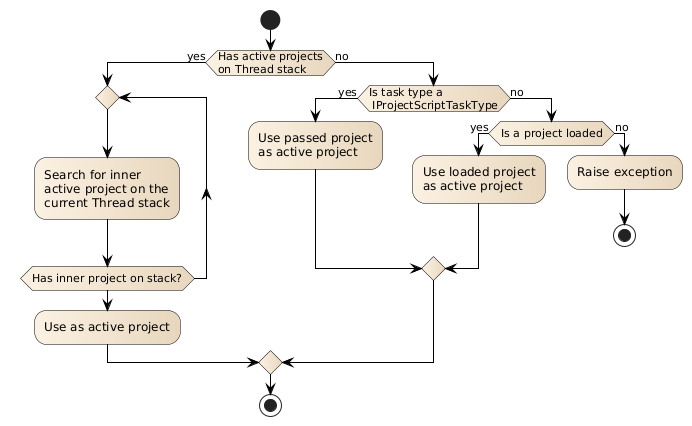
It is possible that there is no active project, e.g. no project was loaded.
You can switch the active project, by calling the IProject.with(Transformer) method on an IProject instance.
// Retrieve theProject from other API like load a project
IProject theProject = ...;
theProject.with {
    // Now theProject is the new active project inside of this lambda
}
To access the active project you can use the activeProject(Transformer) and getActiveProject() methods.
scriptTask('taskName') {
  code {
    if (projects.projectActive) {
      // active IProject is available as "activeProject" property
      scriptLogger.info "Active project: ${projects.activeProject.projectName}"
      projects.activeProject {
        // active IProject is available inside this Closure
        scriptLogger.info "Active project: ${projectName}"
      }
    } else {
      scriptLogger.info 'No project active'
    }
  }
}
isProjectActive() returns true if and only if there is an active
IProject. If isProjectActive() returns true it is safe to call getActiveProject().
getActiveProject() allows accessing the active IProject like a
property.
activeProject(Transformer) allows accessing the active IProject
in a scope-like way. This will enable the project specific API inside of the code parameter.
Accessing the project search
The SearchApiEntryPoint provides the possibility to search parameters, containers or module configurations by several criteria.
The API also provides the ability to execute several checks on the results.
scriptTask("TestSearchApi", DV_PROJECT) {
code {
        activeProject {
            // Use the search API with a certain datamining query from the GUI FindView
            def findings = search("Definition==EcucGeneral")

            // It is possible to use the search API multiply times
            def number = search("Definition==EcucGeneral").size()

            // Use the closure to operate on the search results
            search("Definition==EcucGeneral"){
                // To prove that the result
                def containsObjCondition = { sr -> sr.result().contains("/ActiveEcuC/EcuC/EcucGeneral[0:DummyFunction]") }
                def result = isConditionMet(containsObjCondition)
                // Report or print result

                // Check if result size is equal to 22
                isSize(ESearchOperator.EQ, 22)
            }
        }
    }
}
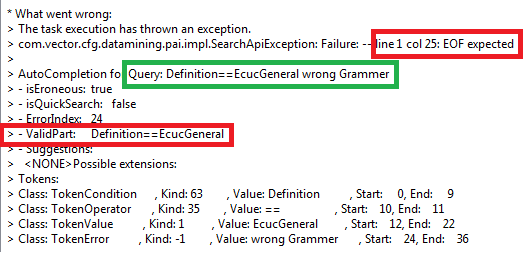
search(String) is used to evaluate a DataMiningService query.
If the query isn't correct, a SearchApiException will be thrown.
Example:
The ISearchResultApi provides the possibility to make evaluations based on the search results.
Use isConditionMet(Predicate) to pass a condition to the search result. With this condition a certain expectation can be
proven.
Use isSize(ESearchOperator, int) to pass a condition to compare it with the size of the search result. It can be used to check a
certain expectation. The passed operation (ESearchOperator) defines the condition.
Use size() to get the result size of the search.
Use result() to get a list of the result elements. The list contains ObjectLinks as Strings. Returns an empty list if no
elements are found.