Generate Code for vVIRTUALtarget
The target types you can generate for a project depend on your MICROSAR delivery. Select the target type before generating code and, for Dual-Target deliveries, confirm that the virtual target is available as a generation target.
-
A validated, generatable DaVinci Configurator project.
-
Awareness of which target types your MICROSAR delivery supports (VTT Only or Dual-Target).
-
Open Project Settings or the
General.jsonfile, and select the target type.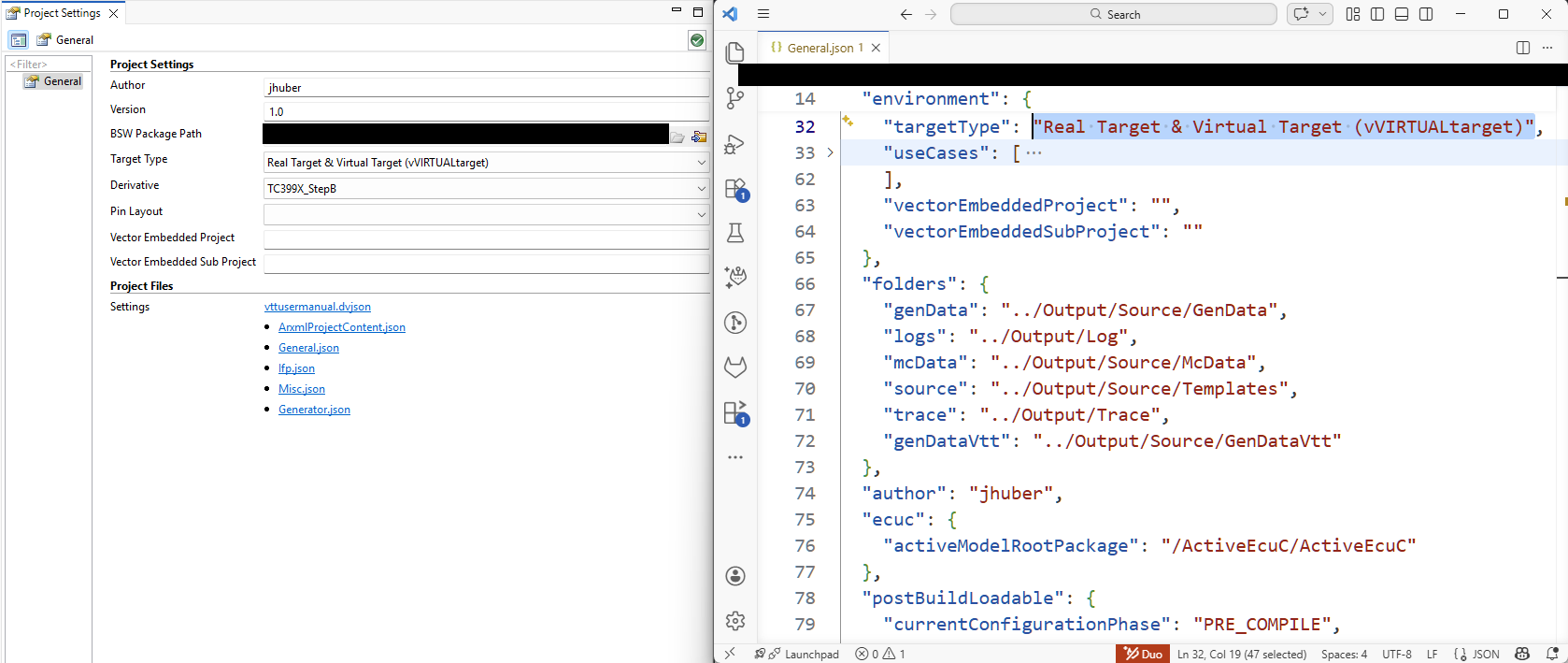 Figure 1. Selection of Target Type, Case vVIRTUALtarget Dual-Target
For VTT Only, DaVinci Configurator preselects the option Virtual Target (vVIRTUALtarget) and it is the only available generation target.
-
For Dual-Target deliveries, confirm that Virtual Target appears as a generation target in the code generation dialog.
The option Virtual Target activates VTT modules in your project and adds the generation target Virtual Target (vVIRTUALtarget) to the code generation dialog, see below.
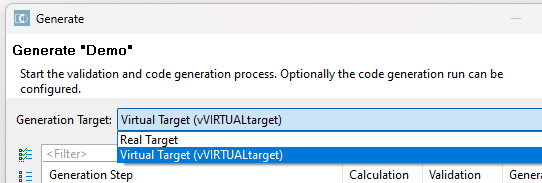 Figure 2. Generation Dialog with Virtual Target Enabled