Using the Project with Different Configurator Versions
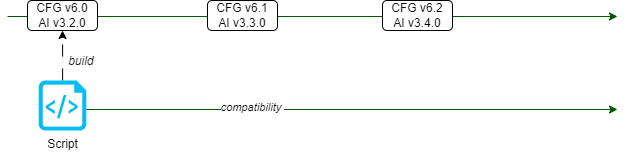
You can execute the script tasks of a script project in different versions of the DaVinci Configurator as long as the following conditions are met:
-
The script was compiled with the oldest DaVinci Configurator version in which it should be used.
-
The DaVinci Configurator version span must not contain a breaking change.
-
If you use the BswmdModel, you have to use a compatible BSW package.
-
The used BSW module definitions (BSWMD files) must have compatible names and multiplicities.
-
Script Project Update to a Newer Configurator/AutomationInterface Version
If updating the script project to a newer DaVinci Configurator or AutomationInterface version, it is necessary to rebuild the script project.
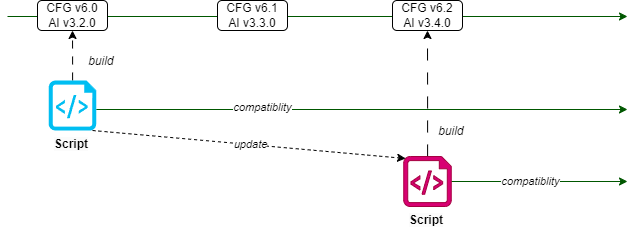
Steps to execute:
-
Verify the correct reference in the
build.gradlefile to the DaVinci Configurator installation folder.
scriptProject {
    cfgPath = file("<PATH_TO_CFG6>")
}-
Rebuild the script project with the
gradlew buildcommand.
This will update the compile time dependencies of your script project according to the new DaVinci Configurator version.
Version Compatibility
The table shows the release version alignments of the AutomationInterface and the DaVinci Configurator 6.
-
AutomationInterface v3.11.0 - DaVinci Configurator v6.4.0
-
AutomationInterface v3.10.0 - DaVinci Configurator v6.4.0
-
AutomationInterface v3.9.0 - DaVinci Configurator v6.3.0
-
AutomationInterface v3.8.0 - DaVinci Configurator v6.2.0
-
AutomationInterface v3.7.0 - DaVinci Configurator v6.2.0
-
AutomationInterface v3.6.0 - DaVinci Configurator v6.1.0
-
AutomationInterface v3.5.0 - DaVinci Configurator v6.0.0
-
AutomationInterface v3.4.0 - DaVinci Configurator v0.7.0
-
AutomationInterface v3.3.0 - DaVinci Configurator v0.6.0
-
AutomationInterface v3.2.0 - DaVinci Configurator v0.5.0
-
AutomationInterface v3.1.0 - DaVinci Configurator v0.4.0
-
AutomationInterface v3.0.0 - DaVinci Configurator v0.3.1