Script Task Execution
This section lists the APIs to execute and query information for script tasks. The sections document the following aspects:
- Script task execution
- Logging API
- Path resolution
- Error handling
- User defined classes and methods
- User defined script task arguments
Execution Context
Every IScriptTask could be executed, and retrieve passed arguments and other context information. This execution information of a
script task is tracked by the IScriptExecutionContext.
The IScriptExecutionContext holds the context of the execution:
- The script task arguments
- The current running script task
- The current active script logger
- The active project, if existing
- The script temp folder
- The script task user defined arguments
The IScriptExecutionContext is also the entry point into every automation API, and provide access to the different API classes. The classes are described in their own
chapters like IProjectHandlingApiEntryPoint.
The context is immediately active, when the code block of an IScriptTask is called.
Groovy Code
The client sample illustrates the seamless usage of theIScriptExecutionContext class in Groovy:
scriptTask("taskName", DV_APPLICATION){
  code{  // The IScriptExecutionContext is automatically active here
     // Call methods of the IScriptExecutionContext
     def logger = scriptLogger
     def temp = paths.tempFolder

     // Use an automation API
     generation{
         // Now the Generation API is active
     }
  }
}IScriptExecutionContext is automatically activated inside the code{} block.
Java Code
For Java clients the methodIScriptExecutionContext.getInstance(Class) provides access to the API classes, which are seamlessly available for the
groovy clients:
// Java code
// Passed from the script task:
IScriptExecutionContext scriptContext = ...;

// Retrieve automation API in Java
IGenerationApi generation = scriptContext.getInstance(IGenerationApiEntryPoint.class).getGeneration();

// In groovy code it would be:
generation{

}IScriptTaskCode).
Code Block Arguments
The code block can have arguments passed into the script task execution. The arguments passed into thecode{ } block are defined by
the IScriptTaskType of the script task.
scriptTask("Task"){
  code{ arg1, arg2, ... -> // arguments here defined by the IScriptTaskType

  }
}

scriptTask("Task2"){
  // Or you could specify the type of the arguments for code completion
  code{ String arg1, List<Double> arg2 ->
  }
}
The arguments can also can be retrieved with IScriptExecutionContext.getScriptTaskArguments().
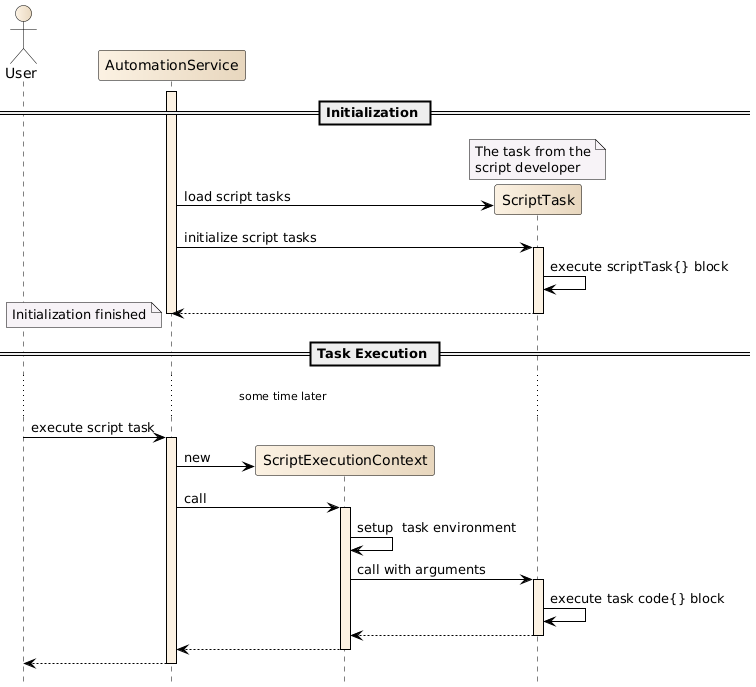
Task Execution Sequence
The figure shows the overview sequence when a script task gets executed by
the user and the interaction with the IScriptExecutionContext. Note that the context gets created each time the task
is executed.
User Defined Classes and Methods
You can define your own methods and classes in a script file. The methods a called like any other method.
scriptTask("Task"){
    code{
        userMethod()
    }
}

def userMethod(){
    return "UserString"
}
Classes can be used like any other class. It is also possible to define multiple classes in the script file.
scriptTask("Task"){
    code{
        new UserClass().userMethod()
    }
}

class UserClass{
    def userMethod(){
        return "ReturnValue"
    }
}
You can also create classes in different files, but then you have to write imports in your script like in normal Groovy or Java code.
The script should be structured as any other development project, so if the script file gets too big, please refactor the parts into multiple classes and so on.
daVinci Block
The classes and methods must be outside the daVinci{ } block.
import static com.vector.cfg.automation.api.ScriptApi.*
daVinci{
    scriptTask("Task"){
        code{}
    }
}

def userMethod(){}

class UserClass{}
Code Completion
Note that the code completion for the Automation API will not work automatically in own defined classes and methods. You
have to open for example a scriptCode{} block. The chapterScriptApi describes how to use the Automation API for
your own defined classes and methods.
Usage of Automation API in own defined Classes and Methods
In your own methods and classes the automation API is not automatically available differently as inside of the script task
code{} block. But it is often the case, that methods need access to the automation API.
The class ScriptApi provides static methods as entry points into the automation API. The static methods either return the API objects, or you could pass a
Closure, which will activate the API inside of the Closure.
Access the Automation API like the Script code{} Block
The ScriptApi.scriptCode(Transformer) method provides access to all automation APIs the same way as inside of the normal
script code{} block.
This is useful, if you want to call script code API inside of your own methods and classes.
def yourMethod(){
     // Needs access to an automation API
     ScriptApi.scriptCode{
         // API is now available
         generation.generate()
     }
}
The ScriptApi.scriptCode() method can be used to call API in Java style.
def yourMethod(){
     // Needs access to an automation API
     ScriptApi.scriptCode().generation.generate()
}
Java note: The ScriptApi.scriptCode() returns the IScriptExecutionContext.
Access the Project API of the current active Project
The ScriptApi.activeProject() method provides access to the project automation API of the currently active project.
This is useful, if you want to call project API inside of your own methods and classes.
def yourMethod(){
     // Needs access to an automation API
     ScriptApi.activeProject{
         // Project API is now available
         transaction{
             // Now model modifications are allowed
         }
     }
}
The ScriptApi.activeProject() method returns the current active IProject.
def yourMethod(){
     // Needs access to an automation API
     IProject theActiveProject = ScriptApi.activeProject()
}
Stateful Script Tasks
Script tasks normally have no state or cached data, but it can be useful to cache data during an execution, or over multiple
task executions. The IScriptExecutionContext provides two methods to save and restore data for that purpose:
getExecutionData()- caches data during one task executiongetSessionData()- caches data over multiple task executions
Execution Data
Caches data during a single script task execution, which allows to save calculated values or services needed in multiple parts of the
task, without recalculating or creating it. Note: When the task is executed again the executionData will be empty.
scriptTask("TaskName"){
  code{
      // Cache a value for the execution
      executionData.myCacheValue = 500

      def val = executionData.myCacheValue // Retrieve the value anywhere
      scriptLogger.info  "The cached value is $val"

      // Or access it from any place with ScriptApi.scriptCode like:
      def sameValue = ScriptApi.scriptCode.executionData.myCacheValue
  }
}
Session Data
Caches data over multiple task executions, which allows to implement a stateful task, by saving and retrieving any data calculated by the task itself.
Caution: The data is saved globally so the usage of the sessionData can lead to memory leaks or OutOfMemoryErrors. You have to take care not to
store too much memory in the sessionData. The DaVinci Configurator will also free the sessionData, when the system run low on free memory. So you
have to deal with the fact, that the sessionData was freed, when the script task getting executed again. But the data is not deallocated during a running
execution.
scriptTask("TaskName"){
  // Setup - set the value the first time, this is only executed once (during initialization)
  sessionData.myExecutionCount = 1

  code{
      // Retrieve the value
      def executionCount = sessionData.myExecutionCount

      scriptLogger.info  "The task was executed $executionCount times"

      // Update the value
      sessionData.myExecutionCount = executionCount + 1
  }
}
API usage
Both methods executionData and sessionData return the same API of type IScriptTaskUserData.
The IScriptTaskUserData provides methods to retrieve and store properties by a key (like a Map). The retrieval and store
methods are Object based, so any Object can be a key. The exception are Class instances (like String.class, which required that the value
is an instance of the Class).
On retrieval if a property does not exist an UnknownPropertyException is thrown. Properties can be set multiple times and will override the old value. The keys of the
properties used to retrieve and store data are compared with Object.equals(Object) for equality.
The listing below describes the usage of the API:
scriptTask("TaskName"){
  code{
      def val
      // The sessionData and executionData have the same API

      // You have multiple ways to set a value
      executionData.myCacheId = "VALUE"
      executionData.set("myCacheId", "VALUE")
      executionData["myCacheId"] =  "VALUE"
      // Or with classes for a service locator pattern
      executionData.set(Integer.class, 50)  // Possible for any Class
      executionData[Integer] = 50

      // There are the same ways to retrieve the values
      val = executionData.myCacheId
      val = executionData.get("myCacheId")
      val = executionData["myCacheId"]
      // Or with classes for a service locator pattern
      val  = executionData.get(Integer.class)
      val  = executionData[Integer]

      // You can also ask if the property exists
      boolean exists = executionData.has("myCacheId")
  }
}
ScriptAccess - Calling ScriptTasks
Sometimes it can be helpful to call other script tasks from inside your task. The scripts{} block or getScripts()
method provides API to retrieve existing IScripts and call other IScriptTasks from your running IScriptTask.
Note: If you just want to reuse code of your own scripts in an automation script project, create a normal method containing the code and call it, instead of calling the task. The method is typesafe, has code completion support and is much faster than calling a script task.
Calling script tasks
To call a task you need the name of the task and theIScriptTaskType. The IScriptTaskType determines the argument types and the
return type of the script task. Then you can use scripts.callScriptTask(String, Object...) to call the script.
You could also use callScriptTaskWithUserArgs(String, String, Object...), if you want to pass user defined arguments.
scriptTask("TaskName"){
    code{
        scripts.callScriptTask("OtherTask")
        //The same
        scripts{
            callScriptTask("OtherTask")
        }
    }
}

scriptTask("OtherTask"){
    code{
        //Other task code
    }
}
Calling script tasks with task arguments
If theIScriptTaskType requires task arguments, you have to pass the arguments to the callScriptTask()
methods. The return value of the method is the returned value of the called script task.
scriptTask("TaskName", DV_PROJECT){
    code{
        def arg1 = "First argument"
        def arg2 = 5
        def result = scripts.callScriptTask("OtherTask", arg1, arg2)
        // Result contains the calculated value of OtherTask
    }
}

scriptTask("OtherTask"){
    code{arg1, arg2 ->
        return arg1 + arg2
    }
}