System Description and StructuredExtract
Beside the raw MDF Model to access the AUTOSAR model, the Configurator provides a lightweight facade model abstracting parts of the
system description modeling of AUTOSAR. This so-called SIModel provides more convenience in general, and is especially needed to work on the
StructuredExtract in a comfortable way.
StructuredExtract in AUTOSAR denotes the System with category SYSTEM_DESCRIPTION which contains the hierarchic application software composition. A
key feature of the SIModel is the ability to create component prototypes and to connect them to arbitrary other component prototypes in the composition
hierarchy.
Another key feature of the SIModel is the ability for permanent bridging to the underlying MDF Model: The SIModel-facades will never provide a
complete wrapper for the AUTOSAR model. Instead, at any point in the SIModel it is possible to navigate to the underlying MDF model via
SIModelObject.getMdfObject() to access non-abstracted features. Since the SIModel-facades are stateless, this will never interfere with the
SIModel.
AUTOSAR also defines the FlatExtract as System with category ECU_EXTRACT, which contains the ECU flat view of all software components. The
Configurator promotes working directly on the StructuredExtract, even for the ECU-centric use case. To this end, it utilizes the SIModel to also
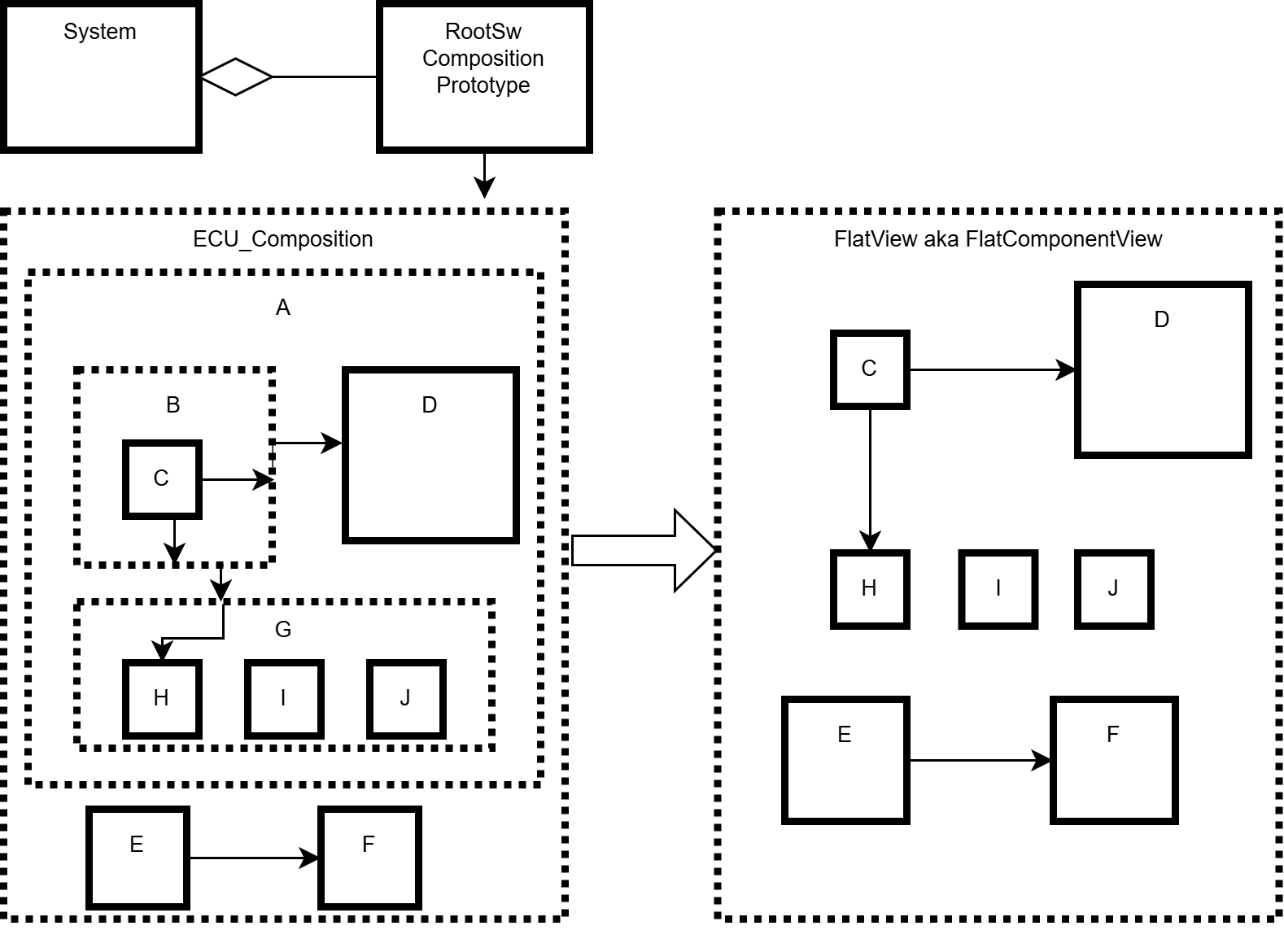
provide a FlatView of the StructuredExtract, letting a user browse the structured AUTOSAR model as if it was a FlatExtract. Figure
StructuredExtractAndFlatView shows an example illustrating the relationship between the contents of a StructuredExtract and what becomes visible
in the FlatView.
The FlatExtract as defined by AUTOSAR is only available on demand as an export use-case. The FlatExtract export includes specific extensions of the
AUTOSAR modeling which are hidden behind the SIModel for convenient handling.
SIModel vs. AUTOSAR Modeling
The MDF model in the configurator comprises the full model as defined by AUTOSAR. The SIModel instead describes a selected subset of the AUTOSAR model and
differs in certain aspects from the raw AUTOSAR modeling. Both should improve the client experience in regard to simpleness and comfort.
A detailed introduction to the MDF model is available in MDF Model Raw.
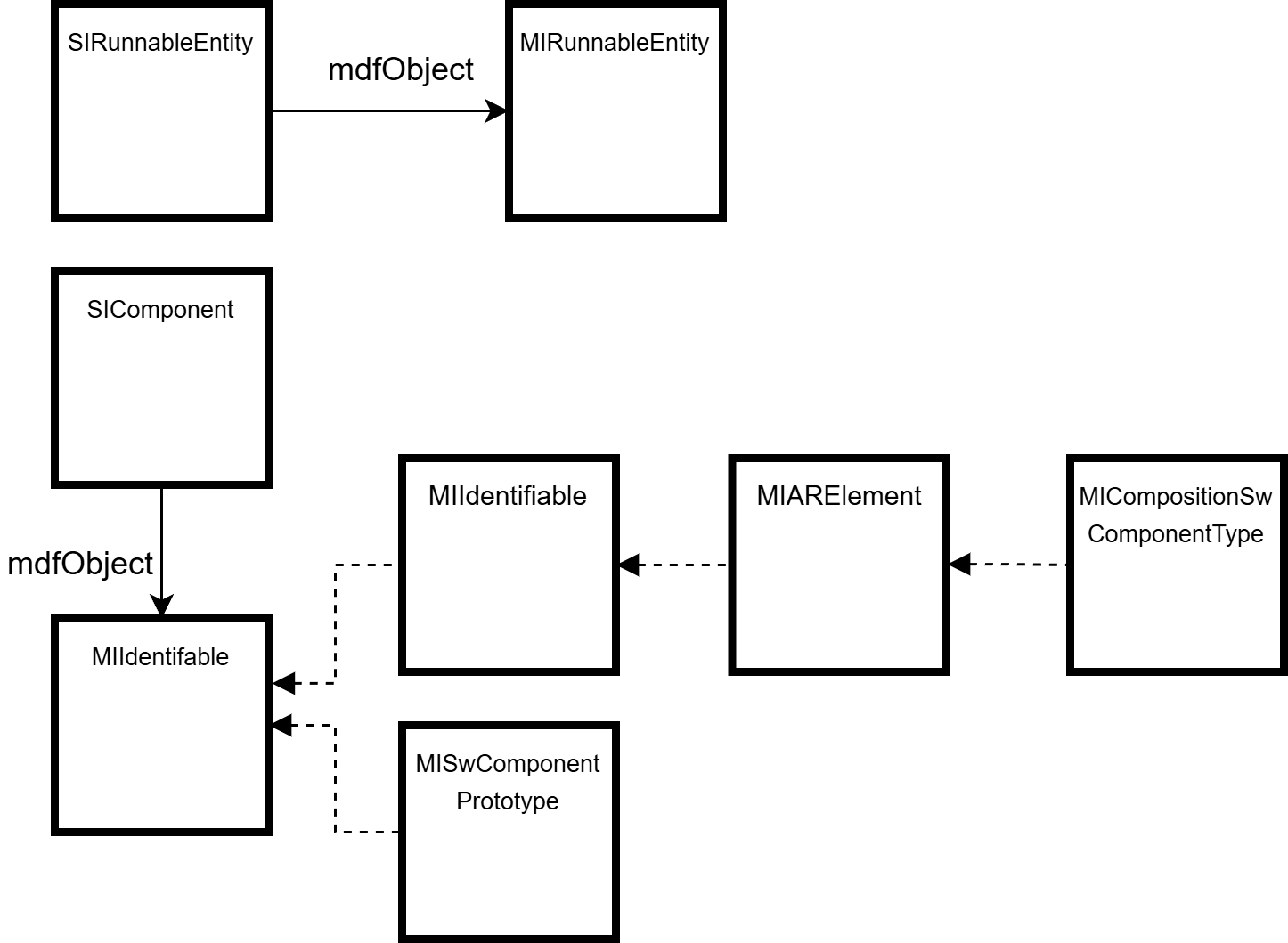
All SIModel objects are anchored to at least one MDF object: this can be retrieved by means of the SIModelObject.getMdfObject() method and is properly
typed for the SIModel subtypes. This allows for an easy transition to the full AUTOSAR model for all features or data structures of AUTOSAR which are not
directly supported by the SIModel. Since the SIModel is modeled closely after the AUTOSAR model, the anchor MDF object is often directly mappable to
an SIModelObject: in more abstracted modeling it might be a more generic MDF object as shown in Figure SIModelAnchorExamples:
- A direct mapping is e.g. the
SIRunnableEntity: it is anchored to theMIRunnableEntity - A more abstracted mapping is e.g. the
SIComponent: it is anchored generically toMIIdentifiable, as we also support the top-level composition type modeled as theSICompositionComponentSubstitute, a subtype ofSIComponent.
SIModelObject.getMdfObject() is the method to bridge from the SIModelObject to the MDF model, bridging from the MDF model to the SIModel is done either
directly for selected elements via the ISysDescModelFactory, or indirectly via the entry points in the ISysDescService.
Since the AUTOSAR model is - in general - a file-related exchange format (ARXML) with backwards compatibility and directly represented by the MDF model, some modeling is not
perfectly suited for representing the business-logic of AUTOSAR for client usage. The SIModel as a facade model can improve this situation by additional business
methods and adapted modeling approaches for better client-usage.
Figure DataMappingAnchors shows a simplified depiction of data mapping in AUTOSAR. The System contains the data mapping which maps between the
data element of a component and a system signal.
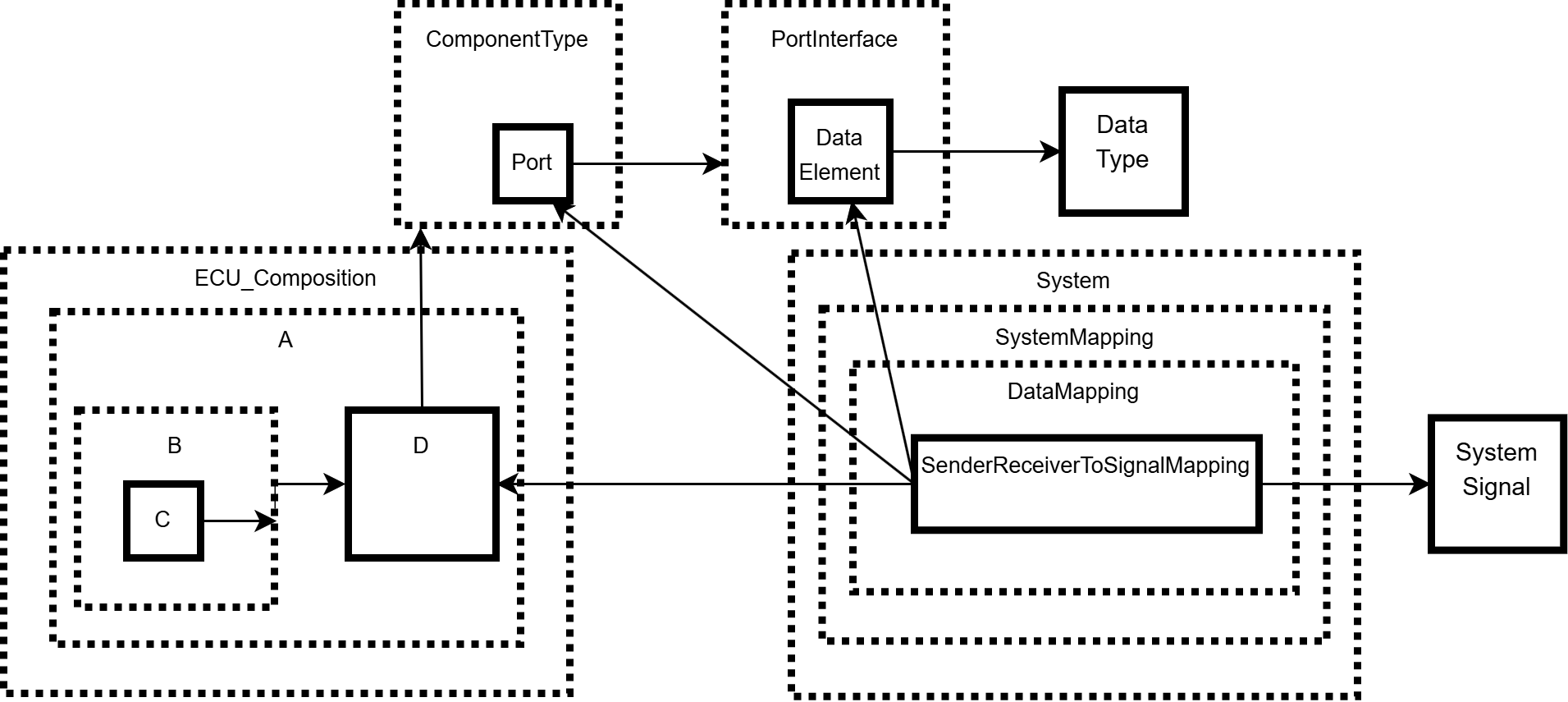
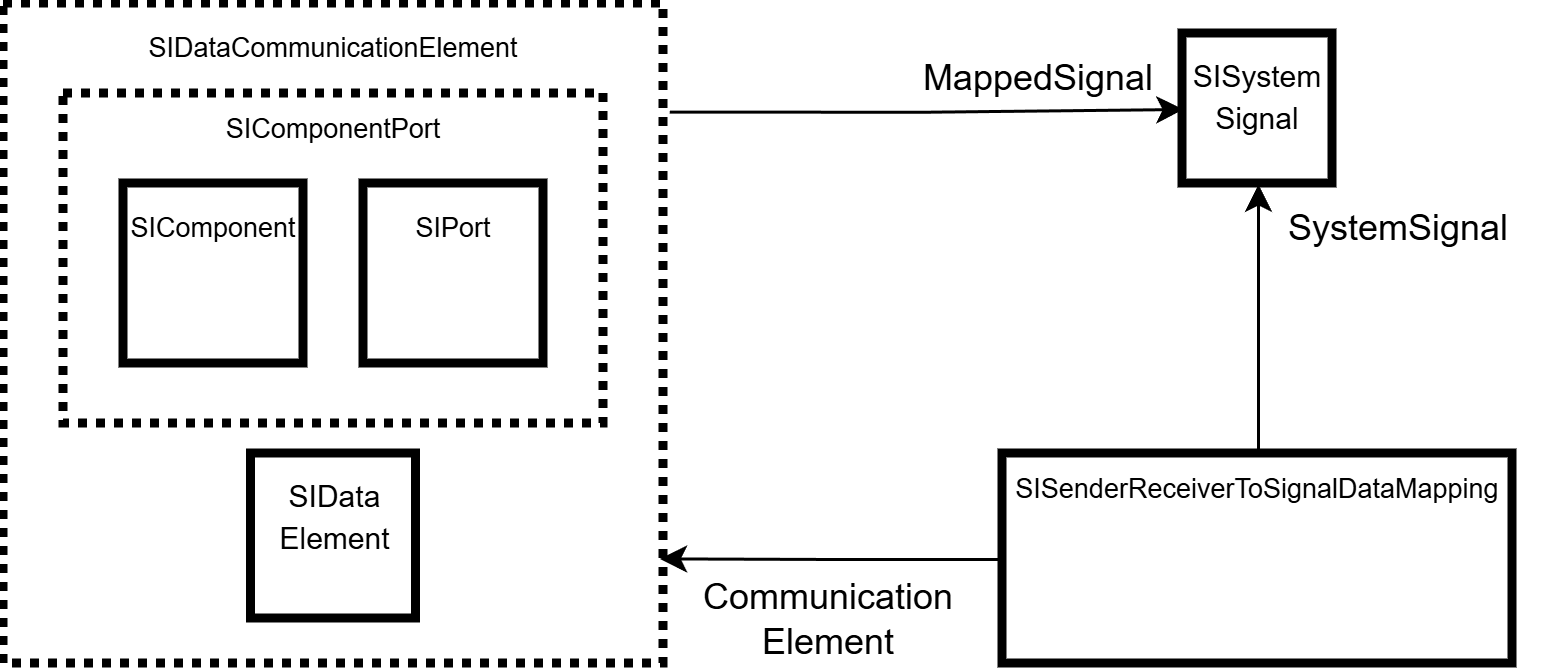
Figure DataMappingInSIModel shows the simplified modeling in the SIModel: usage of composition elements allows for a simpler relation, and a
direct relation to the mapped system signal (getter AND setter) as well as an explicit data mapping element.
ISysDescService and sysDescModel-keyword
The sysDescModel-block is fluent API entry point for accessing the SIModel for the system description. It provides the same methods as the project
service ISysDescService.
The ISysDescService project service is the central entry point for accessing the SIModel for the system
description. It provides:
- the flat component view of the
StructuredExtractviagetFlatComponentView(). - the structured component view of the
StructuredExtractviagetStructuredComponentView(). - the
StructuredExtractitself viagetStructuredExtract(). - access to all
StructuredExtracts for split use cases viagetStructuredExtracts(). - access to the top-level composition of the structured extract via
getStructuredExtractTopLevelComposition(). - generic access to a specific
SIModel-object viagetSIModelObject(AsrPath)orgetSIModelObject(MIObject). - generic access to all instances of a certain SIModel-type via
getAllInstancesOfType(Class, EInstanceFiltering). - the AUTOSAR root element via
getAutosarRoot(). - the preparation for
StructuredExtract-usage in case no or an incomplete structured extract is provided externally viaprepareStructuredExtractUsage(). - access to the
SIFlatMapand itsSIFlatInstanceDescriptors viagetFlatMap(). - additional convenience-methods for structured extract usage.
StructuredExtract and FlatView
AUTOSAR describes the relation between the System with category SYSTEM_DESCRIPTION and the
System with category ECU_EXTRACT as follows:
'AUTOSAR VFB Descriptions naturally form hierarchies of CompositionSwComponentTypes. Consequently, in the System Configuration the SWC-related information for different EcuInstances is not separated but in general is intermingled. In contrast, for the task of ECU configuration (RTE configuration, Service Configuration, Measurement and Calibration) a hierarchically “flat view” on the SwComponentPrototypes running on the EcuInstances is preferable over a hierarchical view, which is more favored by application-software development. Thus, deriving an System with category ECU_EXTRACT actually is a model transformation, following a set of rules.'
This transformation (example shown in Figure StructuredExtractAndFlatView) is provided via two APIs. ISysDescService.getFlatComponentView() provides
the view of the software components, and SIComponentPort.getFlatViewConnectedPorts() provides the view of their connections. The flattening is done
virtually, so each SIComponent has its full hierarchy information provided via SIComponent.getContext(). The details of the context concept is described in
chapter ContextAndCompositionComponentSubstitute.
StructuredComponentView vs. FlatComponentView
Beside the flat component view - which only contains atomic software components as defined by AUTOSAR - the ISysDescService also provides a full list of software
components which contains all components of composition types and the top-level composition itself via ISysDescService.getStructuredComponentView()
The components in both lists provide their full hierarchy context. Since the shortname of a component may not be unique anymore in the hierarchy - either by choosing the same
name for a component in different compositions or by multi-instantiation of the same composition - the according SIComponent provides a unique name in the hierarchy
via SIComponent.getUniqueSwcNameInHierarchy().
Component-Instantiation
Component-Instantiation in general is possible in all composition types. The SIModel works with feature-lists which provide according
createAndAdd-methods for the actual list content. The most common use-case is to instantiate an atomic software component type in the top-level composition of
the structured extract. Listing ComponentInstantiationExample shows an example where an application software component type is retrieved and instantiated as
software component prototype in the top-level composition.
transaction {
   sysDescModel {
      // retrieve the application component type
      SIApplicationComponentType applicationComponentType = siModelObject(AsrPath.create("/a/b/c/MyApplicationSwcType")).orElse(null)

      // retrieve the top-level composition
      SICompositionComponentSubstitute topLevelComposition = structuredExtractTopLevelComposition.orElse(null)

      if (applicationComponentType != null && topLevelComposition != null) {

          // instantiate the component type by creating and adding a component to the top-level composition component feature-list
          SIApplicationComponent myComponent = topLevelComposition.component
                  .createAndAdd("MyComponent", SIApplicationComponent.class, applicationComponentType)

      }

  }
}
Context and CompositionComponentSubstitute
Working on a structured extract implies challenges regarding the software composition hierarchy, connections between and instance references to dedicated software components
nested inside the hierarchy. Therefore, the SIModel facades introduce the SICompositionComponentSubstitute to represent the top-level composition of a composition
hierarchy.
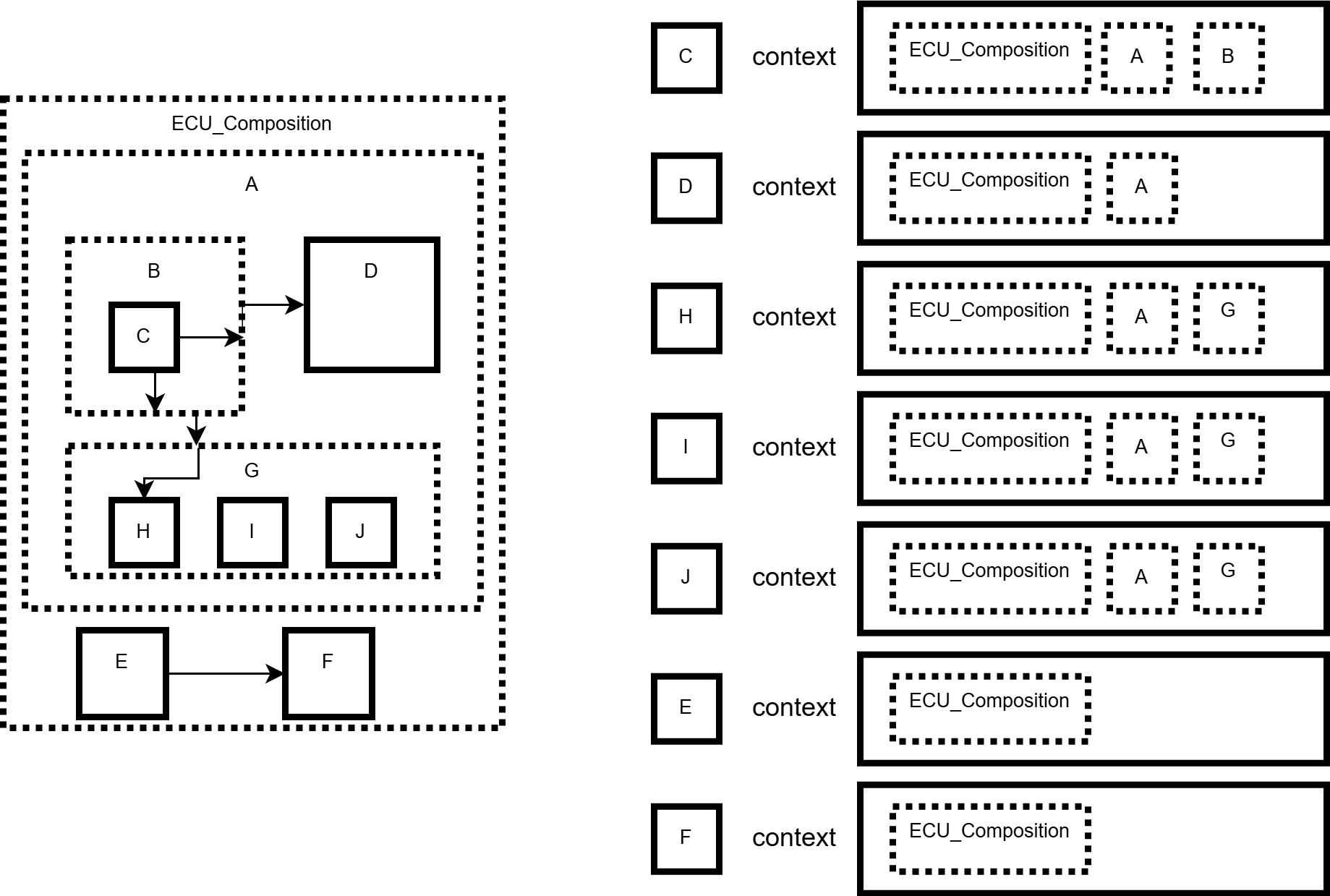
For all SIComponents obtained as children of an SICompositionComponentSubstitute, their SIComponent.getContext() method provides the full nesting
hierarchy of compositions up to the SICompositionComponentSubstitute. For example, the context lists for the structured extract shown in Figure
StructuredExtractAndFlatView can be illustrated as in Figure FlatViewComponentsWithContext.
This has the following advantages and implications:
- The
SICompositionComponentSubstituteallows to handle a top-level composition the same way as a component. - Traversing the software composition hierarchy via an
SICompositionComponentSubstituteensures correct contexts for each containedSIComponent. - The context of a component is a list always starting with the top-level
SICompositionComponentSubstitute, followed by allSICompositionComponents in the hierarchy. - All
SIComponentPorts retrieved viaSIComponent.getComponentPort()with full context can be connected viaIConnectionBuilderwithout a caller having to consider the composition hierarchy (see ConnectionBuilder). SICommunicationElements retrieved fromSIComponentPortwith full context can be used as target forSIDataMapping.setCommunicationElement(SICommunicationElement)to components nested in the hierarchy.ISysDescService.getFlatComponentView()andISysDescService.getStructuredComponentView()each provide flat lists of all components in the hierarchy, with contexts set correctly for theISysDescService.getStructuredExtract().
ComponentPorts
The SIComponentPort facade represents a port prototype bound to an actual component prototype: in AUTOSAR, this relation is only represented by an instance-reference
e.g. to identify the requester and provider port of an assembly connector. In combination with the full context of the bound SIComponent, this allows to build
connections between arbitrary SIComponentPorts: therefore the SIModel provides the IConnectionBuilder to define connections with an appropriate provisioning
of additional properties.
ConnectionBuilder
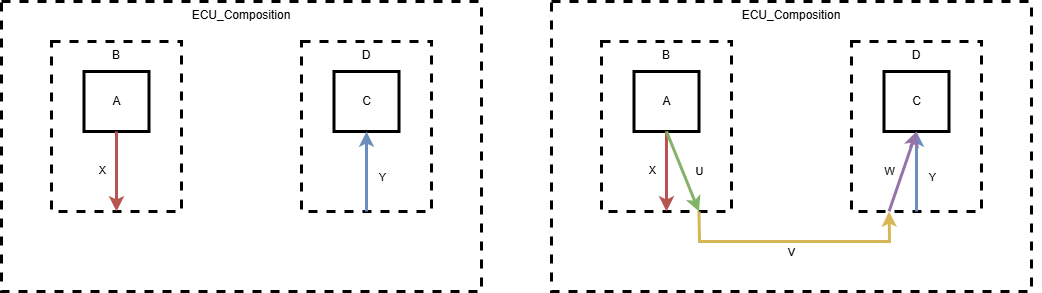
IConnectionBuilder offers means to create connections between arbitrary ports in a hierarchical model. It will automatically find all compositions that need to be
traversed by the connection and eventually create the required ports and connectors. Figure connectToSimpleCase shows an example for such a connection. Please
note that no existing connectors or ports are reused by default.
Optimizations
IConnectionBuilder offers optional optimizations that influence how and which connectors are created. Currently, only one optimization is available. It enables
reusing connectors and ports that are already part of the model.
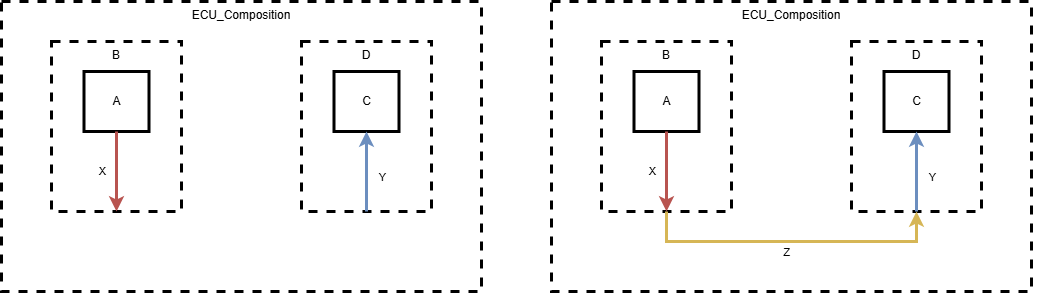
Using the optimization BASIC_DANGLING_CHAINS the builder can be told to reuse matching connectors that are already present. This can be especially useful when
modifying a preexisting model.
The algorithm collects dangling connector chains that are non-branching and use consistent port interfaces. Such a chain of connectors starts at either of the ports to be connected, and terminates on an inner delegation port of the software component hierarchy. The connection is non-branching when no port inside the chain (i.e., all ports except for the start port and end port) connect to exactly two connectors. Port Interfaces are consistent when within any single chain, all ports share the same port interface, namely that of the starting port.
Out of the combinations of chains found from both ports to be connected, the algorithm selects one chain for each side to be reused, so that (a) neither chain contains an assembly connector and (b) the number of connectors to be added to complete the connection is minimal.
In Figure reusingDanglingChainsSimpleCase, a simple case of the dangling chain optimization is shown. Listing
ConnectionBuilderExampleWithDanglingChainReuse shows how to enable the BASIC_DANGLING_CHAINS optimization when creating connections.
Performance
Creating a connection generally involves fetching data from the model, planning the connectors to be created and then actually creating them. While the first of these three steps only implies (cache) read operations, the last step inherently leads to write operations in the model. As read operations in big models can be very costly, a cache is in place to soften these effects. The cache is invalidated with every model write operation. Rebuilding the caches can be a very time-consuming as well.
IConnectionBuilder offers a cache-friendly way to create connectors. The building procedure is split into the main steps IConnectionBuilder.prepare() and
IPreparedConnectionBuilder.build(). In the prepare() step, all cache read accesses are performed. The result is an IPreparedConnectionBuilder
instance that holds all the required information about the connectors to be created. When calling build() on that object, the actual connectors are created,
leading to write operations in the model.
Note that the contents of an IPreparedConnectionBuilder are not verified (again) when executing IPreparedConnectionBuilder.build(). It is the responsibility
of the user to ensure that no changes have been made to the model that would be incompatible with a given IPreparedConnectionBuilder.
The listing ConnectionBuilderExample shows an example of how to create the connections as seen in Figure StructuredExtractAndFlatView.
transaction {
  sysDescModel {
    // Prepare builderFactory, flat component view and retrieval functions
    final ISysDescBuilderFactory builderFactory = getProjectContext()
            .getService(ISysDescBuilderFactory.class)
    final List<SIComponent> flatComponentView = sysDescService
            .getFlatComponentView()
    final Function<String, SIComponent> getComponent =
            (name) -> flatComponentView.stream()
            .filter(comp -> comp.getName().equals(name))
            .findFirst().orElse(null)
    final BiFunction<String, SIComponent, SIComponentPort> getComponentPort =
            (name, comp) -> comp
            .getComponentPort().stream()
            .filter(compPort -> compPort.getPortName().equals(name))
            .findFirst().orElse(null)

    // Retrieve components to connect
    final SIComponent c = getComponent.apply("C")
    final SIComponent d = getComponent.apply("D")
    final SIComponent h = getComponent.apply("H")
    final SIComponent e = getComponent.apply("E")
    final SIComponent f = getComponent.apply("F")

    // The IConnectionBuilder can only bring performance gains when multiple
    // connections are to be created and when used in the intended way:
    // First prepare all connections in bulk, then actually create them in bulk.

    // Prepare the connectionBuilders. The preparations involve cache read
    // accesses. Perform all preparations at one go while the caches are hot.
    // A single write to the model will invalidate these caches.
    // The preparations do not need to be inside a transaction.
    final IPreparedConnectionBuilder builder1 = builderFactory
            .createConnectionBuilder()
            .setProviderPort(getComponentPort.apply("PPort1", c))
            .setRequesterPort(getComponentPort.apply("RPort", d))
            .prepare()
    final IPreparedConnectionBuilder builder2 = builderFactory
            .createConnectionBuilder()
            .setProviderPort(getComponentPort.apply("PPort2", c))
            .setRequesterPort(getComponentPort.apply("RPort", h))
            .prepare()
    final IPreparedConnectionBuilder builder3 = builderFactory
            .createConnectionBuilder()
            .setProviderPort(getComponentPort.apply("PPort", e))
            .setRequesterPort(getComponentPort.apply("RPort", f))
            .prepare()

    // Build the actual connections using the data gathered in the preparations.
    // Building a connection leads to a model write access that invalidates all
    // caches.
    final IConnectionData connection1 = builder1.build()
    final IConnectionData connection2 = builder2.build()
    final IConnectionData connection3 = builder3.build()
  }
}
transaction {
  sysDescModel {
    // Retrieve components to connect
    final SIComponent c = getComponent.apply("C")
    final SIComponent d = getComponent.apply("D")
    final SIComponent h = getComponent.apply("H")
    final SIComponent e = getComponent.apply("E")
    final SIComponent f = getComponent.apply("F")

    // Prepare the connectionBuilders. The preparations involve cache read
    // accesses. Perform all preparations at one go while the caches are hot.
    // A single write to the model will invalidate these caches.
    // The preparations do not need to be inside a transaction.
    final IPreparedConnectionBuilder builder1 = builderFactory
            .createConnectionBuilder()
            .setProviderPort(getComponentPort.apply("PPort1", c))
            .setRequesterPort(getComponentPort.apply("RPort", d))
            // Optimize by reusing existing dangling connector chains
            .enableOptimization(EConnectionBuilderOptimization.BASIC_DANGLING_CHAINS)
            .prepare()
    final IPreparedConnectionBuilder builder2 = builderFactory
            .createConnectionBuilder()
            .setProviderPort(getComponentPort.apply("PPort2", c))
            .setRequesterPort(getComponentPort.apply("RPort", h))
            // Optimize by reusing existing dangling connector chains
            .enableOptimization(EConnectionBuilderOptimization.BASIC_DANGLING_CHAINS)
            .prepare()
    final IPreparedConnectionBuilder builder3 = builderFactory
            .createConnectionBuilder()
            .setProviderPort(getComponentPort.apply("PPort", e))
            .setRequesterPort(getComponentPort.apply("RPort", f))
            .prepare()

    // Build the actual connections using the data gathered in the preparations.
    // Building a connection leads to a model write access that invalidates all
    // caches.
    final IConnectionData connection1 = builder1.build()
    final IConnectionData connection2 = builder2.build()
    final IConnectionData connection3 = builder3.build()
  }
}
Expansion of Prototype Modeling
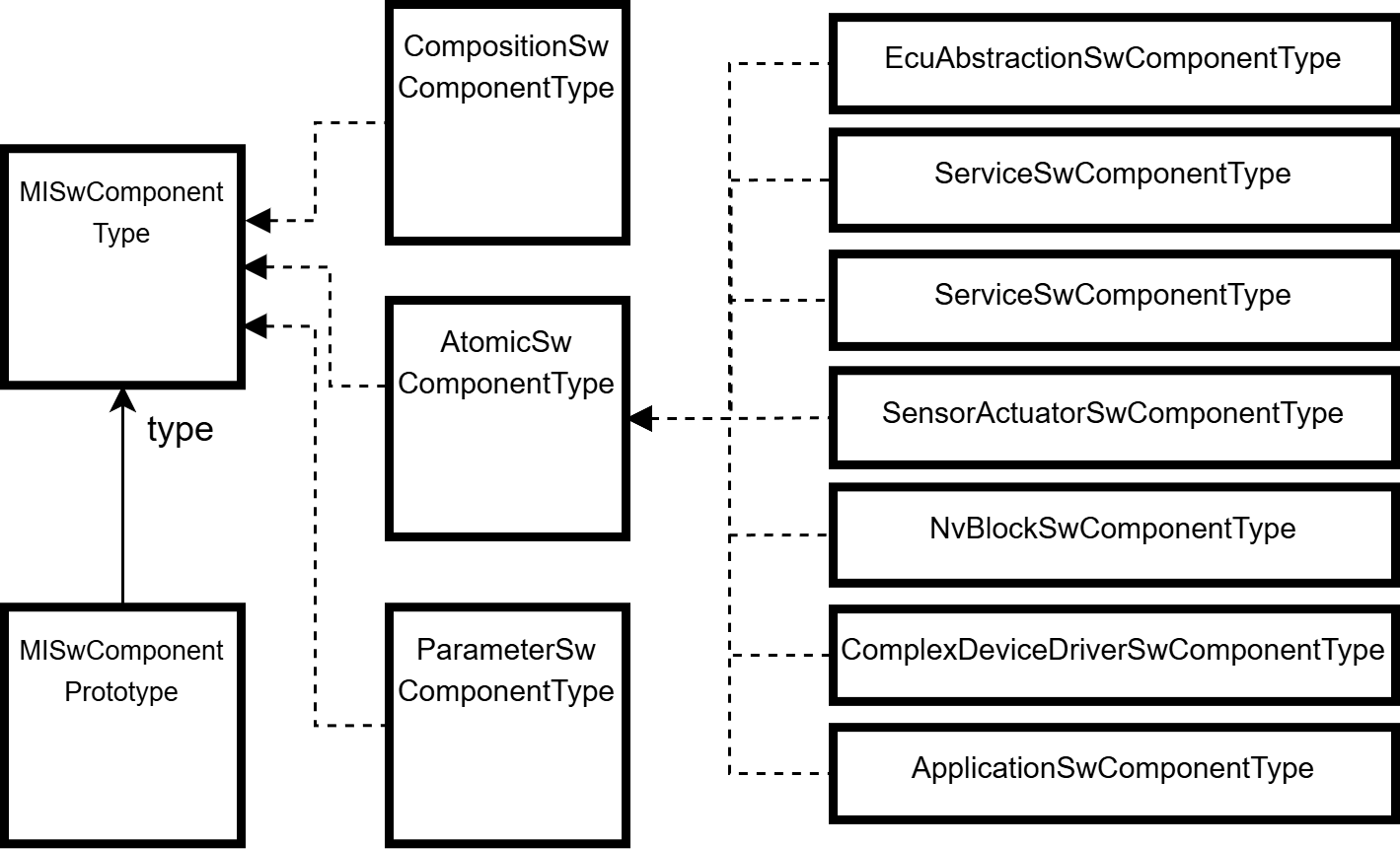
AUTOSAR provides a general prototype-type pattern for instantiation: e.g. an instance is represented by an SwComponentPrototype and has a type relation to
an SwComponentType: on SwComponentType level, according subtypes exist which specialize the component type. A similar pattern is used for ports: a
PortPrototype represents an instance of a port interface and denotes the direction by the subtypes PPortPrototype, RPortPrototype and
PRPortPrototype. The kind of interface is provided by the referenced port interface and its subtypes. Figure AUTOSARComponentPrototype shows this
pattern for component prototypes.
The SIModel enhances this pattern by expanding the prototype with typed instances. In addition to providing type safety regarding features of the component
prototypes, this enables business functionality to be exposed directly on the prototype level, eliminating the need to navigate to the corresponding types. Figure
SIModelComponentModeling shows this pattern.
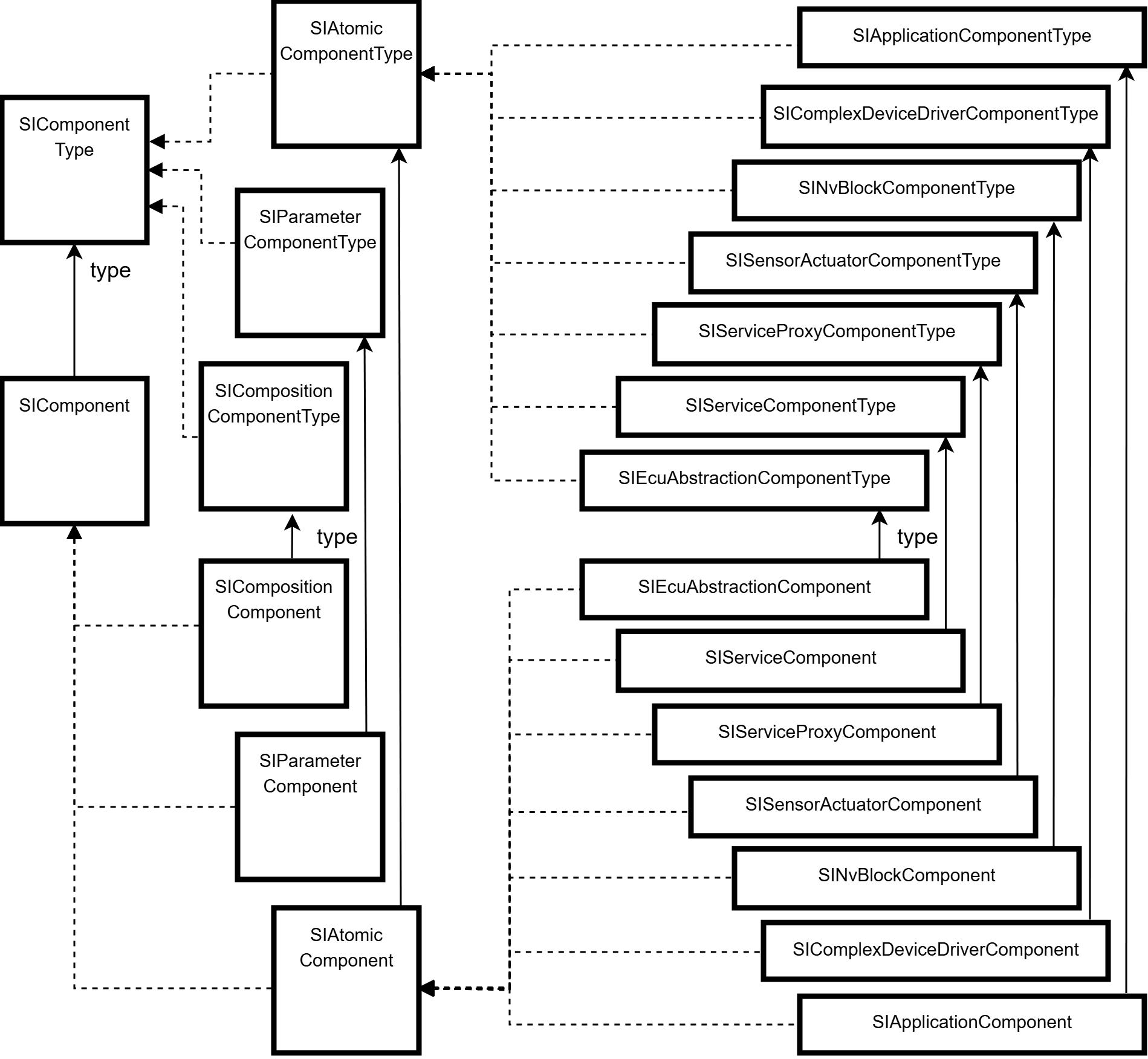
Remark: this prototype expansion is a fast on-the-fly transformation evaluating the type reference: consider this when holding subtypes of SIComponent, SIPort
or SIComponentPort for a longer time spanning model write transactions: changing the type relation on MDF level will break the type-safe subtypes: all internal caches
of the SIModel consider this and will update themselves accordingly. Client code should consider to fetch the elements from scratch when appropriate.
DataTypes and DataElements
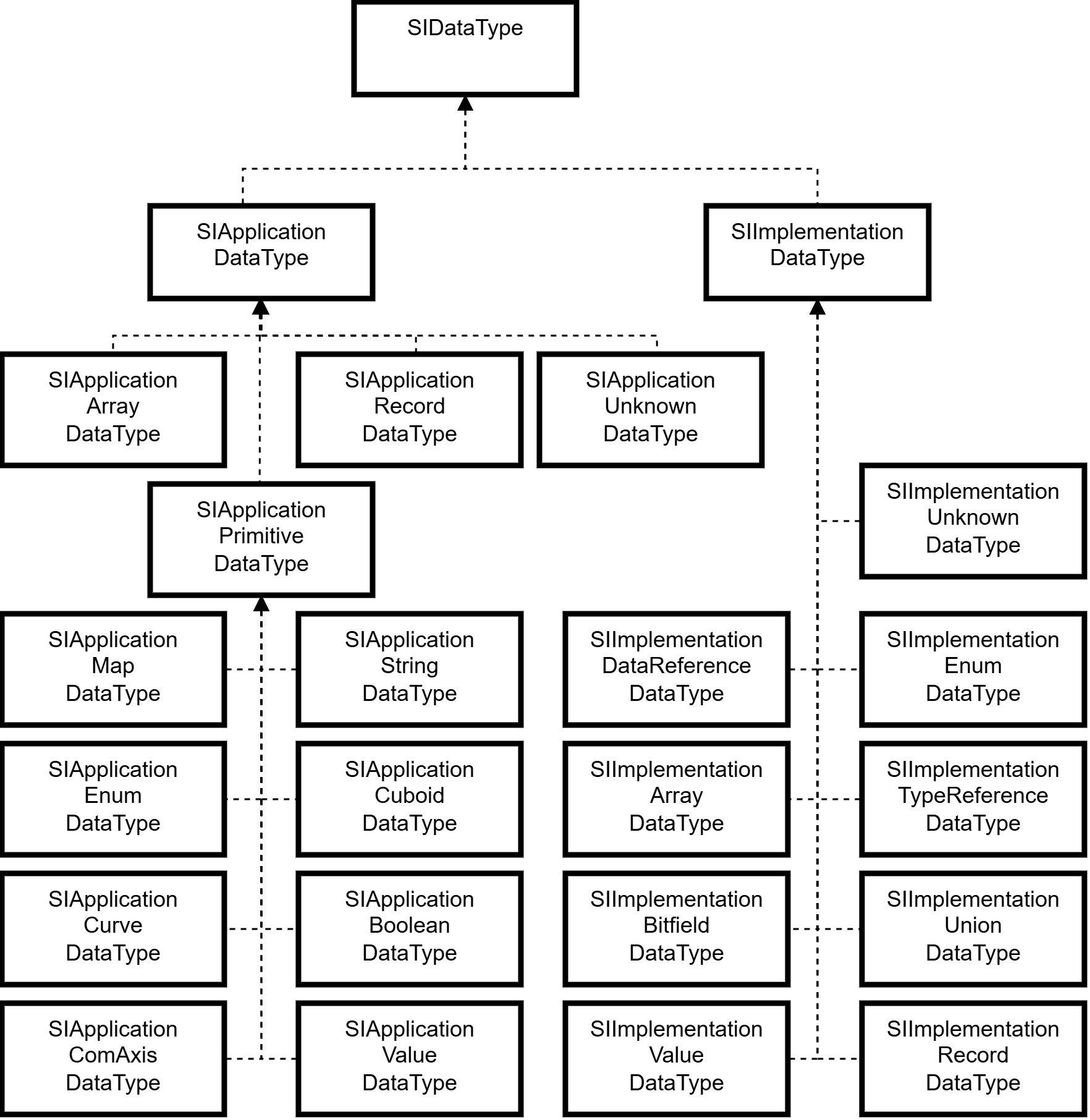
Data types in AUTOSAR are separated in two general categories: application data types and implementation data types. In general, application data types represent physical values like e.g. the speed of a vehicle in km/h, implementation data types represent well-defined internal data types of the Ecu, like e.g. an unsigned integer. The type hierarchy is depicted in AutosarDataTypes.
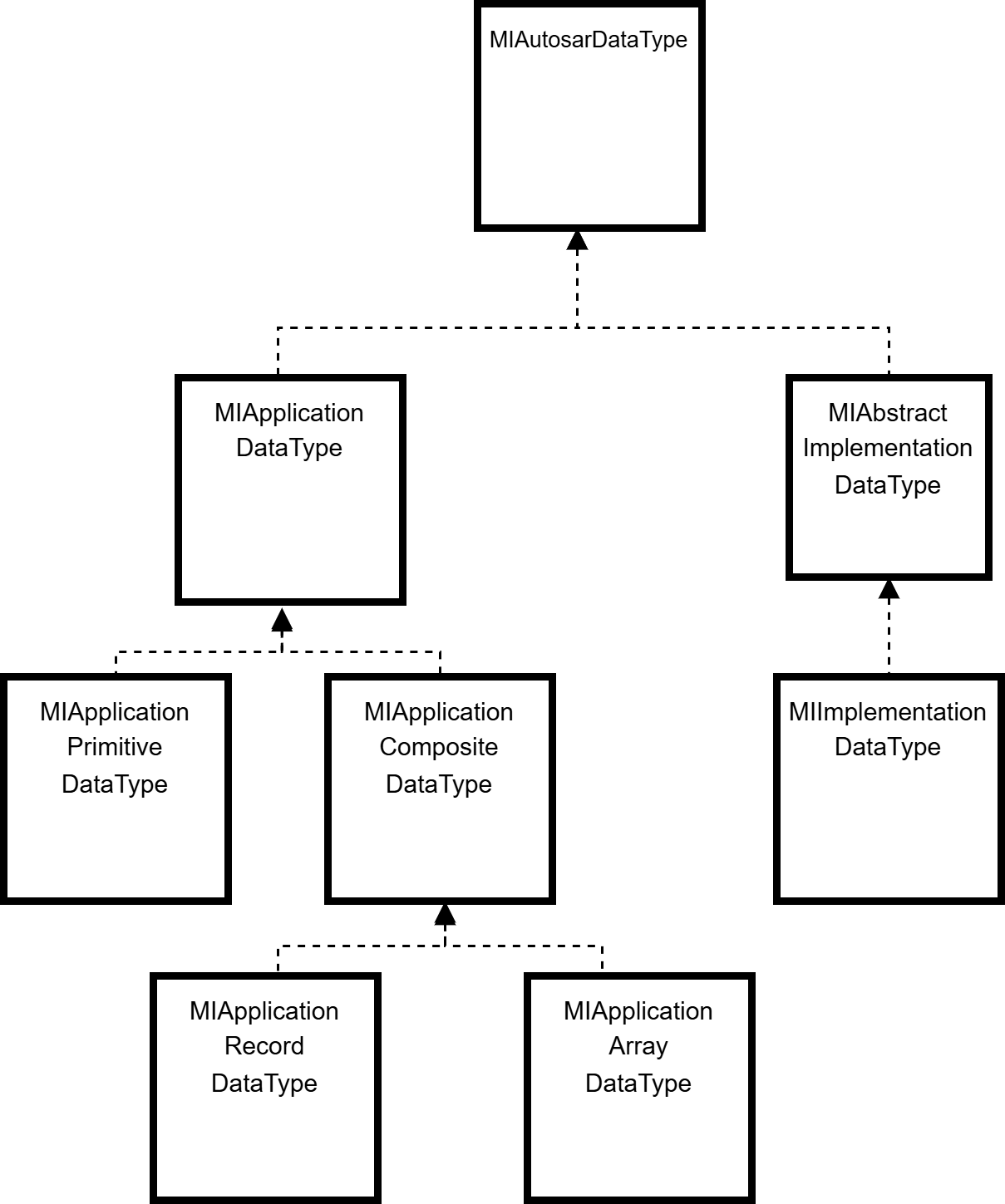
Application data types follow a strict prototype-type pattern, whereas implementation data types exist in two representations: either as data type to be
referenced by a prototype, or as an implementation data type element, which represents prototype and type in one. An example of a Record datatype is shown in
ApplicationRecordDataTypeExample for application data types, and in ImplementationRecordDataTypeExample for implementation data types.
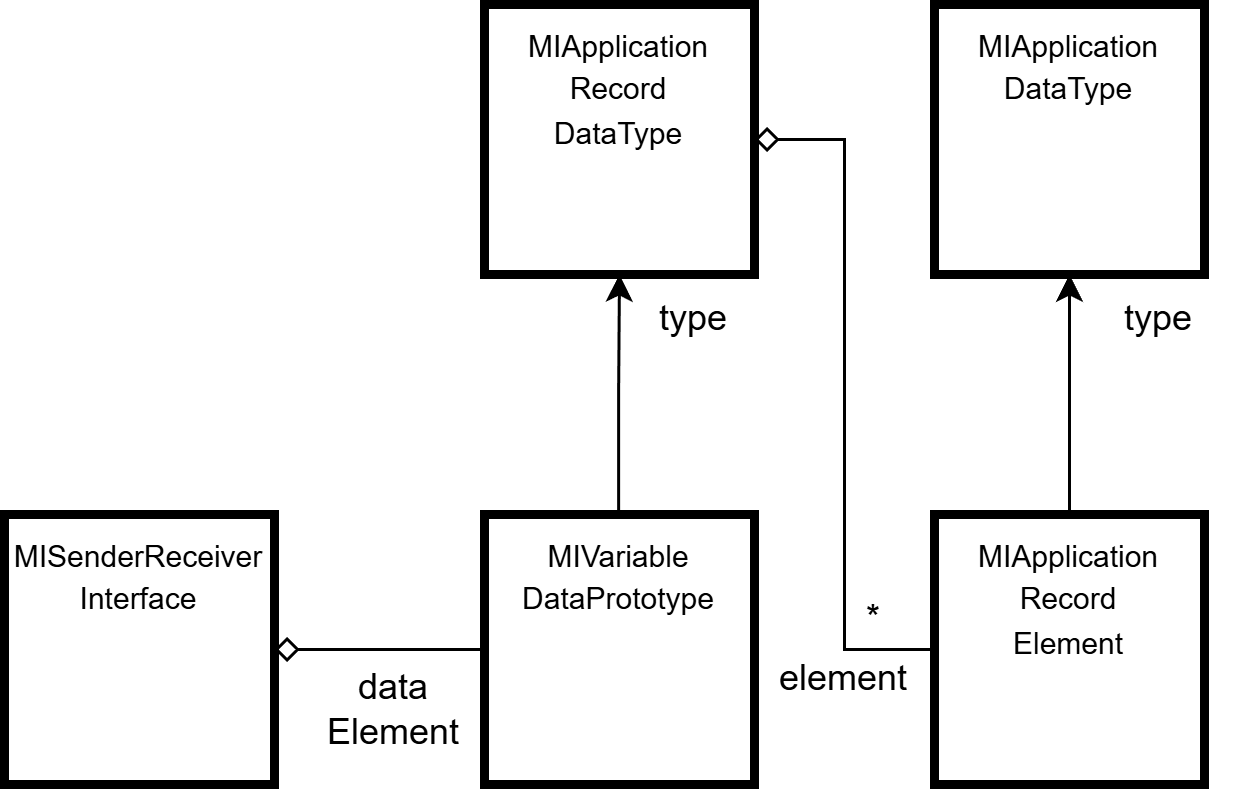
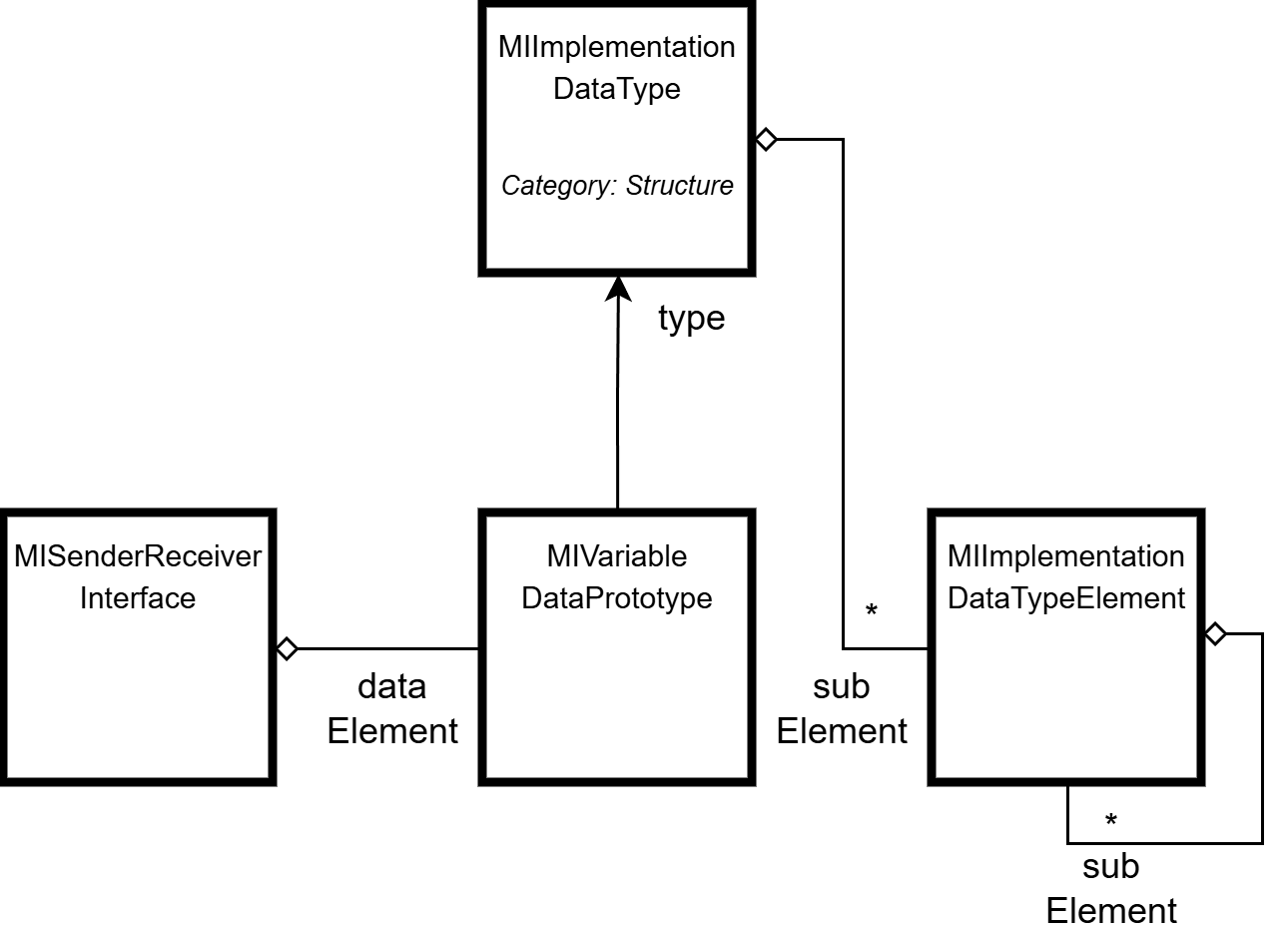
For application data types, records and arrays are directly modeled in AUTOSAR, whereas primitive application data types are modeled in one class and typed by their
Category attribute. Implementation data types are modeled as only one type by AUTOSAR (one for types, one for the elements), and the actual typing is completely
done via the Category attribute. This can be seen in the previous example for the Record data type in
ImplementationRecordDataTypeExample. The SIModel resolves the AUTOSAR modeling by an on-the-fly transformation and provides the actual data type
directly. The resulting type hierarchy is shown in figure SIDataTypeModeling. A complete conversion table is shown in figure SIDataTypeMapping.
Additionally to the data type definition itself, each AUTOSAR data type can optionally reference a so-called CompuMethod. A CompuMethod either
defines the computation rule between physical values of application data types to internal values of implementation data types and vice versa, but is also used to refine the
data type definition itself more specifically.
E.g. Enumeration data types are defined via CompuMethods, but also special application data types like Cuboid, or special implementation data types
like Bitfield. The SIModel resolves this modeling on-the-fly during transformation and provides the actual data type.
SIDataTypeMapping shows the mapping of the according MDF model element to the SIModel element as a table.

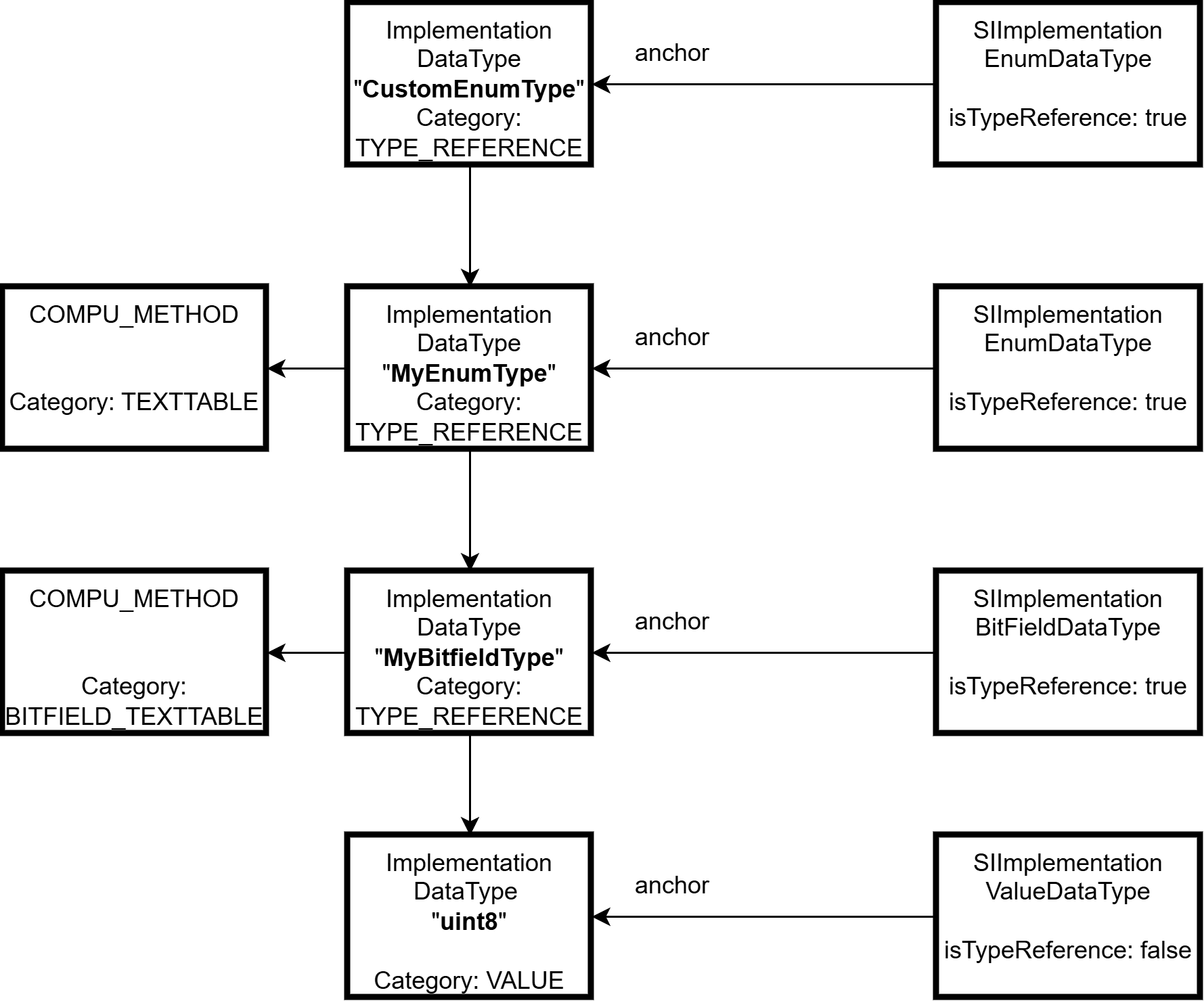
To support the reuse of implementation data types, the AUTOSAR model contains a special implementation data type called TypeReference: this type has a reference
to another implementation data type, but can also contain the reference to a CompuMethod or data constraints. This allows to reference e.g. a
PlatformType uint8, and add a CompuMethod for an Enumeration-definition to define a certain enumeration value based on an uint8 data
type. TypeReferences can form chains, so arbitrary further specializations are possible.
The following rules apply when evaluating the type reference chain to determine the actual data type:
- The final referenced data type is the actual base type.
- The first referenced
CompuMethodor data constraints in the reference chain defines the specialization of the data type.
SIModel does analyze the type reference chain on-the-fly during transformation of the MDF anchor into the actual SIDataType and applies these rules
to determine the matching subtype of SIDataType. This has the following consequences:
- After creating
TypeReferences, clients might refetch the data type afterward when a resolved typing is needed. - Each Implementation-DataType itself can be queried if it is anchored to a type reference and requested as
SIImplementationTypeReferenceDataType.
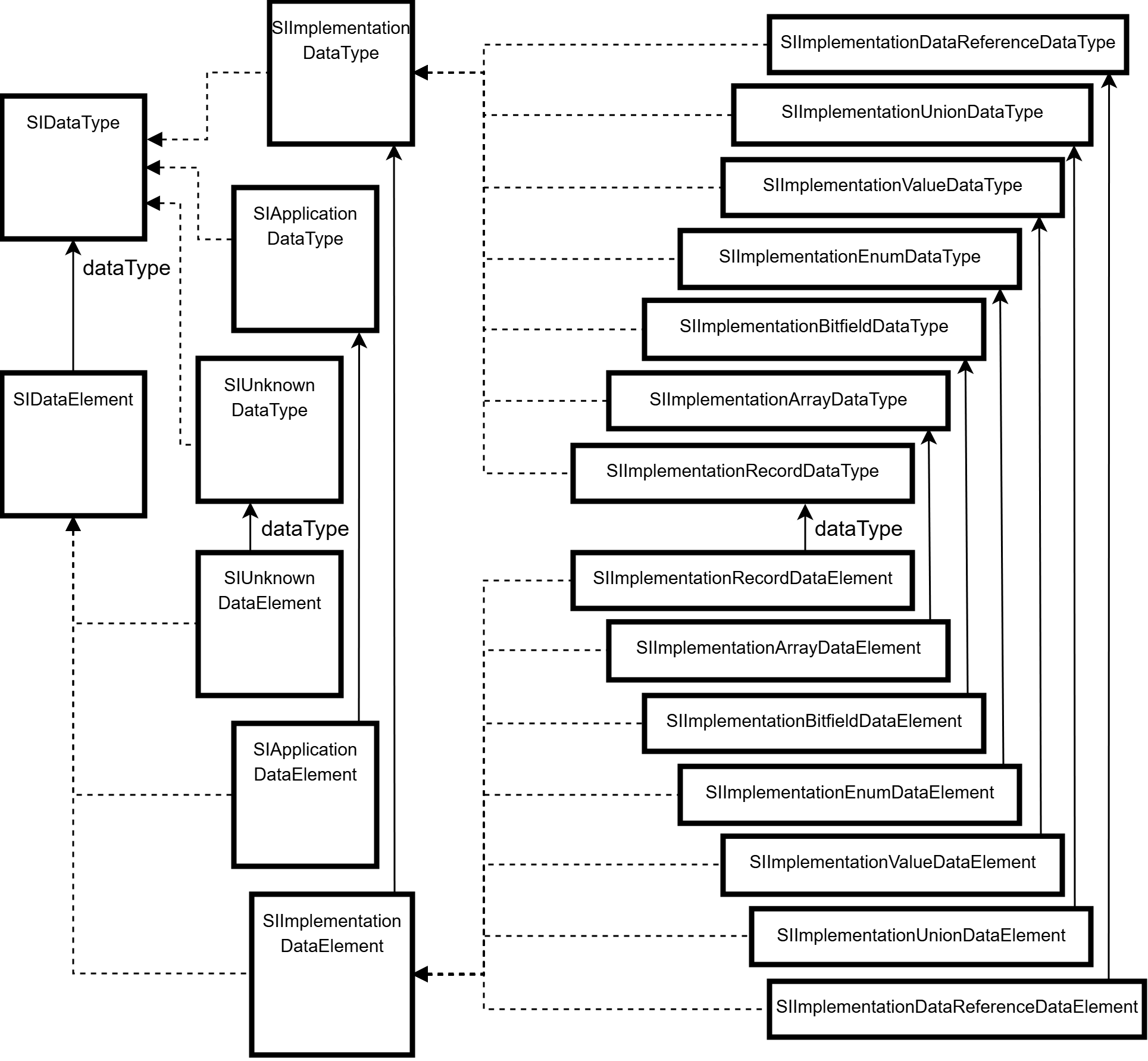
As for SIComponents or SIPorts, the instances of data types (e.g. subtypes of MIDataPrototype) are provided typed according to their referenced data
type and called SIDataElement in the SIModel. This also comprises the implementation data type elements of the implementation datatypes. E.g. a
MIVariableDataPrototype of an MISenderReceiverInterface is represented as properly typed SIImplementationRecordDataElement in case the referenced data
type is an SIImplementationRecordDataType. Since implementation data type elements also exists as TypeReferences, the transformation to the final
referenced data type applied here is the same as for the SIImplementationDataTypes. Figure DataElementModeling shows a partial excerpt of the data
element modeling.
More Examples
sysDescModel {
    flatComponentView.each { // flat view of the structured extract

        // components in the flat component view provide a unique name for the flat view
        def uniqueSwcNameInHierarchy = it.getUniqueSwcNameInHierarchy()

        // components in the flat component view contain the full context hierarchy
        scriptLogger.info("Component '{0}' with context: {1}",uniqueSwcNameInHierarchy, it.context.stream().map(SIComponent::getName).collect(Collectors.joining(".")))

        switch (it) {
            case it instanceof SIApplicationComponent:
                def appType = it.componentType

                // example bridge to mdf
                appType.runnableEntity.each {
                   handleAppTypeEntitiesOnMdfLevel(appType.mdfObject, it.mdfObject)
                }
            break
        case it instanceof SIServiceComponent:
            handleServiceComponent(it)
            break
        default:
           handleDefault()
        }
    }
}
transaction {
  sysDescModel {
    List<SIComponent> flatComponentViewComponents = flatComponentView

    SIComponentPort sourcePort = flatComponentViewComponents.stream()
        .filter(comp -> comp.getName().equals("SourceComponent"))
        .flatMap(comp -> comp.getComponentPort().stream())
        .filter(componentPort -> componentPort.getPortName().equals("SourcePort"))
        .findFirst().orElse(null)

    SIComponentPort targetPort = flatComponentViewComponents.stream()
        .filter(comp -> comp.getName().equals("TargetComponent"))
        .flatMap(comp -> comp.getComponentPort().stream())
        .filter(componentPort -> componentPort.getPortName().equals("TargetPort"))
        .findFirst().orElse(null)

    if (sourcePort != null && targetPort != null) {

        // Connects either direct (same Composition-Level, or ServiceConnector).
        // Or does create delegation ports (different Composition-Level and App-Components).
        sourcePort.connectTo(targetPort)


        boolean isDirectConnected = sourcePort.getConnectedPorts().contains(targetPort)
        boolean isConnectedViaChain = sourcePort.getFlatViewConnectedPorts().stream()
          .filter(condata -> condata.getConnectors().size() > 1)
          .anyMatch(condata -> targetPort.equals(condata.getConnectedComponentPort()))

    }
  }
}
transaction {
   sysDescModel {
      // retrieve toplevel-composition of StructuredExtract
      def topLevelComposition = structuredExtract.get().topLevelComposition

      // retrieve the service component
      topLevelComposition.component.stream().filter(comp -> "ServiceSWCTopLevel".equals(comp.name)).findFirst()
          .ifPresent(serviceComponent -> {

              // retrieve an application component type, create the toplevel prototype and connect it to a service component prototype
              def myAppComponentTypePath = AsrPath.create("/ComponentTypes/ApplicationSWCTopLevel")
              siModelObject(myAppComponentTypePath).ifPresent(appType -> {
                  // create the component prototype
                  def myAppComponentPrototype = topLevelComposition.component.createAndAdd("MyApp", SIApplicationComponent.class, appType)
                  def appComponentPPort = myAppComponentPrototype.componentPort.getFirst()

                   // connector one of its ports to a service component
                  def serviceComponentRPort = serviceComponent.getComponentPort().getFirst()
                  // create a connection on toplevel
                  topLevelComposition.getConnector().createAndAdd(SIAssemblyConnector.class, appComponentPPort, serviceComponentRPort)
              })

              // make a service connection into a composition hierarchy
              topLevelComposition.component.stream().filter(comp -> "CompositionLayer1".equals(comp.name)).findFirst().ifPresent(compositionComponent -> {

                  // get the inner component directly from the component prototype to know the correct context
                  def hierarchicComponent = compositionComponent.component.getFirst()
                  def hierarchicComponentPort = hierarchicComponent.componentPort.getFirst()

                  // connect it to a service component
                  def serviceComponentRPort = serviceComponent.componentPort.get(1)
                  // create a service connection into the hierarchy
                  topLevelComposition.connector.createAndAdd(SIServiceConnector.class, hierarchicComponentPort,
                          serviceComponentRPort)
              })
          })
  }
}
transaction {
   sysDescModel {
      // retrieve a AR package to create a new application component type
      def arPackage = siModelObject(AsrPath.create("/ComponentTypes")).get()

      // create a new application component type
      def appType = arPackage.element.createAndAdd("ExampleAppType",SIApplicationComponentType.class)

      // create a runnable entity and event
      def runnable = appType.runnableEntity.createAndAdd("ExampleRunnable")
      def timingEvent = appType.event.createAndAdd("ExampleTimingEvent",SITimingEvent.class)
      timingEvent.period = 0.1

      // connect the event to the runnable
      timingEvent.startOnEvent = runnable

  }
}