Configure a vVIRTUALtarget Project
vVIRTUALtarget/Dual-Target is a project type you can configure in DaVinci Configurator Classic: it lets you virtualize individual software components or a fully configured ECU as a project alongside, or instead of, your Real-Target project.
You can use a vVIRTUALtarget project to test ECU software in an early development phase, before hardware is available. Later, you can migrate the ECU configuration project to a VTT Dual-Target project that contains modules for both the virtual and the real target. This follows the single-source principle: you only maintain configuration parameters for the Real-Target MCAL modules.
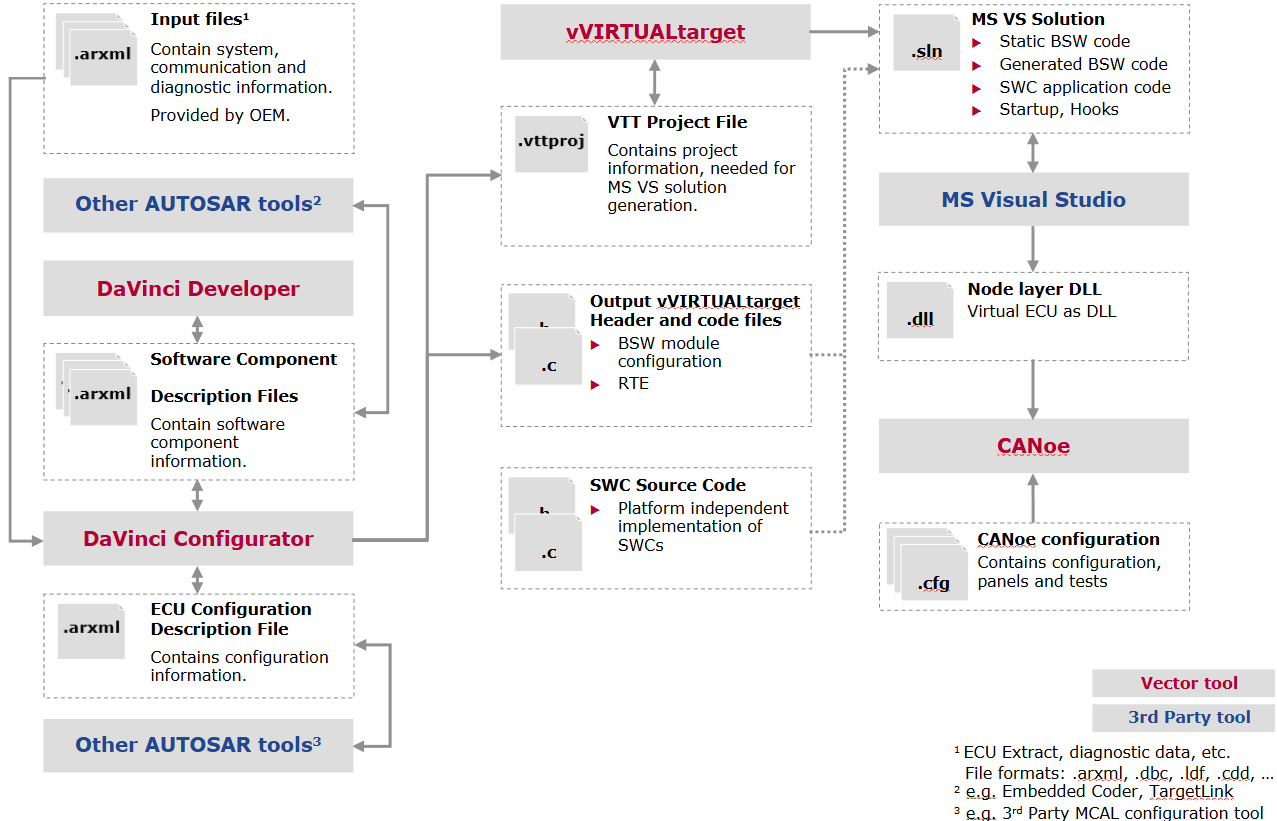
Workflow with vVIRTUALtarget gives an overview of the workflow with vVIRTUALtarget. The first column in the figure, with DaVinci Developer Classic and DaVinci Configurator Classic, does not differ from the usual hardware ECU workflow. The second and third columns illustrate the vVIRTUALtarget-specific workflow for building and running a virtual ECU.
|
The figure below shows the workflow with Microsoft Visual Studio as IDE and CANoe as runtime environment. |
|
To create a new project in DaVinci Configurator Classic, see Creation Methods. For a general introduction to a MICROSAR BSW Package and how to configure the most important BSW modules, read the Startup Manual with vVIRTUALtarget first. |
For detailed instructions on each workflow step, see vVIRTUALtarget.
Topics to dive deeper:
-
Set Up a vVIRTUALtarget Project with DaVinci Configurator — linking a DaVinci Configurator project to vVIRTUALtarget and configuring the Target Environment.
-
Migrate a vVIRTUALtarget Project — migrating a project from one VTT use case to another (not to be confused with the Migration Guide’s upgrade from a previous DaVinci Configurator version).
-
Extend a Real-Target Setup with vVIRTUALtarget — switching a project from Real-Target only to Dual-Target.
-
vVIRTUALtarget — for everything about operating the vVIRTUALtarget tool itself: architecture, supported features, ECU configuration, code and solution generation, and execution and testing in CANoe.