Post-Build Selectable
vVIRTUALtarget also supports the MICROSAR Identity Manager (Post-Build Selectable), which lets you include several BSW configurations within a single ECU. At startup, the application determines the BSW variant to activate and initializes the BSW accordingly.
|
More information on the MICROSAR Identity Manager can be found in the Technical Reference Technical Reference of MICROSAR Identity Manager. |
For VTT, consider the following special aspects.
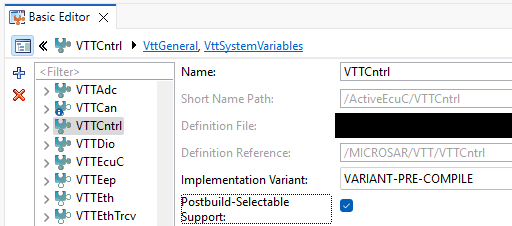
Enable Post-Build Selectable Support
You can activate Post-Build Selectable Support by checking the Postbuild-Selectable Support box, or by running the validation action VTT01201 (Post Build Variance Support) in the VTTCntrl module.
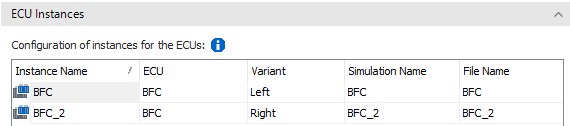
To get a virtual ECU instance for each variant, configure the Simulation Setup in vVIRTUALtarget correctly. The Variant Names you specify in vVIRTUALtarget must match the ECUC variant names configured in DaVinci Configurator. For a detailed description of how to handle ECU variants, see the Simulation Setup section in the vVIRTUALtarget Help.
Variant Selection in EcuM
Implement the variant selection code in EcuM Callouts, based on the
virtual ECU’s variant name. The following code shows how to query the
variant name and return the corresponding configuration pointer of the
active variant. In this example, two variants exist: Left and
Right.
FUNC(EcuM_GlobalConfigRefType, ECUM_CODE) EcuM_DeterminePbConfiguration(void)
{
/***************************************************************************************************
 * DO NOT CHANGE THIS COMMENT! <USERBLOCK EcuM_DeterminePbConfiguration> DO NOT CHANGE THIS COMMENT!
***************************************************************************************************/
  /* Add implementation of EcuM_DeterminePbConfiguration() */
  if (VttPlatformEmu_TestVariantName("Left"))
  {
    return & (EcuM_GlobalConfigRoot.Left);
  }
  if (VttPlatformEmu_TestVariantName("Right"))
  {
    return & (EcuM_GlobalConfigRoot.Right);
  }
  return NULL_PTR;
/***************************************************************************************************
 * DO NOT CHANGE THIS COMMENT!            </USERBLOCK>                   DO NOT CHANGE THIS COMMENT!
***************************************************************************************************/
} /* End of EcuM_DeterminePbConfiguration() */
Debugging of Variants
You can debug virtual ECUs with, for example, Visual Studio or other
IDEs and debuggers. If two or more variants of the same ECU run in the
same CANoe instance (that is, in the same RuntimeKernel.exe) and you
set a breakpoint in the ECU code in Visual Studio, both variants may hit
that breakpoint. This hinders debugging a single variant, because all
variants share all breakpoints. To debug just a single variant of the
ECU, you have several options:
-
To break on a function
funcin DLLECU_Left.dll, manually add a breakpoint (break at function) using the function name{ECU_Left.dll}func. -
When you set a breakpoint in the code, the breakpoints view shows several sub-breakpoints for it, one per variant. You can manually deselect sub-breakpoints.
-
You can restrict a breakpoint to certain processes and threads (see the filter property of a breakpoint). Filtering by process doesn’t help much, since all virtual ECUs run in the same
RuntimeKernel.exe. However, each task of each variant runs as its own thread with a unique name, which you can use in the filter.