Post-build Selectable
Model Views
What Model Views Are
After project load, the MDF model contains all objects found in the ARXML files. Variation points are just data structures in the model without any special meaning in MDF.
If you want to deal with variants, you must use model views. A model view filters access to the MDF model based on the variant definition and the variation points.
There is one model view per variant. If you use this variant’s model view, the MDF model filters exactly what this variant contains. All other objects become invisible. When you retrieve parameters of a container for example, you’ll see only parameters contained in your selected variant.
final boolean isVisible = viewMgr.isVisible(t.paramVariantA);The IModelViewManager Project Service
TheIModelViewManager handles model visibility in general. It provides the following means:
- Get all available variants
- Execute code with visibility of a specific predefined variant only. This means your code sees all objects contained in the specified variant. All objects which are not contained in this variant will be invisible
- Execute code with visibility of invariant data only (see
IInvariantView). - Execute code with unfiltered model visibility. This means that your code sees all objects unconditionally. If the project contains variant data, you see all variants together
- Get all variants, a specific object is visible in
- Find out if an object is visible in a specific variant
final List<IPostBuildPredefinedVariantView> variants = viewMgr.getAllPostBuildVariantViews();final List<IPostBuildView> allVaraintsOrInvariantView = viewMgr.getAllPostBuildVariantViewsOrInvariant();try (final IModelViewExecutionContext context = viewMgr.executeWithModelView(t.variantViewA)) {
assertIsVisible(t.paramInvariant);
assertIsVisible(t.paramVariantA);
assertNotVisible(t.paramVariantB);
}
try (final IModelViewExecutionContext context = viewMgr.executeWithModelView(t.variantViewB)) {
assertIsVisible(t.paramInvariant);
assertNotVisible(t.paramVariantA);
assertIsVisible(t.paramVariantB);
}Important remark: It is essential that the
execute…()methods are used exactly as implemented in the listing above. Thetry (…) {…}construct is a Java 7 feature which guarantees that resources are closed whenever the try block is being left. For details read: Java try-with-resources
Collection<IPostBuildPredefinedVariantView> visibleVariants = viewMgr.getVisiblePostBuildVariantViews(t.paramInvariant);
assertThat(visibleVariants.size(), equalTo(2));
assertThat(visibleVariants, containsInAnyOrder(t.variantViewA, t.variantViewB));

visibleVariants = viewMgr.getVisiblePostBuildVariantViews(t.paramVariantA);
assertThat(visibleVariants.size(), equalTo(1));
assertThat(visibleVariants, containsInAnyOrder(t.variantViewA));
Variant Siblings
Variant siblings of an MDF object are MDF object instances which represent the same object but in other variants.
The method IModelVarianceAccessPublished.getPostBuildVariantSiblings() provides access to
these sibling objects:
- Ecuc Module Configuration:
Since module configurations are never variant, this method always returns a collection which contains the specified object only - Ecuc Container:
For siblings of a container all of the following conditions apply:- They have the same AUTOSAR path
- They have the same definition path (containers with the same AUTOSAR path but different definitions may occur in variant models - but they are not variant siblings because they differ in type)
- Ecuc Parameter:
For siblings of a parameter all of the following conditions apply:- The parent containers have the same AUTOSAR path
- The parameter siblings have the same definition path
Multi-instance parameters are special. In this case the method returns all multi-instance siblings of all variants. - System description object:
For siblings ofMIReferrables all of the following conditions apply:- They have the same meta-class
- They have the same AUTOSAR path
MIReferrables all of the following conditions apply:- Their nearest
MIReferrable-parents are either the same object or variant siblings - Their containment feature paths below these nearest
MIReferrable-parents is equal
Special use cases: When the specified object is not a member of the model tree (the object itself or one of its parents has no parent), it also has no siblings. In this case this method returns a collection containing the specified object only.
Remark concerning visibility: This method returns all siblings independent of the currently visible objects. This means that the returned collection probably contains objects which are not visible by the caller! It also means that the specified object itself doesn't need to be visible for the caller.
The Invariant Model Views
There are use cases which require to see the invariant model content only. One example are generators for modules which don’t support variance at all.
There are two different invariant views currently defined:
-
Value based invariance (values are equal in all variants): The `IPostBuildInvariantValuesView`contains objects where all variant siblings have the same value and exist in all variants.
-
Definition based invariance (values which shall be equal in all variants): The`IPostBuildInvariantEcucDefView` contains objects which are not allowed to be variantaccording to the BSWMD rules.
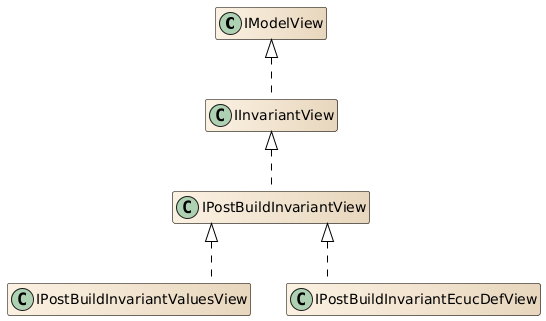
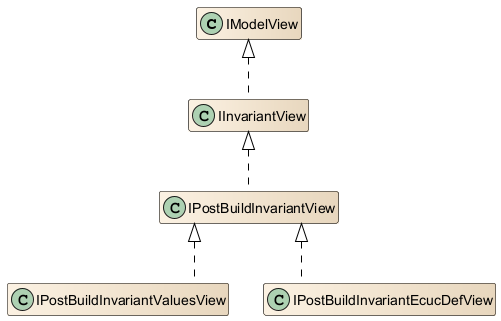
All Invariant views derive from the same interface IInvariantView, so if you want to use an
invariant view without specifying the exact view, you could use the IInvariantView interface.
The Invariant model views
There are use cases which require to see the invariant model content only. One example are generators for modules which don't support variance at all.There are two different invariant views currently defined:
- Value based invariance (values are equal in all variants):
TheIPostBuildInvariantValuesViewcontains objects were all variant siblings have the same value and exist in all variants. - Definition based invariance (values which shall be equal in all variants):
TheIPostBuildInvariantEcucDefViewcontains objects which are not allowed to be variant according to the BSWMD rules.
IInvariantView, so if you want to use an invariant view and not specifying the exact view, you could use the
IInvariantView interface. The figure InvaraintViews describes the hierarchy.
The PostBuild InvariantValues model view
TheIPostBuildInvariantValuesView contains only elements which have one of the following properties:
- The element and no parent has any
MIVariationPointwith a post-build condition - All variant siblings have the same value and exist in all variants. Then one of the siblings is contained in the
IPostBuildInvariantValuesView
IPostBuildInvariantValuesView by calling IModelViewManager.getPostBuildInvariantValuesView().
IModelViewManager viewMgr =...;
IPostBuildInvariantValuesView invariantView = viewMgr.getPostBuildInvariantValuesView();
// Use the invariantView like any other model view
Example
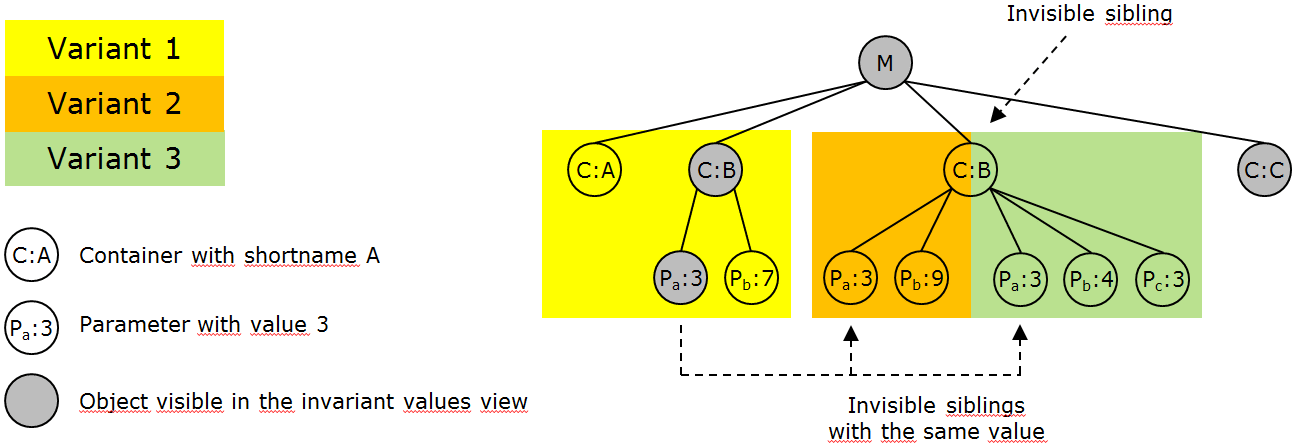
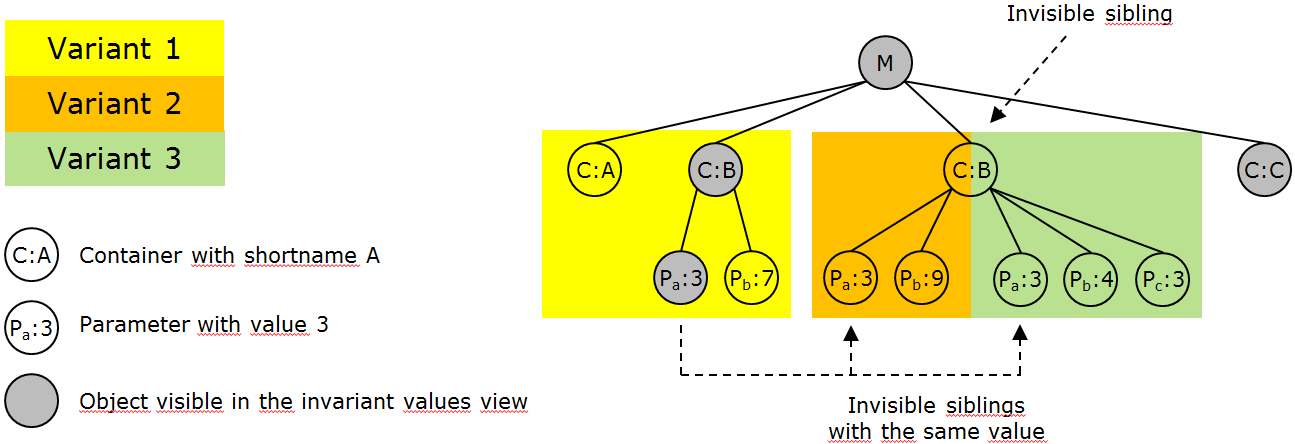
The figure InvariantValuesExample describes an example for a module with containers and the visibility in theIPostBuildInvariantValuesView.
- Container A is invisible because it is contained in variant 1 only
- Container B and C are visible because they are contained in all variants
- Parameter a is visible because it is contained in all variants with the same value
- Parameter b is invisible: It is contained in all variants but with different values
- Parameter c is invisible because it is contained in variant 3 only
Specification
See internal design documents in SharePoint for details of theIPostBuildInvariantValuesView.
The PostBuild Invariant EcuC definition model view
TheIPostBuildInvariantEcucDefView contains the same objects as the invariant values view but additionally excludes
all objects which, by (EcuC / BSWMD) definition, support variance. Using this view you can avoid dealing with objects which are accidentally equal by value (in your test
configurations) but potentially can be different because they support variance.
More exact the IPostBuildInvariantEcucDefView will additionally exclude elements which have the following properties:
- If the parent module configuration specifies VARIANT-POST-BUILD-SELECTABLE as implementation configuration variant
- All objects (
MIContainer,MINumericalValue, ...) are excluded, which support variance according to their EcuC definition. (potentially variant objects)
- All objects (
- If the parent module configuration doesn't specify VARIANT-POST-BUILD-SELECTABLE as implementation configuration variant. All contained objects do not support
variance, so the view actually shows the same objects as the
IPostBuildInvariantValuesView.
The implementation configuration variant in fact overwrites the objects definition for elements in the ModuleConfiguration.
Reasons to Use the view
The EcucDef view guarantees that you don't access potentially variant data without using variant specific model views. So it allows you to improve code quality in your generator.When your test configuration for example contains equal values for a parameter which is potentially variant you will see this parameter in the invariant values view but not in the EcucDef view. Consequences if you access data in other module configurations: When the BSWMD file of this other module is being changed, e.g. a parameter now supports variance, objects can become invisible due to this change. You are forced to adapt your code then.
Usage
You could retrieve an instance ofIPostBuildInvariantEcucDefView by calling IModelViewManager.getPostBuildInvariantEcucDefView(). And then use it as any other
IModelView.
IModelViewManager viewMgr =...;
IPostBuildInvariantEcucDefView invariantView = viewMgr.getPostBuildInvariantEcucDefView();
// Use the invariantView like any other model view
Specification
See internal design documents in SharePoint for details of theIPostBuildInvariantEcucDefView.
Accessing Invisible Objects
When you switch to a model view, objects which are not contained in the related variant become
invisible. This means that access to their content leads to an InvisibleVariantObjectFeatureException.
com.vector.cfg.model.asr.ecuc.access.IEcucReferrableAccesscom.vector.cfg.model.asr.ecuc.access.IEcucModelAccesscom.vector.cfg.model.asr.ecuc.compare.IModelEquivalenceServicecom.vector.cfg.model.access.AsrPathcom.vector.cfg.model.access.DefRefcom.vector.cfg.model.asr.ecuc.access.ecucdefinition.IEcucDefinitionAccess(all methods which deal with configuration side objects)
- Support access to type and object identity of MDF objects (definition and AUTOSAR path)
- Parameter value or other content related information must still be retrieved in a context the object is visible in
- Also not contained are methods which change model content. E.g. deleting invisible objects, set parameter values, ...
IViewedModelObject
TheIViewedModelObject is a container for one MIObject and an IModelView that was used when viewing the MIObject.
The interface provides getter for the MIObject, and the IModelView which was active during creation of the IViewedModelObject. So the
IViewedModelObject represents a tuple of MIObject and IModelView.
This could be used to preserve the state/tuple of a MIObject and IModelView, for later retrieval.
Examples:
- BswmdModel objects
- Elements for validation results, retrieved in a certain view
- Model Query API like ModelTraverser, to preserve
IModelViewinformation
Notes:
A IViewedModelObject is immutable and will not update any state. Especially not when the visibility of the getMdfObject(), is changed after the construction
of the IViewedModelObject.
It is not guaranteed, that the MIObject is visible in the creation IModelView, after the model is changed. It is also possible to create an
IViewedModelObject of a MIObject and a IModelView, where the MIObject is invisible.
getCreationModelView() returns the IModelView of the IViewedModelObject, which was
active when the model object was viewed IViewedModelObject.
Change Modes
Variant Specific Model Changes
The data model provides an execution context which guarantees that only the selected variant is being modified. Objects which are visible in more than one variant are cloned automatically. The clones and the object which is being modified (or their parents) automatically get a variation point with the required post-build conditions. The following picture shows how this execution context works:See figure VariantSpecificModelChangeOfParameter.

- Before modifying the parameter, this instance is invariant. The same MDF instance is visible in all variants
- When the client code changes the parameter value, the model automatically clones the parameter first
- Only the parameter instance which is visible in the currently active view is being modified. The content of other variants stays untouched
Remark: This change mode is implicitly turned off when executing code in the IInvariantView or in an unfiltered context.
try (final IModelViewExecutionContext viewContext = viewMgr.executeWithModelView(variantView)) {
    try (final IModelViewExecutionContext modeContext = viewMgr.executeWithVariantSpecificModelChanges()) {
        ma.setAsString(parameter, "Vector-Informatik");
    }
}
Variant Common Model Changes
The data model provides an execution context which guarantees that model objects are modified in all variants.
The behavior of this mode depends on the mode flag parameter as follows:
- mode == ALL : All parameters and containers are affected
- mode == DEFINITION_BASED (default): Only those parameters and containers are affected which do not support variance (according to their definition in the BSWMD file and the implementation configuration variant of their module configuration)
- mode == OFF : Doesn't turn on this change mode (this value is used internally only)
The following picture shows how this execution context works:
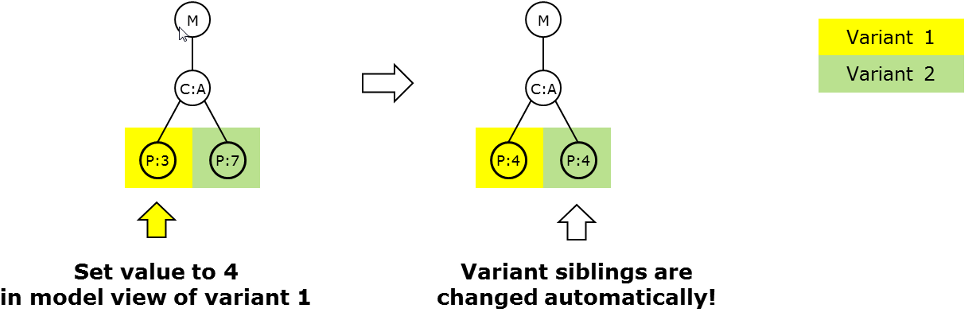
See figure VariantCommonModelChangeOfParameter.
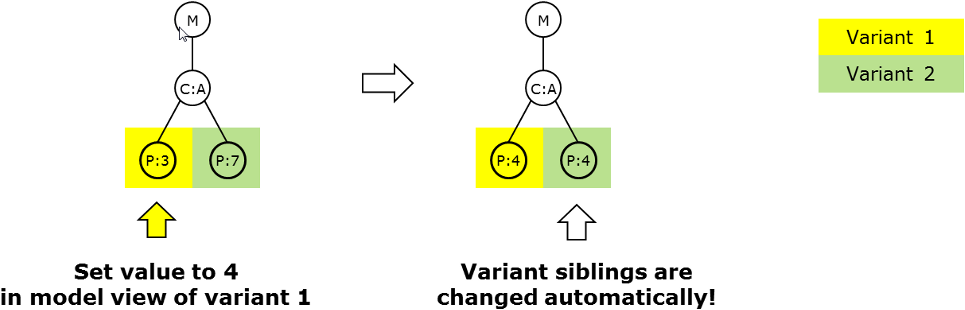
- We start with a variant model which contains one parameter in two instances - one per variant - with the values 3 and 7
- When the client code sets the parameter value in variant 1 to 4, the model automatically modifies the variant sibling in variant 2
- As a result, the parameter has the same value in all variants
This change mode works with parameters and containers. The following operations are supported:
- Container/parameter creation: The created object afterwards exists in all variants the related parent exists in. Already existing objects are not modified. Missing objects are created
- Container/parameter deletion: The deleted object afterwards is being removed from all variants the related parent exists in. So actually all variant siblings are deleted
- Parameter value change: The parameter exists and has the same value in all variants the parent container exists in. If a parameter instance is missing in a variant, it is being created
Special behavior for multi-instance parameters:
- This mode guarantees that a set of multi-instance parameters is equal in all variants
- Only the values of multi-instance parameters are relevant. Their order can be different in different variants
- Beside the values, this change mode guarantees that all variants contain the same number of parameter instances. So, when a multi-instance set is being modified in a variant view, this change mode creates or deletes objects in other variants to guarantee an equal number of instances in all variant sibling sets
Remark: This change mode is implicitly turned on with the mode flag ALL when code is being executed in the IInvariantView. It is being ignored implicitly when
executing code in an unfiltered context.